The Top 20 LMS Features List: A Detailed Overview
 17 minutes






If you’re handling training for a growing organization, picking the right LMS feels like a big decision — one that can’t easily be undone if it doesn’t fit. You’re probably dealing with issues like clunky reporting, tricky integrations, or learners who just aren’t engaging, and you want features that actually address those issues without overcomplicating things.
In this article, I’ll walk you through the LMS features that matter most, so you can match them to your actual needs, sidestep common pitfalls, and build a stronger case for what your organization truly requires.
A Quick Overview of Core LMS Features
Every solid LMS starts with the basics: building training programs, assigning them to learners, and pulling reports to see what’s working once they’re done.
But there’s a lot more to look for if you want a platform that truly fits your team’s needs and growth.
| Business Benefit | Feature | Details |
|---|---|---|
| Quick Setup and Easy Training Delivery | Course creation | This feature enables the rapid assembly of training courses using built-in editors and authoring tools. |
| Course management | This tool streamlines the organizing, updating, and versioning of course assets and maintains consistency across large catalogs. | |
| Learning paths | Paths structure courses in sequence to guide learners and reduce manual enrollments. | |
| Keeping control of everything | User management | Granular roles and permissions to control access to courses, data, and administrative tasks. |
| Assessments | Assessments evaluate learner performance through quizzes, assignments, and more to quantify knowledge levels. | |
| Reports and analytics | These tools aggregate training data to reveal performance trends and compliance gaps. | |
| Making things easy: the business view | Artificial intelligence | AI automates content management and generation, personalizes training recommendations, and accelerates skill-gap analysis. |
| Workflow automation | Automation of rule-based actions like enrollments, certifications, and notifications to reduce manual administration. | |
| Support and customer service | Quick and convenient technical resolution, onboarding, and usage insights. | |
| Making things easy: the learners’ view | Blended learning | This feature integrates virtual classrooms with self-paced modules using video conferencing and asynchronous content. |
| Single sign-on (SSO) | Centralized authentication streamlines access and reinforces identity security. | |
| Dynamic content notifications and reminders | Notifications and reminders automate learner prompts for deadlines and course updates to increase completion rates. | |
| Ensuring efficient learning | Social learning | Peer interaction through forums, messaging, and live sessions where trainees learn from each other. |
| Gamification | Provides points, badges, leaderboards, storylines, levels, and a reward marketplace; boosts engagement, progress, and completion rates. | |
| Content library | Provides pre-made courses for soft skills, compliance, and customer success. | |
| Embracing more learners | Accessibility | Accessibility ensures learning platform usability across devices (mobile learning) and accommodates diverse training needs. |
| Multilingual interface | A multilingual interface localizes the LMS UI to support global learners and improve adoption. | |
| Planning for the future | Software integration capabilities | Software integrations connect the LMS via APIs to CRM, HRIS, analytics, and more. |
| eCommerce | This tool handles course sales, payment processing, and revenue tracking. | |
| Security features | These features safeguard data through encryption, 2FA, backups, and compliance with standards like GDPR and ISO. |
Quick Setup and Easy Training Delivery
At their core, LMS platforms handle planning, building, and delivering training. So, any LMS that’s “worth its salt” needs these essentials to get you started without headaches:
- Course Creation
- Course Management
- Learning Paths
Let’s break them down.
1. Course creation
Most LMS platforms come with basic course builders that let you add text, links, videos, images, and quizzes. But if you’re creating professional courses or want everything in one convenient place, you’ll need a dedicated authoring tool.
Take iSpring LMS, for example. It includes a built-in AI-powered course creation feature plus iSpring Suite, a full authoring toolkit. You can build everything from video lectures and quizzes to interactive presentations, backed by a huge content library for any training scenario.
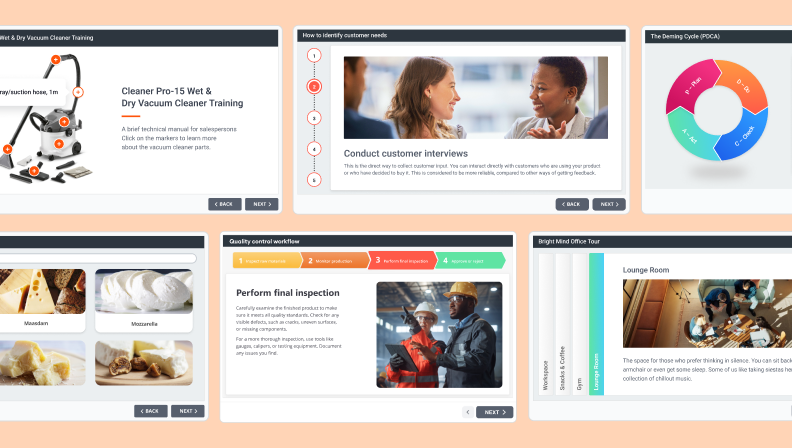
Here’s a sample Fire Safety onboarding course made with iSpring Suite:

2. Course management
Course management is a key feature for creating a smooth learning experience by keeping your training initiatives and materials well organized. To stay efficient — especially when managing many courses — your LMS should include features that reduce administrative work and help you maintain a clean, scalable course catalog:
- A clear, intuitive structure for organizing modules, lessons, and assessments.
- Fast content management with drag-and-drop functionality for easy rearranging or uploading.
- Bulk actions to duplicate, update, or archive multiple courses at once.
- Version control for tracking changes and ensuring that content stays consistent.
- Centralized asset management so documents, videos, and quizzes can be reused across courses.
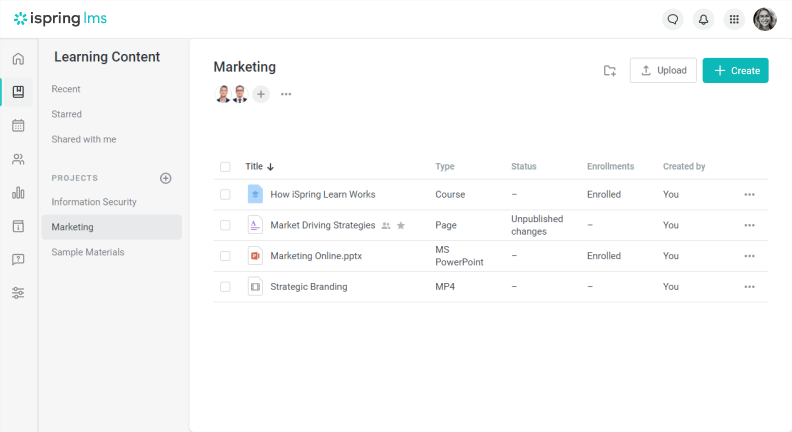
Course management feature in iSpring LMS
3. Learning paths
Learning paths (or tracks) let you structure training into sequenced courses, so learners follow a clear progression without skipping key steps.
Learning tracks make training straightforward for learners and save your L&D team a ton of time. Instead of manually enrolling people in every single course, you assign them to the track once — and the LMS handles the rest.
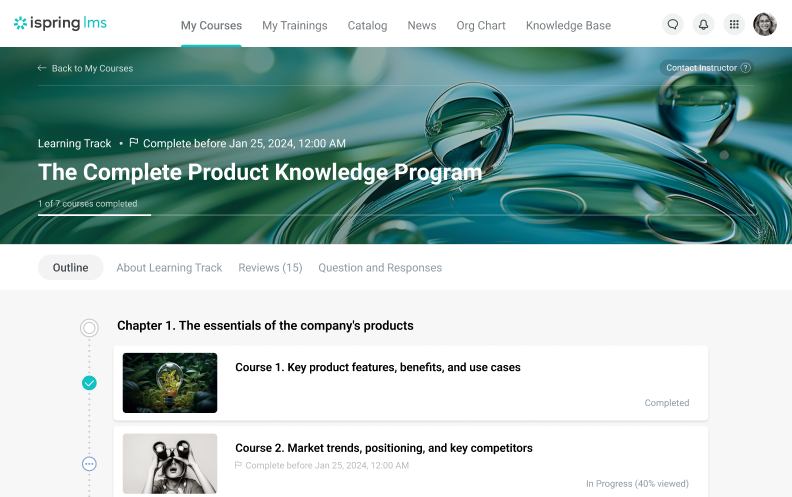
Learning tracks feature in iSpring LMS
Personalized learning paths work well for sales enablement. For instance, you can create training on cross-selling skills or handling new customers using interactive role-plays and realistic scenarios in which reps practice safely before facing real-life situations.
Keeping Control of Everything
After launching your courses, you need clear visibility into what’s working by delivering effective training and then tracking learning outcomes, completion speed, and goal alignment. A good LMS makes this straightforward with:
- User management
- Assessments
- Reports and analytics
Let’s see what all this means.
4. User management
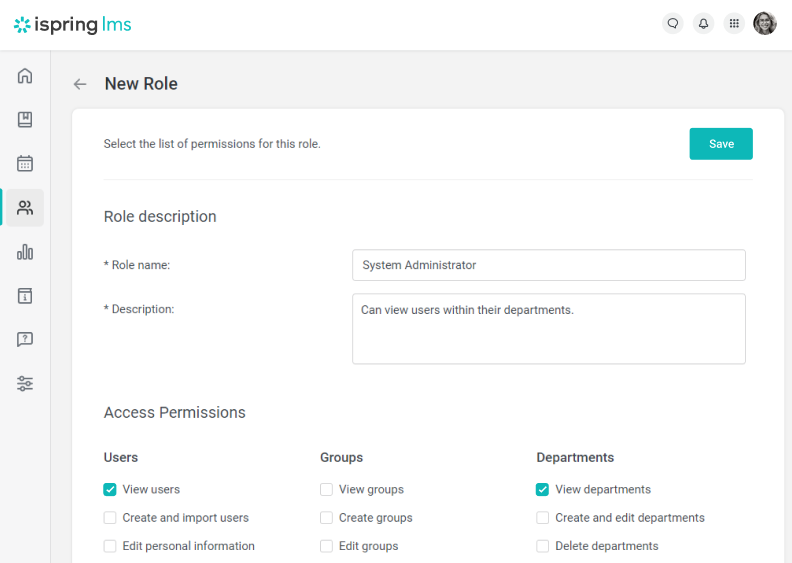
Different users in your organization need tailored permissions within the LMS. For instance, employees only require access to training courses, while instructors must be able to upload materials and track learner progress. Permissions clearly outline what each role can and cannot do on the platform.
The iSpring LMS offers six standard user roles:
- Account Owner
- Account Administrator
- Department Administrator
- Course Author
- Learner
- Supervisor
Using an LMS that offers customizable user roles is recommended. Take partner training, for example. You can add a new System Administrator role and allow them to create specific roles and permissions, ensuring that partners have access to any relevant learning programs.
5. Assessments
Assessment tools are key for measuring learner understanding, tracking progress, and giving targeted feedback. They let you customize training to individual needs, boost engagement, and strengthen knowledge retention — which is critical for compliance training.
Here’s what you can add to your training courses to assess students:
- Quizzes with multiple-choice and other types of questions
- Surveys and polls
- Assignments
Let’s see how different LMS solutions implement these features:
- Moodle offers a quiz module that randomizes questions and answers, includes automatic grading of assignments, and allows instructors to provide detailed feedback. It also supports peer assessments, in which students can review and grade each other’s work based on predefined criteria.
- TalentLMS includes tools for creating tests and surveys with multiple question types (including multiple-choice), skill assessments through practical tests and assignments, and automatic certification programs upon the successful completion of assessments.
- As for iSpring, this LMS features an interactive quiz maker, a survey tool for collecting feedback, real-time user progress tracking, and personalized learning paths.
6. Reports and analytics
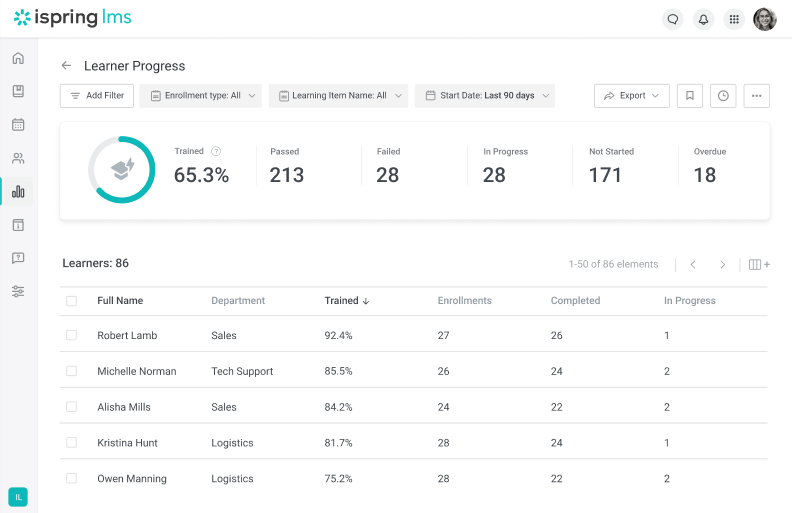
Without LMS reports, it’s very difficult to gauge the impact of your learning material accurately. Reporting allows you to see learner progress, learning outcomes, and more:
- Analyze how an individual or team is performing.
- Understand the results of a training course.
- Provide training overviews and fill urgent skill gaps.
Many learning management systems include tools that generate automated custom reports, saving you time and effort. This feature automates the heavy lifting of sharing learning results with stakeholders.
Making Things Easy: The Business Perspective
We always choose new software to make our work easier. This means the perfect LMS must offer the following:
- Artificial intelligence
- Workflow automation
- Support and customer service
Keep reading to see how these features can facilitate your daily workflow.
7. Artificial intelligence
AI features ensure better engagement, knowledge retention, and more. Artificial intelligence can help you:
- Create training materials from scratch.
- Improve employee development by personalizing learning tracks.
- Suggest related courses based on a learner’s performance or skill gaps.
- Provide behavioral insights.
- Answer questions 24/7 via chatbots.
- Provide real-time feedback to students.
- Translate training content into multiple languages.
- Turn text into speech, and vice versa.
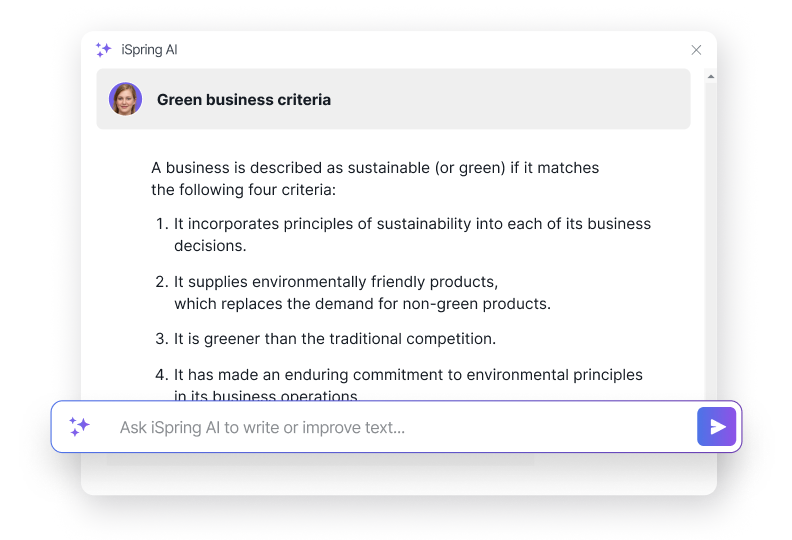
iSpring has an AI-enhanced authoring tool as part of its ecosystem. You can ask the assistant to write quiz questions, structure the text and add headings, create employee training summaries, and build entire courses from scratch.
8. Workflow automation
Workflow automation cuts the time and effort spent on repetitive manual tasks. It’s a game-changer when you’re managing multiple courses with lots of enrolled users.
Let’s examine how different LMS providers implement this feature:
- Moodle offers dynamic rules, allowing you to trigger actions based on if-then conditions.
- Docebo supports AI-powered automation. For example, the built-in AI can automate skill assignments, provide personalized content suggestions, and search for new training content.
- iSpring LMS enables automatic enrollment, course assignment, reporting, and certification.
9. Support and customer service
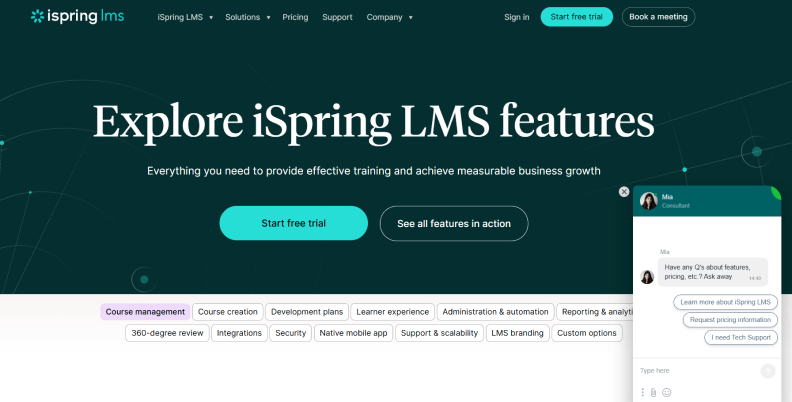
Timely, effective support is crucial for fixing technical issues and keeping learning uninterrupted. A dedicated helpdesk with live chat, for example, resolves learner questions quickly.
Customer service also provides valuable feedback for platform improvements. User suggestions on new features, user-friendly interfaces, or responsive design often lead to meaningful updates.
Making Things Easy: The Learners’ Perspective
While making things easy for admins is important, your LMS should prioritize learner convenience. These features make a real difference in their experience:
- Blended learning
- Single sign-on (SSO)
- Dynamic content notifications and reminders
Below is a detailed overview.
10. Blended learning
Blended learning refers to a mix of synchronous and asynchronous learning. In other words, synchronous learning comprises live training sessions, while asynchronous learning involves self-guided learning. Blended learning ensures more flexibility for learners without losing the personal touch provided in virtual classrooms.
The importance of online learning and video conferencing cannot be overstated. Thus, if you plan to run blended learning programs, consider an LMS provider that integrates with video conferencing tools. This ensures a seamless experience for learners and makes it easier for L&D teams to schedule and manage in-person training sessions directly in the LMS.
Also read: What Is Blended Learning?
11. Single sign-on (SSO)
We know what it’s like trying to remember all the different password combinations for multiple applications, platforms, and other systems. SSO centralizes this process: your employees use their corporate login credentials to log in to multiple corporate learning resources, and all links to these web pages are stored in the Quick Links section of the user portal.
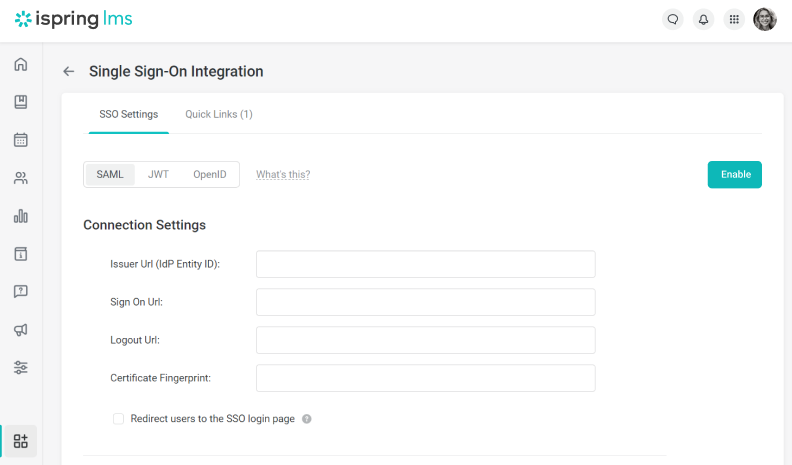
Rather than typing credentials each time users enter an application, with the SSO feature, they only have to do it once. This cuts down on time spent resetting passwords and increases the chances of employees entering the LMS and taking their member training.
At first glance, single sign-on is merely a convenience. However, it also improves security and reduces the IT workload, as IT teams spend less time resetting passwords.
12. Dynamic content notifications and reminders
As many HR and L&D teams know, employees sometimes need a gentle reminder to complete their training — especially mandatory training. An LMS with automated notifications and reminders takes this off your plate by following up with those who haven’t finished their assigned courses.
Automated alerts can be set to notify employees who miss deadlines a week after a compliance training is due, for instance. You should also be able to customize these messages — personalizing them with the learner’s name and course title — and schedule reminders for upcoming due dates automatically.

Ensuring Efficient Learning
Besides convenience, you need features that make learning engaging and effective. A strong LMS will have these essentials for better outcomes:
- Social learning tools
- Gamification
- Content library
Read about what these features do below.
13. Social learning
Social learning tools let learners collaborate and learn from each other through exchanges in informal settings. They foster knowledge sharing, communication between learners and instructors, and boost engagement, retention, soft skills, and motivation — making them especially useful for compliance training.
Social learning features the following:
- Discussion forums
- Messaging capabilities
- Webinars and live sessions
- A central repository with up-to-date product information
- User-generated content
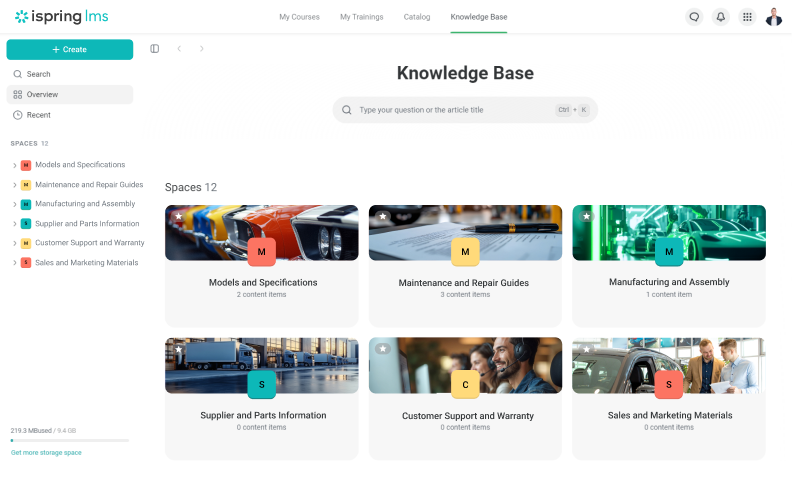
You’ll want social learning features if you’re launching mentorship programs, encouraging teamwork, sparking real-time interactions, or building a strong learning community among your employees.
14. Gamification
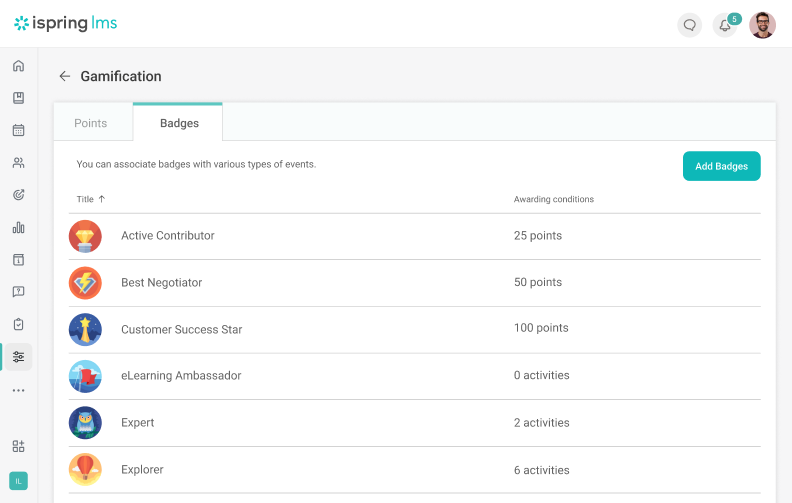
Gamification keeps learners engaged and motivated. It lets you set milestones, recognize achievements, boost completion rates, and spark friendly competition.
Here are common elements to look for:
- Points earned for completing tasks and activities
- Badges pinned to profiles for milestones and efforts
- Leaderboards showing rankings across key metrics
- Storylines that turn training into an engaging narrative
- Game levels in which new modules unlock after tasks are completed
- A reward marketplace to redeem points for perks like extra days off
15. Content library
A training content library provides learners with instant access to pre-made courses and materials right in your LMS. It’s perfect for delivering quality on-demand content or building a culture of continuous learning — especially when budgets are tight and needs are straightforward.
For instance, you’ll find ready-made courses on soft skills training, customer success, health and safety, and more, with simple content management that’s built in.
Embracing More Learners
Training often starts with your own employees, but as your business grows, you’ll likely need to expand to partners, customers, or global teams. To scale smoothly and reach everyone effectively, prioritize these must-have features:
- Accessibility
- Multilingual Interface
Learn more about these features below.
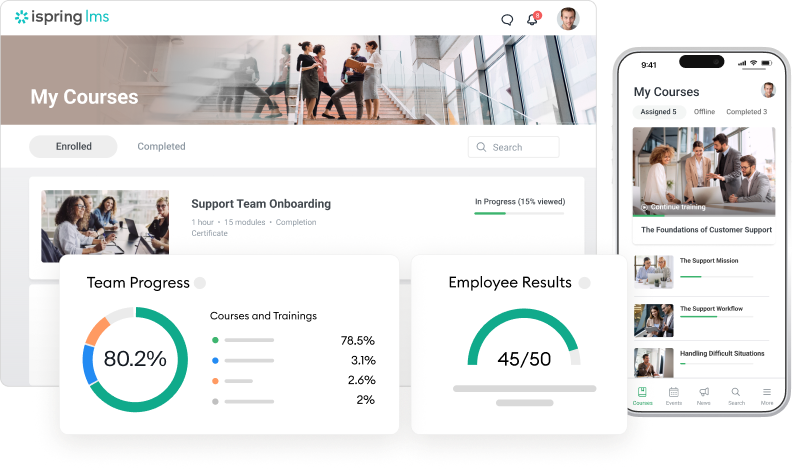
16. Accessibility
Accessibility matters even more for distributed teams. It ensures that every learner, regardless of their location or abilities, can reach the training content. Look for these key accessibility features in an LMS:
- Access from both desktop and mobile devices, ideally with native mobile apps
- Text-to-speech functionality for employees with visual impairments
- Closed captions and transcripts to support learners who are deaf or hard of hearing
17. Multilingual interface
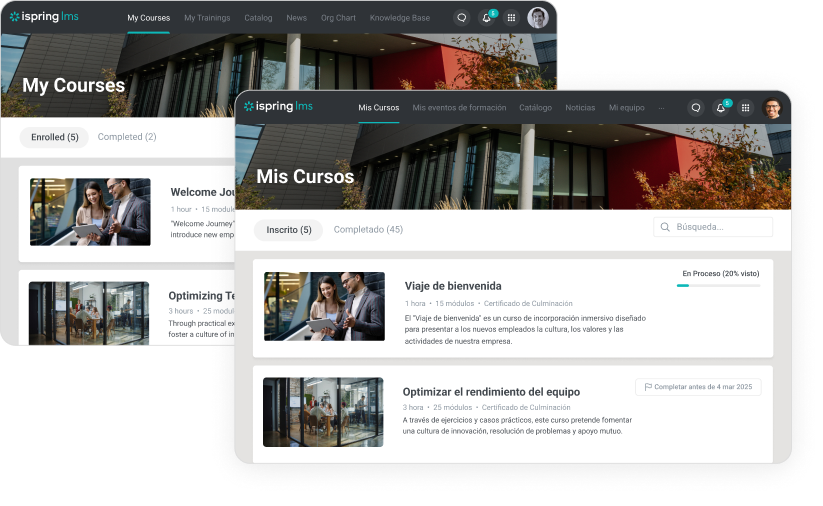
If your organization trains teams across multiple locations, a multilingual interface becomes a key feature. Localizing courses takes time and effort, but if your LMS already supports the languages your teams use, switching the interface is quick and straightforward.
By choosing an LMS that supports multiple languages, you ensure that learners have access to their learning platform in their native languages. This significantly increases adoption and improves learner engagement rates.
Looking to the Future
As someone who is planning for your organization’s growth, you’ll want an LMS that’s scalable from the start and ready for upcoming needs. Look for strong, future-proof features like:
- Software integration capabilities
- eCommerce functionality
- Robust security features
We’ll cover these essentials to help simplify your LMS decision.
18. Software integration capabilities
LMS integrations boost your system’s capabilities and create a smooth user experience by connecting with other software you already use. When choosing an LMS, look for seamless integration with:
RESTful APIs to share data with third-party apps
- Content management systems
- CRM tools like Salesforce
- Enterprise resource planning (ERP) systems
- HR tools
- Google Analytics and other web analytics platforms
- Video conferencing tools such as Microsoft Teams or Zoom
- Communication apps like Slack or Gmail
- eCommerce platforms
- Plagiarism checkers
These integrations help you automate workflows, improve data accuracy, and deliver a more connected learning experience.
19. eCommerce
Monetization is a key feature for organizations that sell paid courses. It handles transactions, payment processing, and revenue reporting all in one place.
Automating these steps saves time and resources, simplifying enrollments and payments — especially for professional creators, non-profits, or startups with tight budgets.
eCommerce tools let learners buy directly from authors, helping to diversify content, attract more users, and sell bundles like full customer training programs.
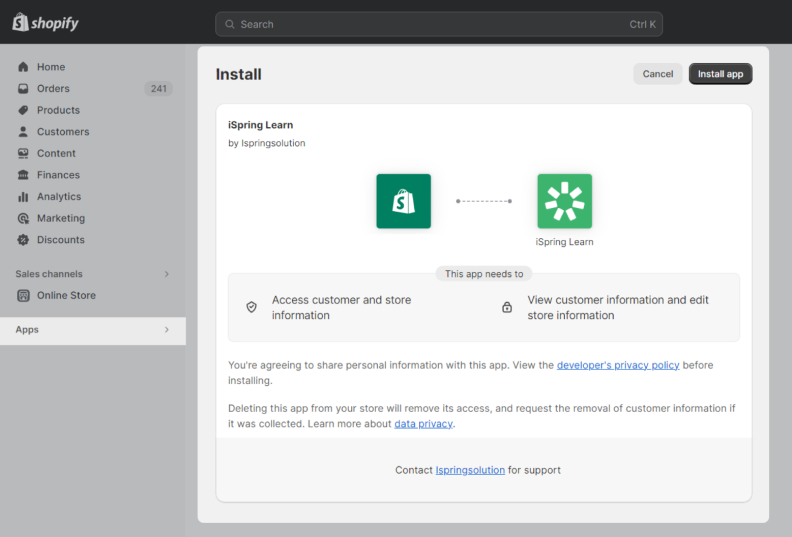
The Shopify eCommerce integration feature in iSpring LMS
20. Security features
LMS security features are essential to protect important data and ensure user privacy. Here are the key security features the right LMS should have:
- 2-factor authentication
- Regular data backups
- Complex password requirements
- Data encryption
- Role-based access control
- Compliance with local security industry standards (e.g., GDPR, ISO)
- Disaster recovery protocols
The Bottom Line
Not all modern LMS platforms are created equal. We hope this learning management system feature list helps you find one with everything your organization actually needs.
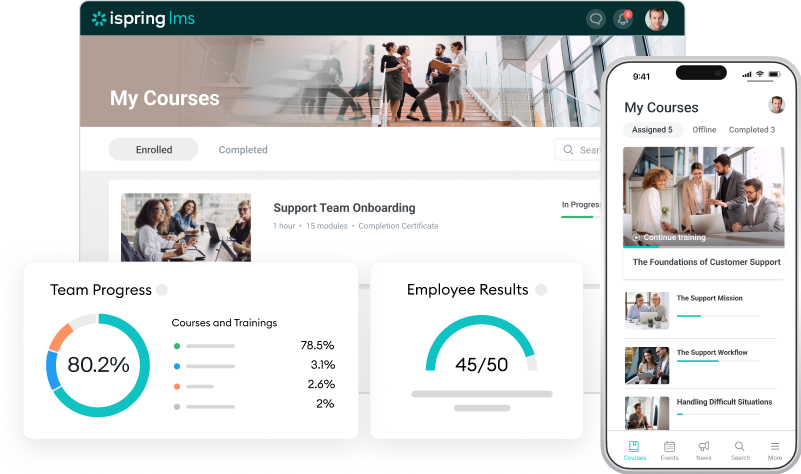
If you’re looking for a simple yet capable LMS, consider iSpring LMS for building your learning programs. It covers the essentials — comprehensive reporting, solid customization, strong content management and authoring, plus mobile access — and works for the great majority of training scenarios.
Sign up for a free demo, and our team can walk you through how it will handle your specific needs.
FAQs on the Essential Features of an LMS
What is an LMS?
A learning management system (LMS) is a digital learning platform used for creating courses, delivering them, and tracking learner progress. LMSs commonly provide learners with easy access to training materials, such as online courses, training videos, and digital job aids.
What are the benefits of an LMS?
Here are some of the most significant benefits that an LMS offers:
- Cost-effectiveness: Despite an initial investment, the best learning management systems reduce training costs significantly. Delivering training online reduces expenses related to travel, instructor fees, and accommodation.
- Flexibility: Using an LMS gives employees access to the training anytime, anywhere, with individual learning paths. An LMS supports both self-paced and instructor-led training, allowing your organization to train employees with flexibility.
- Workload reduction: LMS platforms dramatically reduce the workload for L&D teams by automating time-consuming admin tasks, such as enrolling new employees in training and sending reminders.
How does an LMS improve learning?
We all have different learning styles. A perfect LMS brings stale training to life by incorporating interactive learning activities, quizzes, and learning paths. These gamification features boost learner engagement and knowledge sharing further and foster a culture of learning. As a result, learners achieve better results and are more motivated to participate in future learning programs.
How should I go about selecting an LMS?
There’s a lot to consider when picking the right learning management system for your business. We recommend following this easy four-step process:
- Identify your needs. It’s essential to perform internal research and identify your business’s training needs.
- Define your LMS requirements. List all of your requirements (and the extras that would be great but aren’t essential).
- Research: Gather research from reliable sources and get to know what modern LMS solutions are available.
- Write a Request for Proposal (RFP): The best way to do this is by writing an LMS RFP that outlines all of your requirements (and the extras that are nice-to-have elements but aren’t essential).
- Create a shortlist and test-drive them: Use your research and RFP to shortlist 3-5 LMS platforms. Next, request demos and get to know how the features of each learning management system work.
- Make your decision: Using the feedback, create a document to list the LMS functions for each option, how well it performs, and any pain points you find. Present your findings to all relevant stakeholders and agree on the best learning management system for your organization.
for your mission-critical project


LMS Pricing: Find the Right Pricing Model for You [2026]

LMS Implementation: A 10-Step Plan for Success

The 8 Best LMS Software: The Ultimate Review
