The 9 best Adobe Captivate alternatives
 28 minutes






If you’re an instructional designer, eLearning developer, or L&D professional exploring Adobe Captivate alternatives, you’re probably looking for a course creation tool that better fits your corporate or technical training workflow.
You might have tried Adobe Captivate, only to find its interface too complex or not suited to your workflow. You may also need a different way to collaborate with subject matter experts, reuse existing PowerPoint presentations, or create and localize courses with AI. Adobe Captivate has AI-assisted features and interactive software simulations, but other tools may suit your particular training projects even better.
In this article, I’ll review nine of the best Adobe Captivate alternatives in the eLearning space that could be the right solution for you or for your L&D teams. I’ll analyze their features, highlight who they are best suited for, and compare pricing to help you decide.
Key takeaways
- For PowerPoint-based training: iSpring Suite AI lets you turn existing presentations into interactive courses with quizzes, role-play simulations, and AI-assisted content creation.
- For software simulations: ActivePresenter is a strong alternative to Adobe Captivate, with screen recording, interactive practice activities, and perpetual licenses.
- For advanced interactions: Articulate 360 and Lectora offer extensive customization, while dominKnow ONE is worth considering for collaborative authoring and reusable content.
- For faster course development: Easygenerator, Create, and Mindsmith simplify authoring in different ways, while H5P offers a free, open-source option for creating interactive learning activities.
Before switching: Test a representative course in your shortlisted tools, including its interactions and LMS publishing.
Why switch from Adobe Captivate?
Adobe Captivate remains a capable authoring tool, especially when creating interactive software simulations and responsive eLearning content. But for many teams, course requirements, and development workflows, another tool may be a better fit.
Here’s why most users consider an alternative:
- Learning curve: Like other traditional authoring tools, Captivate has extensive authoring capabilities, but its interface and workflows take time to master. If you need to produce straightforward employee training quickly, a simpler editor may be more practical. Looking for practical ways to engage learners? Explore these approaches to making online courses interactive.
- Existing training materials: For many organizations with large PowerPoint libraries, an authoring tool that works directly with presentations may be more practical than those requiring a separate editing workflow.
- Collaboration: If subject matter experts and instructional designers need to contribute to the same project, they might prefer cloud collaboration and review tools.
- AI-assisted development: Both Captivate and its alternatives offer AI features, but their capabilities differ when it comes to generating course drafts, assessments, voiceovers, and translations.
- Budget and licensing: Adobe Captivate costs US$408 per year. Depending on your team size and requirements, a different subscription model or a perpetual license may be more suitable.
The goal isn’t to replace Captivate with a simpler tool, but to find one that supports the types of courses you create most often, without paying for complexity you don’t need.
Adobe Captivate alternatives at a glance
| Tool | Description | Best for |
| 1. iSpring Suite AI | An all-in-one eLearning authoring tool built on a familiar PowerPoint interface with AI features for generating content, quizzes, and multimedia, enabling professional courses with no tech background. | L&D teams that want to turn existing PowerPoint presentations into LMS-ready employee training. |
| 2. Articulate 360 | A complete eLearning suite: Storyline 360 lets you create highly interactive, slide-based courses with complex branching and simulations; Rise 360 enables fast creation of responsive, modular courses directly in a browser. | Instructional designers who need both advanced interactive courses and mobile-friendly learning modules. |
| 3. ActivePresenter | One of the affordable alternatives to Adobe Captivate that covers three key features: eLearning authoring, screen recording, and editing of audio and video clips. | Creating software tutorials, application training, and simulations, particularly when a perpetual license is preferable. |
| 4. Lectora | Comprehensive software for creating courses with a high level of customization via programming code, external libraries, and scripts; most suitable for well-trained developers. | Experienced course developers who need extensive customization and control over learning content. |
| 5. dominKnow ONE | A comprehensive eLearning tool with solid collaboration features designed for large businesses. | Enterprise L&D teams managing large course libraries, multiple authors, and localization workflows. |
| 6. Easygenerator | Browser-based course creator with templates and AI tools for transforming existing documents into training content. | Subject matter experts and decentralized training teams that need to create courses without advanced authoring skills. |
| 7. Create (formerly Elucidat) | A cloud-based eLearning authoring tool that enables you to create online courses with pre-built templates. | Teams producing standardized courses collaboratively without extensive design or development resources. |
| 8. Mindsmith | An AI-first course editor for generating, refining, and publishing learning content, with usage governed by AI credits. | Individual authors and small teams looking to accelerate initial course development with AI. |
| 9. H5P | An open-source tool for creating interactive videos, quizzes, presentations, and branching activities within existing learning platforms. | Teams and educators who need affordable interactive learning content without requiring a full authoring suite. |
How I selected these Adobe Captivate alternatives
I selected tools that address common Adobe Captivate use cases — interactive courses, assessments, software simulations, and LMS publishing.
Then I compared them based on authoring capabilities, ease of use, AI features, collaboration, publishing options, and pricing. For sources I used product documentation, published pricing, and user feedback on websites like G2. The information is current as of October 2026.
Best Adobe Captivate alternatives
Before we explore the alternatives in detail, watch the video below comparing Articulate 360 and iSpring Suite AI vs Adobe Captivate across three practical criteria:
- Authoring workflow: Captivate takes time to learn, Storyline offers detailed control over interactions, and iSpring works directly in PowerPoint.
- Software simulations: Captivate provides dedicated demonstration, practice, and assessment workflows.
- Choosing the right tool: The best option depends on what you prioritize — software training, custom interactions, or developing courses from existing presentations.
Note: I haven’t performed the same hands-on test of every tool on this list.
Type: Desktop and cloud-based authoring
OS: Windows for PowerPoint-based authoring; browser access for cloud tools
Pricing: $970 per author/year for iSpring Suite; $1,290 for iSpring Suite AI with AI capabilities
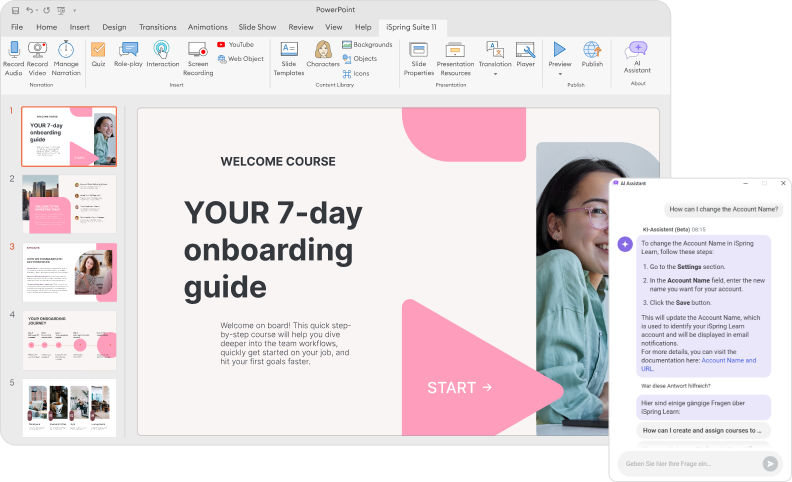
iSpring Suite AI is an Adobe Captivate alternative tailored to creating eLearning courses quickly. It works as a PowerPoint add-in, so you can repurpose existing presentations and convert them into interactive eLearning courses in a familiar environment.
With iSpring, you can create interactive quizzes, video tutorials, and branching role-play simulations for communication skills training.
iSpring Suite provides the core PowerPoint-based authoring tools, while iSpring Suite AI adds expanded AI capabilities and access to iSpring Cloud AI for creating scrollable courses and collaborating online.
Key features
- PowerPoint-based course creation
- Quizzes and surveys with 14 question types
- Branching dialogue simulations and video editing
- Ready-made interactions, templates, and content library
- SCORM 1.2, SCORM 2004, xAPI, cmi5, and AICC publishing
- AI-assisted writing, quizzes, images, translation, and ElevenLabs-powered voiceovers
- Cloud-based course creation and collaboration through iSpring Cloud AI
Pros
- Reuses existing PowerPoint presentations
- Familiar interface with built-in tools for authors without technical expertise
- Dedicated branching dialogue simulation builder
- Mobile-friendly course publishing
- AI-assisted content creation and localization
- Collaborative authoring through iSpring Cloud AI
- Special pricing for eligible organizations and educators
- 24/7 live tech support via phone, email, and chat
Cons
- Desktop authoring requires Windows and PowerPoint
- Fewer customization options for complex interactions than advanced authoring tools
- Dialogue simulations are designed for practicing conversations, not hands-on software training
- No built-in VR course authoring
Compared with Adobe Captivate
Captivate provides dedicated tools for interactive software simulations, including demonstration, practice, and assessment modes. iSpring Suite AI is better suited to teams that regularly turn PowerPoint presentations into employee training.
For example, you can add quizzes, a branching conversation for scenario-based learning, and an instructional video to an existing onboarding presentation, then publish it to an LMS. If learners need hands-on practice in a software application, Captivate may be a better fit.
Pricing
- iSpring Suite — $970 per author/year: Core authoring tools, including limited AI translation.
- iSpring Suite AI — $1,290 per author/year: Core toolkit, expanded AI features, and iSpring Cloud AI.
A 14-day free trial is available. Special pricing is available for individual educators, with nonprofit organizations.

Type: Desktop-based and Web-based authoring
OS: Windows for Storyline 360; browser-based Rise 360 works on Windows and Mac
Pricing: Articulate 360 AI starts at $1,449 per user annually for the Personal plan.
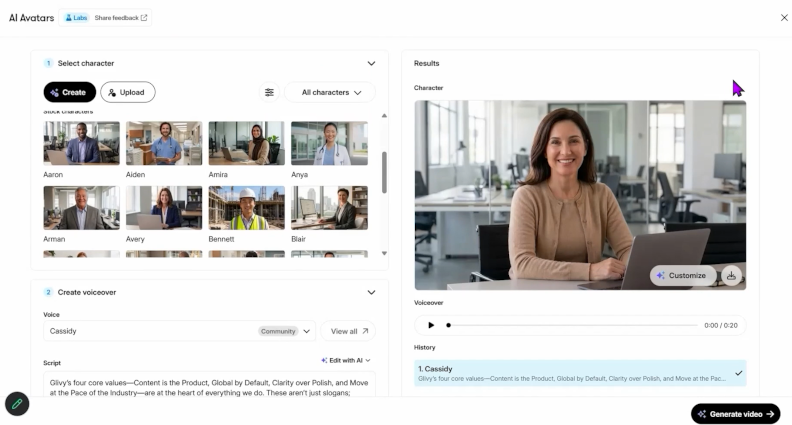
Articulate 360 is a comprehensive eLearning authoring suite that includes Storyline 360 for highly interactive, slide-based courses and Rise 360 for creating responsive, block-based courses. Storyline offers detailed control over triggers, layers, and complex logic in branching scenarios, while Rise helps authors build courses with less technical expertise.
Key features
- Advanced interactions, branching scenarios, and software simulations in Storyline 360
- Responsive course creation and collaboration in Rise 360
- Content library with templates, characters, and stock media
- SCORM, xAPI, AICC, and cmi5 publishing
- AI-assisted course drafting, quiz creation, and generation of learning assets
Pros
- Wide range of interactivity options
- Supports multimedia, including audio, video, and animations
- Familiar interface for PowerPoint users in Storyline; straightforward block-based editing in Rise
- Collaboration and cloud-based workflows
- Responsive, mobile-ready courses in Rise
- Large user community and frequent updates
Cons
- Higher cost than some alternatives to Adobe Captivate
- Storyline and Rise aren’t sold separately
- Advanced Storyline features have a learning curve
- Rise offers limited customization and advanced simulation options
- Storyline’s built-in video editing is basic
- Rise requires an internet connection
Compared with Adobe Captivate
Storyline is well suited to custom interactions and branching scenarios. Captivate has more dedicated workflows for recording software demonstrations and creating practice simulations. If software training is your priority, compare both tools using the same exercise.
Pricing
- Articulate 360 AI Personal: $1,449 per author/year
- Articulate 360 AI Teams: $1,749 per author/year
Both include Storyline 360 and Rise 360. Some advanced AI capabilities use separately purchased credits.
Too much to read? Get a summary from AI
Type: Desktop
OS: Windows, Mac
Pricing: A free edition is available for personal/non-commercial use; paid editions start at $249 for a perpetual license (one-time payment).
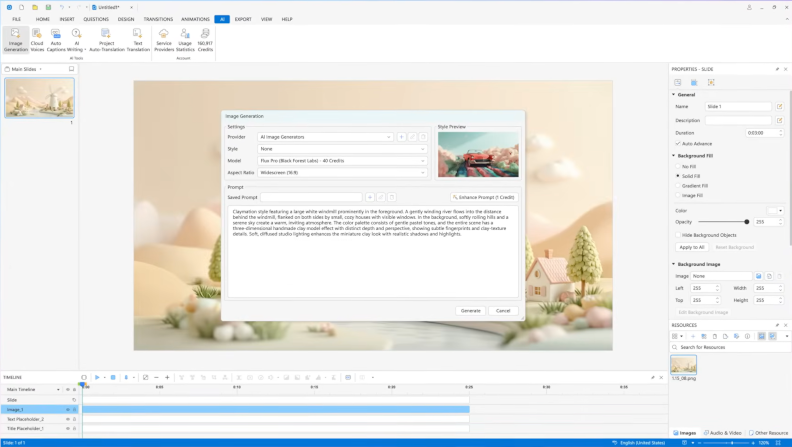
ActivePresenter combines eLearning authoring, screen recording, and video editing in a single application. Like Adobe Captivate, it lets you record software walkthroughs and turn them into interactive simulations, including demonstrations, practice activities, and tests.
It’s particularly worth considering if you regularly create software tutorials or application training. Unlike Captivate’s subscription model, ActivePresenter offers perpetual licenses.
Key features
- Interactive software simulations and branching scenarios
- Video recording, editing, and interactive assessments
- HTML5, SCORM 1.2, SCORM 2004, and xAPI publishing
- AI-assisted writing, image generation, text-to-speech, and captions
Pros
- Powerful screen recording and video editing tools
- Interactive simulations and assessments
- Familiar slide-based authoring interface
- Perpetual licenses and educational discounts
Cons
- Advanced features have a learning curve
- Highly customized interactions can require manual setup
- No real-time cloud co-authoring
- Smaller user community than major competitors
Compared with Adobe Captivate
Both tools support interactive software training. ActivePresenter may appeal to teams that want recording, editing, and course authoring in a single desktop application without an annual subscription. However, their simulation workflows differ, so test a representative exercise before switching. For a broader overview of available tools, see our guide to eLearning simulation software.
Pricing
- ActivePresenter Free: Free for personal/non-commercial screen recording and basic video editing. Advanced exports may include watermarks.
- ActivePresenter Standard: $249 for a perpetual license (one-time payment). Adds commercial use, advanced video editing, and document exports.
- ActivePresenter Pro: $499 for a perpetual license (one-time payment). Includes interactive quizzes, branching scenarios, responsive course design, and LMS publishing.
- ActivePresenter Pro EDU: $249 for a perpetual license for eligible educational users and organizations. Eligibility verification is required.
Each license can be activated on one computer at a time. Purchases include updates for the licensed major version and free upgrades to new major versions for one year. Additional AI credits are available for purchase separately.
Type: Desktop + web
OS: Windows for desktop authoring; browser access for Lectora Online
Pricing: Starts at $1,549/year for Studio Gold Suite
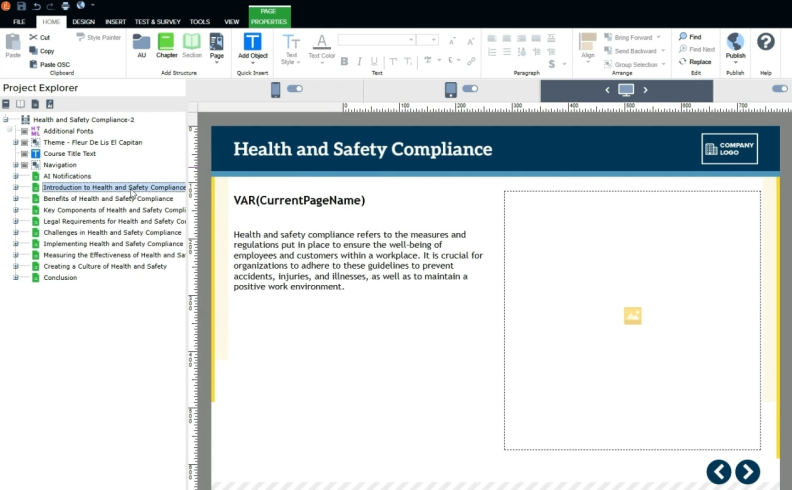
Lectora is an eLearning authoring tool for experienced instructional designers who need detailed control over course interactions, navigation, and visual design. It supports custom scripts, JavaScript, CSS, variables, and branching logic, making it suitable for projects with complex simulations and interactions that go beyond ready-made templates.
For faster development, Lectora also offers Course Starter templates and an asset library. Its AI Course Wizard can generate an initial course draft that authors can edit and customize. For teams developing compliance training, Lectora Online supports collaborative authoring, while ReviewLink lets stakeholders review courses and provide feedback.
Key features
- Custom scripts, CSS, fonts, and libraries
- Advanced branching, variables, and triggers
- Course Starter templates and built-in asset library
- Accessibility features and responsive design
- Collaboration and review tools
- SCORM, xAPI, AICC, cmi5, and HTML5 publishing
Pros
- Powerful tools for customizable eLearning content
- Extensive options for complex interactions and branching scenarios
- Built-in accessibility features, including keyboard navigation and screen reader compatibility
- Support for various multimedia formats
- Dedicated user community and learning resources
Cons
- Steep learning curve
- Complex interface that may overwhelm beginners
- Highly specialized interactions may require custom development
- Higher price point
- Complex projects may require JavaScript knowledge
- Some workflows can be less intuitive and more time-consuming
Compared with Adobe Captivate
Both tools support interactive eLearning, but Lectora offers more flexibility for custom scripting, course behavior, and accessibility controls. Adobe Captivate has more dedicated workflows for recording software demonstrations and building practice simulations.
If you need VR training, note that Lectora can integrate with CenarioVR, but access to that application depends on your subscription package.
Pricing
- Studio Gold Suite — from $1,549/year: Includes Lectora Online and Desktop, MicroBuilder, ReviewLink, and the Asset Library.
Type: Cloud-based authoring, with a desktop application for software capture
OS: Windows, Mac, Chrome OS for browser-based authoring
Pricing: Custom quote
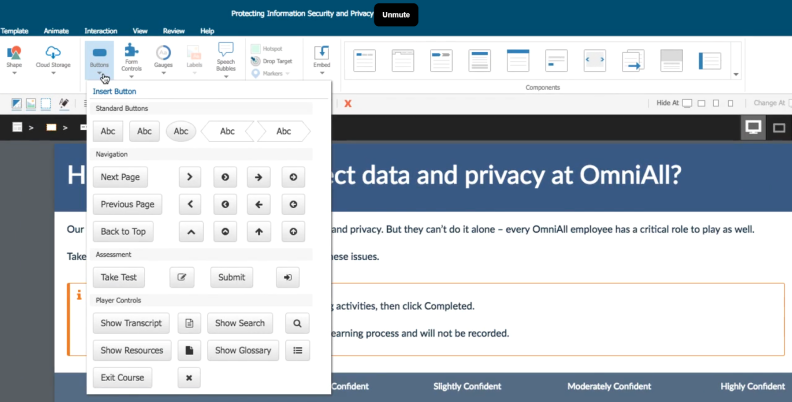
dominKnow ONE is an eLearning authoring solution for teams that create and maintain large training libraries. It combines course development with centralized content management, reusable learning objects, version control, and a collaborative review and approval workflow.
The platform also supports multilingual course development. Authors can manage language versions within a single project and export content for translation.
Key features
- Single-source authoring and reusable learning objects
- Collaboration, version control, and review management
- Interactive software simulations with demonstrations, guided practice, and assessments
- Translation and localization workflows
- SCORM, AICC, xAPI, cmi5, HTML5, and document publishing
- AI Translator, available as an additional-cost option
Pros
- Centralized management of learning content
- Reusable content across multiple projects
- Collaboration and review tools for multiple authors
- Support for software simulations
- Multilingual content management
Cons
- Limited offline functionality
- Advanced content management features may require onboarding
- Pricing is available upon request
Compared with Adobe Captivate
Both tools support interactive courses and software simulations. dominKnow’s Capture tool can record software tasks and turn them into demonstrations, practice activities, and assessments.
The main difference is the authoring workflow. dominKnow is particularly useful when multiple authors need to maintain related courses, reuse content, and manage updates across a training library. If software simulations are your primary requirement, test the same exercise in both tools before switching.
Pricing
- Business: For individual authors and small teams.
- Business Plus: For teams of five or more that need additional content management and administration options.
- Enterprise: For larger organizations with advanced deployment and governance requirements.
Pricing is available upon request. There’s also a free trial.
Type: Cloud-based authoring
OS: Windows, Mac, and other systems with a supported web browser
Pricing: From $1,499/year for one author
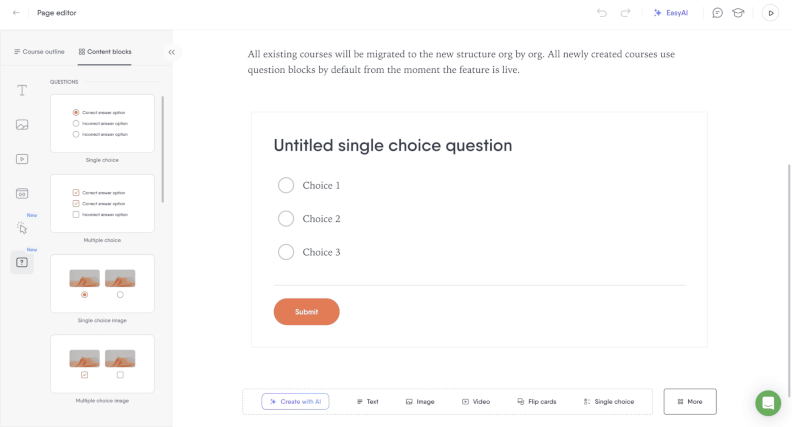
Easygenerator is a cloud-based eLearning authoring tool that helps subject matter experts and employees create training courses without extensive instructional design experience. Its straightforward editor, templates, and interactive elements are well suited to turning internal knowledge into online courses.
The platform also includes EasyAI for drafting courses, improving text, generating questions, and creating images.
Key features
- Browser-based authoring with templates and interactive elements
- Quizzes and knowledge checks
- Supports SCORM and xAPI with dynamic SCORM
- Real-time co-authoring, external review with comments, and learner analytics on Team and Enterprise plans — multiple authors can work on a course simultaneously, while reviewers can provide feedback without editing the content
- AI-assisted course creation and editing
- Course translation through the paid EasyTranslate add-on
Pros
- Accessible to authors without advanced instructional design skills
- Templates help subject matter experts create courses
- Responsive content for desktop and mobile learning
- Co-authoring and review tools for teams
- AI tools for drafting content and questions
Cons
- Limited customization for complex interactions
- Not designed for advanced interactive software simulations
- Co-authoring and learner analytics require Team or higher plans
- EasyTranslate costs extra
- The Pro plan limits the number of courses and learners
Compared with Adobe Captivate
Easygenerator prioritizes simple course creation over advanced customization. It’s a practical choice when employees need to create content based on their expertise and turn it into onboarding, policy, or knowledge-sharing courses.
Adobe Captivate is better suited to interactive software simulations and projects that require detailed control over course behavior.
Pricing
- Pro — $1,499/year: One author, up to 10 courses and 100 learners.
- Team — $7,495/year: Starts at five authors, with unlimited courses and learners, co-authoring, reviews, and learner analytics.
- Enterprise — custom pricing: Additional customization, integrations, and support.
A 14-day free trial is available. SCORM export and several other features require a paid plan after the trial.
Type: Web
OS: All
Pricing: Custom quote
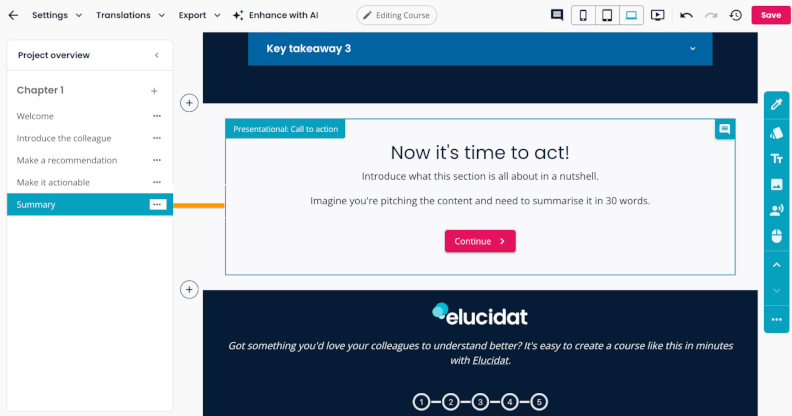
Create (formerly Elucidat) is a cloud-based eLearning authoring tool for building responsive courses with no coding or design experience required. It offers ready-made templates, customizable page layouts, and brand controls to help teams produce consistent training materials.
The platform also supports collaboration, tools for tracking progress, and AI-assisted content creation, including course outlines, text-to-speech narration, and translation into more than 75 languages.
Key features
- Ready-made templates and customizable page layouts
- Interactive quizzes, animations, and page transitions
- Brand controls for consistent course design
- PowerPoint import and SCORM compatibility
- Collaboration and learner engagement tracking
- AI-assisted course creation and multilingual translation
Pros
- No coding or design experience required
- Templates simplify course development
- Flexible layouts and brand customization
- Built-in collaboration and learner tracking
- AI-assisted authoring and translation
Cons
- No dedicated software simulation recording tools
- Subscription pricing isn’t publicly listed
Compared with Adobe Captivate
Create is better suited to teams that need to produce and maintain responsive, brand-consistent courses across departments or locations. Its templates and collaborative workflows help standardize course development.
Adobe Captivate offers dedicated tools for recording software workflows and building interactive practice simulations. If hands-on software training is a priority, Captivate is the more relevant option.
Pricing
Create doesn’t publish standard subscription prices. Contact Confirm for a quote based on your organization’s requirements.
8. Mindsmith — Best for AI-powered eLearning course creation
Type: Web
OS: All (browser-based)
Pricing: A free plan is available; paid plans start at $468 per author/year, billed annually.

Mindsmith is a cloud-based eLearning authoring tool with an AI-native workflow for creating interactive courses from text prompts, documents, and presentations. You can generate a first draft, then refine it in a visual editor.
The platform offers over 30 interactive elements, including quizzes, flashcards, branching scenarios, and interactive videos. It also supports dynamic SCORM publishing, allowing authors to update published course content without repeatedly uploading packages to an LMS.
Key features
- AI-assisted course creation from prompts and source materials
- A visual editor with over 30 interactive elements
- Quizzes, branching scenarios, and interactive learning activities
- Responsive course design and custom branding
- Real-time collaboration and version history
- AI-generated images, narration, assessments, and translation into over 70 languages
- Dynamic SCORM publishing
Pros
- Generates course drafts from existing materials
- A wide selection of interactive elements
- AI assistance throughout the authoring process
- Dynamic updates to published SCORM courses
- Collaboration and multilingual content creation
Cons
- AI usage limits depend on the subscription plan
- Real-time collaboration and version history require the Business plan
Compared with Adobe Captivate
Mindsmith is useful for turning documents and presentations into interactive onboarding, compliance, or product knowledge training. Its AI-powered workflow can reduce the amount of manual drafting required.
Adobe Captivate offers dedicated workflows for recording software demonstrations and creating simulations in which learners practice tasks in an application. If hands-on software training is your priority, compare the tools using a representative exercise rather than assuming their interactive features are interchangeable.
Pricing
- Free: $0, with 450 one-time AI credits, Mindsmith branding, and SCORM sharing.
- Professional: $468/year (the equivalent of $39/month, billed annually). Includes 2,000 monthly AI credits, narration, branding, and scenarios.
- Business: $780/year (the equivalent of $65/month, billed annually). Includes 5,000 monthly AI credits, collaboration, and version history.
- Enterprise: Custom pricing, including unlimited AI generation and advanced permissions.
9. H5P — Best for free interactive learning content
Type: Open-source, browser-based authoring technology
OS: Windows, Mac, and Linux (through supported web-based platforms)
Pricing: Free, open-source software; hosting and maintenance costs may apply
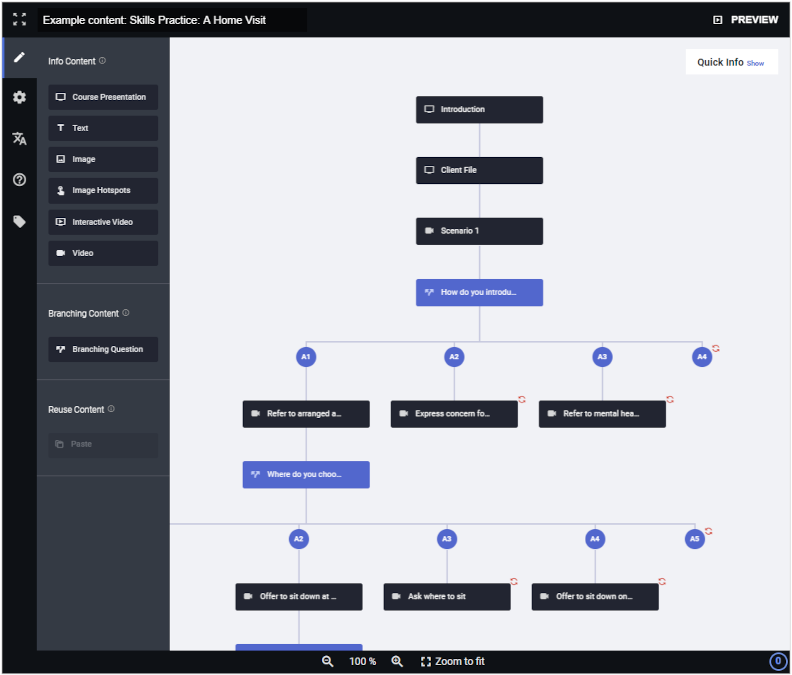
H5P is a free, open-source tool for creating interactive learning activities, including quizzes, presentations, branching scenarios, and interactive videos. Rather than using a standalone authoring application, you create H5P content within a supported platform, such as Moodle, WordPress, or Drupal.
For example, you can add questions to a training video or build a branching scenario in which learners make choices and receive feedback. H5P also supports interactive presentations with quizzes and multimedia, making it useful for knowledge checks, short lessons, and supplementary training content.
Key features
- Interactive videos with embedded questions and feedback
- Course presentations, quizzes, drag-and-drop activities, and branching scenarios
- Browser-based editing within supported platforms
- Free plugins and integrations for Moodle, WordPress, and Drupal
- Import and export of reusable H5P content
- Open-source technology that can be customized by developers
Pros
- Free, open-source software with no authoring license fees
- A wide range of ready-made interactive content types
- Interactive videos, quizzes, and branching scenarios without custom programming
- Works within supported websites and learning platforms
- Content can be reused and shared across compatible H5P installations
Cons
- Not a complete replacement for advanced eLearning authoring suites
- No dedicated workflow for recording interactive software simulations
- Requires a supported platform rather than working as a standalone application
- Self-hosting may involve technical setup and ongoing maintenance
- No native SCORM package export; LMS tracking depends on the hosting platform and integration
Compared with Adobe Captivate
H5P is a cost-effective alternative when you need to create interactive learning activities rather than develop complex standalone courses. It can help teams add quizzes, interactive videos, and branching scenarios to an existing learning platform without paying for an authoring license.
Adobe Captivate provides more comprehensive course development tools, including dedicated workflows for recording software demonstrations and creating interactive simulations. H5P doesn’t offer the same capabilities for hands-on software training.
Pricing
H5P is free, open-source software licensed under the MIT license. You can create and host H5P content using supported platforms such as Moodle, WordPress, or Drupal without paying authoring license fees.
However, hosting, setup, maintenance, and technical support may involve additional costs. H5P.com is a separate paid hosting and authoring service with additional features and support.

Adobe Captivate alternatives: Which tool fits your needs?
Use this decision matrix to narrow down your options based on your learning team’s needs. If you’re planning a new training project rather than replacing existing courses, start with a learning needs analysis to identify what employees need to learn before choosing an authoring tool.
| If you need to… | Consider | Why it fits | Key trade-off |
| Turn PowerPoint presentations into interactive courses | iSpring Suite AI | Works directly in PowerPoint and adds quizzes, role-plays, and other learning interactions | Desktop authoring requires Windows and PowerPoint |
| Build advanced interactions and branching scenarios | Articulate 360 | Storyline offers detailed control over interactive slides and branching | Storyline has a steeper learning curve than template-based editors |
| Customize courses extensively | Lectora | Supports advanced customization, including JavaScript and CSS | Requires more technical expertise for complex projects |
| Record software workflows and create practice simulations | ActivePresenter or Adobe Captivate | Both offer dedicated tools for recording software demonstrations and simulations | ActivePresenter is less suited to teams that need cloud-based coauthoring |
| Coordinate course development across multiple authors | dominKnow ONE | Supports collaborative authoring, reusable content, and centralized project management | Pricing requires a quote, making costs harder to assess upfront |
| Let subject matter experts create training | Easygenerator | Provides a straightforward authoring workflow for non-specialists | Course and learner limits apply to some plans |
| Produce responsive, brand-consistent courses | Create (formerly Elucidat) | Combines templates, collaboration, and brand controls | Pricing is available upon request |
| Generate course drafts from existing documents using AI | Mindsmith | Turns source materials into interactive lessons that authors can refine | AI credits are limited on some plans |
| Add interactive quizzes, videos, and activities to an existing learning platform | H5P | Offers free, open-source interactive content types and integration with supported platforms | Not a complete course authoring suite; self-hosting requires setup and maintenance |
These recommendations aren’t mutually exclusive. For example, Articulate 360 also supports software simulations, while Mindsmith and H5P offer different ways to create branching learning activities.
If software simulations are your main requirement, start with Adobe Captivate and ActivePresenter. If you already develop training in PowerPoint, iSpring Suite AI may be a more natural fit. For collaborative course production, compare dominKnow ONE, Easygenerator, and Create based on who will author the content and how much control they need.
Before choosing a tool, create a short sample course that reflects your actual training requirements. Check how easily you can build the necessary interactions, collaborate on revisions, and publish to your LMS. Pay particular attention to the limitations listed above: some may be irrelevant to your workflow, while others could rule out a tool entirely.
What to consider before switching from Captivate
Switching authoring tools can simplify course development, but migrating existing training may take more work than learning a new interface. Before replacing Adobe Captivate, check five things.
- Can you reuse existing Captivate projects?
Don’t assume another authoring tool can open editable Captivate files. Review your course library to identify what needs rebuilding and which assets — images, audio, videos, and text — you can reuse. If you need to rebuild complex courses, storyboarding for eLearning can help you plan their structure and interactions before starting development.
- Can you recreate your interactions?
Pay particular attention to simulation design, branching logic, and assessment feedback. A video demonstration isn’t a substitute for a simulation in which learners practice completing a task.
- Will courses work in your LMS?
Adobe Captivate supports SCORM 1.2 and SCORM 2004. Check whether your chosen alternative supports the formats required by your LMS, including SCORM or xAPI. Upload a sample course and test its launch, completion tracking, quiz scores, and resume behavior. If you’re new to the format, see how to test SCORM content. Also check whether your LMS provides the analytics tools and learner management features your team needs.
- Does the workflow suit your team?
Consider who creates, reviews, and updates courses. Check collaboration features, operating system requirements, permissions, and version control.
- What’s the total cost of switching?
Include the time needed to rebuild courses, train authors, and test published content — not just subscription fees. You may find it more practical to maintain existing Captivate courses while creating new ones in another tool.
Start with a pilot: Recreate one representative Captivate course in your preferred alternative. Include an assessment, an interaction, and your usual LMS publishing settings. Record the development time and any functionality you couldn’t reproduce.
Frequently Asked Questions about Adobe Captivate alternatives
Which Adobe Captivate alternatives offer AI features?
iSpring Suite AI, Articulate 360, Easygenerator, and Mindsmith offer AI features for course creation. These include generating course drafts, quizzes, and other learning content, although the available capabilities differ by tool and plan.
Mindsmith focuses on AI-assisted course generation from prompts and existing materials, while iSpring Suite AI combines AI tools with PowerPoint-based authoring. Compare the specific features and usage limits before choosing a tool.
What are the best free Adobe Captivate alternatives?
ActivePresenter offers a free edition for personal and non-commercial use. Mindsmith also has a free plan with AI usage limits. H5P is a free, open-source option for creating interactive learning activities, although hosting and maintenance may involve extra costs.
For professional training, check licensing restrictions and publishing capabilities before relying on a free plan. iSpring Suite AI isn’t free, but it offers a 14-day free trial.
Which Adobe Captivate alternatives work on Mac?
ActivePresenter has a native macOS application. Browser-based tools such as Easygenerator, dominKnow ONE, Create, and Mindsmith can also be used on a Mac. H5P can be used through a supported web-based platform, such as Moodle or WordPress.
Articulate Rise works in a browser, but Storyline 360 requires Windows. iSpring Suite AI requires Windows and PowerPoint for desktop authoring.
Can I import existing Adobe Captivate projects into another authoring tool?
Generally, no. SCORM compatibility doesn’t mean that one tool can edit another tool’s source files.
You can often reuse images, audio, video, and text, but quizzes and simulations may need to be rebuilt. Test the process with one representative course before migrating your library.
Final thoughts
The right choice among Adobe Captivate alternatives depends on the courses you create and the workflows your team needs. Compare your shortlisted tools using a real training project, paying particular attention to interactions, collaboration, and LMS publishing.
If you create training in PowerPoint, try iSpring Suite AI free for 14 days to see how its authoring, assessment, and AI features fit your workflow.
Create online courses and assessments in record time.





How to Create a SCORM File from Course Content

How to Convert Your PowerPoint Slides to an eLearning Module
