Free Online Conference | Wednesday, October 28th
iSPRING AI DAYS 2026
L&D’s Next Step: From AI Adoption to Orchestration

iSpring Suite — What's New
Every month, we add new features and content so you can create more outstanding courses, spend less time on content development, and get better training results.
October 2026
Keep your PowerPoint slides accessible while creating quizzes
Learn how to create quizzes →
Try to create a quiz in iSpring Suite →
Choose your course design before AI generation
The AI Course Generator now includes a new Design step, so you can set your course style before generating the slides.
Choose an accent color, background color, and font from ready-made options or customize the colors to match your brand. Use the preview to see how your course will look before you generate it.
Previously, you had to adjust the design after generation — changing colors in PowerPoint and customizing the player theme in iSpring Suite. Now, the AI generator creates your slide draft in the style you selected from the start.
Less manual work and a course that’s ready to review, customize, or publish faster.
September 2026
New characters and animated icons in the Content Library
We’ve added new visuals to the Content Library to help you create more engaging and polished eLearning content.
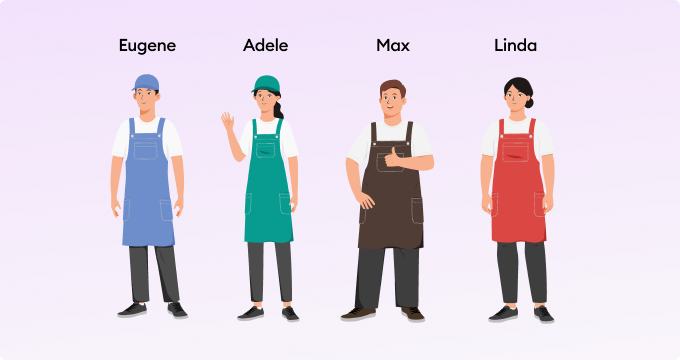
The Character Builder now includes characters wearing aprons. Use them to represent a wide range of roles, from sales associates, baristas, and waiters to chefs, florists, beauty professionals, cleaners, and pickup-point staff.
For the first time, the Content Library now includes a pack of animated GIF icons. This new type of visual helps bring interactive content to life and makes it easy to highlight tips, audio, actions, and completion or verification states.

August 2026
Expand your AI language options in iSpring Cloud
We've expanded the list of languages available for creating and translating courses with AI, adding 27 new languages—from Belarusian and Uzbek in Cyrillic to African languages such as Igbo, Shona, Xhosa, and Yoruba.
We've also improved support for existing languages. AI can now distinguish between regional and script variants, including English for Australia, Canada, and India; Serbian in Latin and Cyrillic; Punjabi in Gurmukhi and Shahmukhi; and Simplified and Traditional Chinese.
AI will use the vocabulary and spelling specific to the selected language variant, helping you create courses for a wider audience and reduce post-translation editing.
New character poses and icons in your brand colors
Make your courses more engaging with new visual options in the Content Library.
Create more realistic scenes with new character poses
The Character Builder now includes new poses: sitting with or without a chair, standing with their back turned, talking on the phone, celebrating, and looking to the side.

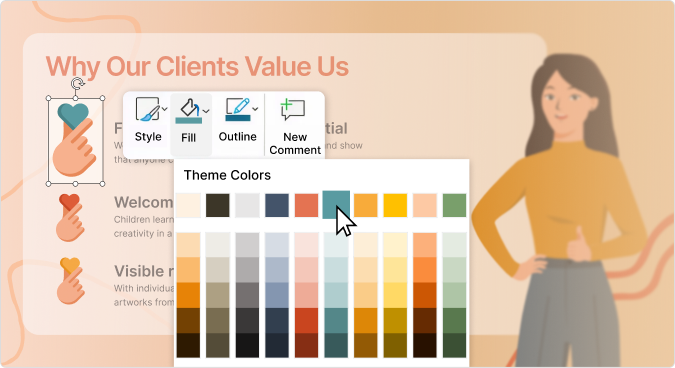
New colorful icons that you can customize to match your brand
Explore new features for your course design →
Speed up content creation with AI
Write and refine training content with AI directly in your workflow. Generate text from scratch, rewrite it in a different tone, expand key ideas, summarize long passages, or organize content into clear, structured lists.
Reduce the time spent writing and editing so you can focus on course design, practical activities, and learning quality.
New characters, backgrounds, and templates for training scenarios
July 2026
Create slide courses faster with AI
You can now generate complete slide-based courses from your source materials. Simply enter a topic and, if needed, upload documents, presentations, or training materials. AI will create a course brief, outline, and a first draft for you.
Spend less time building courses from scratch and more time refining content, improving delivery, and creating engaging learning experiences.
Learn more about creating courses with AI →
June 2026
Text-to-Speech for scrollable courses
You can now easily add audio narration to any page or block in your scrollable courses. Powered by ElevenLabs, the AI-generated narration sounds natural and is created directly from your text — no recording equipment or voiceover artist needed.
Give your learners the flexibility to read at their desk or listen on the go. Transcripts are available in the player, providing built-in accessibility for visually impaired employees.
Available in iSpring Cloud (standalone, as part of Suite AI, and as part of iSpring LMS).
Natural AI voices from ElevenLabs, now in Text-to-Speech
iSpring Suite AI's Text-to-Speech now features voices from ElevenLabs — noticeably more natural and expressive than standard TTS.
Engage your learners with narration that's easy to listen to and helps them remember more without recording equipment or hiring a voiceover artist.
Available on the Suite AI plan.
May 2026
Up to 1.5x faster video course publishing
Spend less time waiting for your courses to publish, especially for video-heavy projects. Our new algorithm uses hardware acceleration to process and publish videos up to 1.5x faster on average.
Republishing after edits is also 20–80% quicker. You’ll save anywhere from a few minutes to an hour per course, getting your updates live faster and keeping your learners moving without delays.
Create ready-to-edit course drafts in minutes with AI Course Creator
Leave the blank page behind. Turn documents, audio files, and prompts into structured course drafts with the help of iSpring Suite AI. Define your audience and learning goals, and AI Course Creator will generate a complete course draft with ready tests and assessments included.
Course creation is now up to 10× faster and takes just three steps:
Step 1. Upload source materials or simply describe what your course should cover in a prompt
Step 2. Get a ready-made structure, lesson text, interactivities, and quizzes
Step 3. Review, refine, and export to SCORM or xAPI for any LMS
Save up to 80% of the time spent on initial draft and focus on what matters most: tailoring content to your learners, adding your expertise, and creating a better learning experience.
See how AI Course Creator helps create interactive courses in no time →
January 2026
Build new interactive scenarios with fresh Content Library characters, backgrounds, and icons
December 2025
Reduce course size with built-in image optimization
Image handling in iSpring Suite is now simpler and more predictable. When you publish a course, images are automatically optimized and converted to WebP to reduce the overall course size while preserving visual quality and transparency. This helps courses load faster, stay compatible with modern browsers, and removes the need to manually adjust compression settings for each project.
Create structured layouts faster with alignment guides in Cam Pro
Cam Pro now includes alignment guides that make it easier to position and duplicate shapes with precision. You can align objects to an edge, keep consistent spacing, and build clean lists and layouts without relying on reference shapes or manual adjustments. This update helps keep slides visually structured as your course grows, reducing time otherwise spent on layout fine-tuning.
Build stunning course visuals instantly with AI
You can now create images directly inside the authoring tool by simply describing what you need. AI helps refine your description, generates visuals in different styles, and lets you try multiple variations until the image fits your course. It’s a quick way to visualize scenarios, illustrations, or icons when stock images don’t match your idea. This effectively eliminates the need to use third-party AI generators.
Create engaging medical, safety, and accessibility-focused courses with a new set of dynamic characters
November 2025
Create engaging health and safety scenarios with our latest characters
The fastest way to localize training: new AI translation for full courses and subcontent
The new automatic AI translation is now available across all iSpring tools, including QuizMaker, Visuals, and TalkMaster. Instantly translate entire courses or individual elements like tests and interactivities to speed up localization and keep content consistent.
October 2025
Foster inclusion and realism with new native american characters and 3D office scenes
Introducing iSpring Suite AI: a Smarter, more capable authoring experience
iSpring Suite Max has evolved into iSpring Suite AI. It's not just renamed. It's upgraded. iSpring Suite AI now includes advanced AI features that help you create courses faster, design smarter, and bring your best ideas to life:
- Speed: Build courses in a day, not weeks.
- Cost: Skip translators, voice actors, and designers.
- Impact: Deliver engaging, accessible learning faster.
New AI tools include:
- AI Course Creation Helper: Instantly generate course outlines, structures, and quizzes. Go from idea to ready-to-build in minutes.
- AI Translator: Localize your courses into more than 70 languages in just a few clicks.
- AI Image Generator: Create unique visuals for your slides and courses.
Plus, your favorites are still here: AI Assistant and Text-to-Speech.
Next on our roadmap: AI-powered tools for instantly generating dynamic quizzes and complex interactions.
Learn more about the new AI features
A smoother workflow with faster video conversion
Video conversion is now significantly faster! On computers with powerful graphics cards, the process runs up to 1.5 times quicker, letting you publish video-based courses in record time. No more long waits!
September 2025
Promote empathy and expertise with industry-specific training casts
Go global instantly with AI translation into 70+ languages
Create longreads for a global audience at no extra cost! With the built-in AI translator, you can localize scrollable courses to 70+ languages in minutes. This will help you cut localization costs, speed up delivery, and boost engagement and retention across global teams by offering training in their native language.
Learn more about AI Translator →
Smarter, mobile-ready content for learning on the go
Mobile-friendly design now works across your entire course! With just one simple setting — “Optimize for smartphones” — your role-plays, interactions, and quizzes will automatically look great on any smartphone.
Besides, when adapting content for mobile, you can now use slide backgrounds in Visuals and QuizMaker that will help keep your design clean, consistent, and professional on any device.
Learn more about "Optimize for smartphones" option →
Break down language barriers with AI translation
Translating your course content has become easier than ever. Our new AI-powered translation tool in iSpring Suite empowers you to translate your courses in seconds — no need for complicated exports or third-party services.
Learn more about course translation with AI →

August 2025
From high seas to hard science: launch immersive training for every deck and lab
July 2025
Meet the new realistic assets in the iSpring Suite evergreen collection
New interactive “Tabs” block in Pages
Keep your page-like courses neat by splitting large chunks of content into clean, clickable sections. Interactive tabs improve structure, save space, and reduce cognitive overload — especially for mobile learners.
Learn more about Tabs →
June 2025
New in Content Library: HoReCa
Adjusting font styles and sizes in role-plays
Tweak font size and style in role-play, including character lines, response options, and messages. Apply bold, italics, or underline to highlight key points and make long dialogues easier to read, making every part of your role-play match your course’s look and feel.
May 2025
New industrial and service characters in Content Library
Custom Fonts for Interactions and Quizzes
You can now apply custom fonts to all elements in interactions and quizzes. Previously, it was only possible to change fonts in titles or the main text.
Here’s what’s new:
- Apply your preferred font and size to every element in an interaction, including glossary lists, tabs, and more.- In quizzes, you can now determine the style in fields like Short answer, Fill in the blanks, and Essay. You can also apply new fonts to feedback windows.
- Use the new Text styles button to apply consistent fonts across an entire quiz with a single click.
April 2025
XLIFF 2.1 Support in Course Translation
iSpring Suite now supports XLIFF 2.1, a widely used format for professional localization. When exporting course text, you can choose between versions 1.2 and 2.1 to match your translation workflow. The new format works better with modern translation platforms and makes it easier to manage multilingual projects and avoid manual edits when working with external vendors or large localization teams.
New in Content Library: Teachers, Teens, and Urban Scenes
Add depth to your content with new characters — two teachers, a teenage student, and a campus visitor to bring school or university settings to life. Use them to explain complex topics, simulate classroom interactions, or show relatable student behavior. We’ve also added new 3D backgrounds, new icon sets and new saturated template for desktop and mobile — perfect for onboarding, workplace safety, and internal standards across industries, from IT to education.
Flexible Course Completion Settings
With the new flexible course completion settings, authors can define their own course completion criteria. This allows them to tailor the learning experience to each learner’s needs and effectively address any training goal.
The requirements for completing and successfully passing the course are configured separately. Authors can create multiple course pathways and set unique completion criteria for each one.
What’s New?
 Set course completion and success criteria independently.
Create multiple learning paths with custom completion rules.
Enjoy a cleaner, more intuitive interface for configuring popular training scenarios.
Learn how to use the new course settings in a blog article →
March 2025
New in Content Library: Business and Consulting
New Characters in Vests
Perfect for retail, gas stations, and delivery points — we’ve added new illustrated characters in vests that look just like your real team. You can change up to three vest colors — especially useful if your brand uses more than one. Just pick a look, set the colors, and drop them into your course.
Closed Captions in iSpring Cam Pro
Now you can add captions to audio and video in iSpring Cam Pro! Captions can be automatically generated, manually added, or uploaded from an existing file.
How to add captions →
February 2025
New Healthcare Assets in the iSpring Content Library
We’ve expanded the Content Library with new characters and assets to help you create even more engaging medical courses. From lab techs to doctors and nurses, you'll find a diverse range of characters ready to bring your training to life.
January 2025
Content Library UI Enhancements for Character Outfits
We are excited to announce two improvements to the Content Library, designed to simplify course creation and elevate the user experience for course authors.
6 new characters, a stylish location, and an awesome course template
December 2024
iSpring’s NEW AI Assistant
No need to look through help docs or contact tech support to work in iSpring Suite like a pro — get instant help and advice from our brand-new AI chatbot!
With the new AI assistant, you can:
-
Get answers to your technical questions about iSpring Suite’s interface
-
Receive step-by-step instructions on using the tool’s features, from formatting a course slide to creating quizzes or adding voice-overs to your content
-
Find detailed articles from iSpring’s collection of help docs
-
Master the software quickly with personalized support — even if you’re new to authoring
To start using the AI assistant, simply click “AI Assistant” in the iSpring Suite tab and type in your question. You’ll get your answer right away.
Try the new AI chatbot now and see how it can save you tons of time and help optimize your course creation process!
Check out 7 awesome updates in iSpring Content Library
November 2024
New characters, backgrounds, and templates for your next fantastic course!
Check out fresh, ready-made assets and a brand-new feature
October 2024
Automatic “Rotate your device” prompt
With a single click, course creators can now add a friendly reminder for learners to switch their device orientation (horizontal or vertical) based on slide dimensions. These prompts disappear after 3 seconds, making them unobtrusive and saving you time on setup.
September 2024
Fresh characters and locations in the iSpring Suite collection
Meet our new Content Library assets for more inclusive eLearning.
iSpring Suite 11.8 just released!
iSpring Suite 11.8 is officially here, and thanks to your feedback, it’s better than ever!Creating on-brand, interactive, and engaging courses just got a whole lot easier. Take a minute to explore the latest enhancements:
Custom themes in quizzes
Tweak every detail in quiz design, from slide backgrounds to checkbox colors! And quickly nail quiz visuals with pre-designed themes to make them look polished and on-brand without any design skills.
“Morph” transition support
Enjoy 100% support of “Morph” transitions when publishing your courses with all animations, gifs, and transparency effects displayed correctly, just like in your original PowerPoint presentations.
Hover effect
Easily highlight objects when users hover or click. No more workarounds — save time by making your courses more interactive and responsive for better learner engagement!
The iSpring Suite plugin for Moodle™
Get comprehensive visual reports on quizzes! Analyze data such as time spent on training, scores, completion rates, and more — while keeping all your statistics intact, even when reloading content.

iSpring Module for Moodle™ software
Now you can upload courses and quizzes created with iSpring Suite to the Moodle™ software platform, monitor learner performance, and gather valuable statistics. You can correlate the learner details with data like completion status, start/end date and time, total time spent, and score.
You can easily filter quiz attempt data by version and status, build reports, and download them to spot any challenges learners might be facing. See where they're struggling in the course and track their progress, not just the final results.
August 2024
August Update of iSpring Content Library + Welcome Course Template
Our latest collection includes amazing new characters, vibrant backgrounds, and an animated welcome course template.
July 2024
iSpring Suite Max Update: Course Captions
Your courses are about to become way more accessible, whether your learners are on the go or in a noisy environment. Plus, they'll now meet WCAG content requirements, ensuring accessibility to learners with hearing impairments.
With iSpring Suite, you can now add captions to audio and video right in the editor! Generate them automatically, add them manually, or upload them from a file. Learners will find the captions easy to follow since the text syncs perfectly with the audio. And with foreign language captions, you can reach an even wider audience.
Content Library Update
June 2024
Content Library update: new characters, backgrounds, templates, and icons
May 2024
iSpring Content Library update + welcome course template
Custom characters in the TalkMaster dialogue simulations
Create a course in which an illustrated assistant will guide the learner through the course and simulate real-life interactions, allowing them to practice key soft skills. Implement characters in any kind of conversational scenario and tailor their appearance to meet the cultural and professional context of your learners.
You can import premade characters from Content Library or customize them right in iSpring Suite together with course co-authors. There’s a perfect match for any situation or interaction! Simulations with these carefully curated characters will feel natural to learners, enhancing engagement and learning effectiveness.
April 2024
Content Library Update: fresh characters, locations, and a mobile-friendly course template
March 2024
Content Library Update
New image editing enhancements in iSpring Cloud
Enhance your course visuals in iSpring Cloud even more! Now you can enrich images with captions and borders, make corners sharp or rounded, and add the zoom effect to let learners enlarge images on click. Take a moment to explore!
iSpring AI in Quizzes and Exercises
Generate quizzes and exercises for your courses in seconds with the built-in AI assistant in iSpring Cloud! Highlight text, select a chapter, or even an entire page — AI will automatically generate relevant single-choice and multiple-response questions, saving you time and effort in course authoring.
Learn more about AI-generated quizzes in help docs →
February 2024
Course creation in iSpring Page is now even easier with these new features
Improve, customize, and transfer your pages quickly and easily.
Updated Navigation in longreads
Now you can tailor your page outline: adjust its structure and decide which items learners will see when going through the longread. Add or hide headings in your outline, choose the layout of the contents sidebar, and control whether readers can view the entire outline or specific parts in the course player. The process is swift and intuitive, thanks to the updated navigation settings. Read more about the update here.
Custom column resize
Make your tables, lists, and infographics even more appealing by manually adjusting column width directly on a page. You just need to hover your mouse over the border between the columns and drag the handlebar. Read this help doc for more details on how to work with custom columns.
Improved Lists
You can change the appearance of your lists and adjust nesting levels in your courses. Choose between lists with colored elements and lists without colors. The second type is more formal and will go well with any content format, from tutorials to reports and presentations. For more details about this capability, check out this help doc.
Exporting pages to other accounts
With this update, you can readily transfer your pages to other iSpring Suite Max, Page, and iSpring Learn accounts. Share pages with colleagues, partners, or clients who work with iSpring products for streamlined collaboration. The export process is super simple: a special code is generated for each page. Copy the code, go to your other iSpring account, and paste it in the relevant project. Voila! A separate copy of the page with the formatting fully preserved will appear in your account instantly. For detailed step-by-step instructions on how to perform the transfer, go to this doc.
iSpring Space is now iSpring Cloud
iSpring Space, which is part of the iSpring Suite Max subscription, is now called iSpring Cloud! Nothing changes — the tool got a new name, but its great features are the same!
You can still enjoy collaborative content creation, easy content sharing, and develop online courses and quizzes using the built-in AI assistant. Happy creating!
January 2024
Content Library Update: New Characters, Pets, Backgrounds, and a Course Template
December 2023
Meet some awesome improvements in Pages
Enjoy even more possibilities for creating slick pages in iSpring Space!
Concise sidebar in the editor mode
Easily customize the size of the sidebar with the table of contents. Leave more space to work with the content when creating courses on a small screen.
Code Snippets
Creating developer-focused courses is now easy with the new code snippets! Easily embed code fragments into pages — they’ll stand out visually and maintain language-specific highlighting and tabbing. Apply custom formatting and select the preferred text size, background color, and more to make the code fragment even more vivid in the text.
Heading 3
Organize your text better with the new H3 heading! What’s more, style and spacing settings will automatically apply to the subsequent text blocks. Just choose them once for the first block, and subsequent ones will inherit background color, spacing between blocks, text styles, colors, and sizes.
Check out what's new in quizzes and role-plays
Grading scale in quizzes
Previously, learners only received 2 quiz results: passed or failed. Now you can easily grade quizzes using a grading scale, and your learners will see a grade based on the number of points they score, such as A, B, C, D, or F. Use the default grading systems: letter grades, numerical scores, comments, or create your own custom scale to match your grading standards or teaching goals!
Listening to response options in role-plays
Now you can listen to response options in role-plays before making a choice. Practice communication skills with a proper accent and intonation, and make your content more accessible to diverse learners!
November 2023
Content Library Update
Link Preview
Instead of mere plain text links, you can create an attractive preview for your learners. The preview includes a title, a brief description, and a picture from the website, if available.
Columns
Refresh the look of your courses and keep your reasoning clear by using this new content block. Add columns and fill them with various types of content: texts, headings, or images. Change your course appearance according to your goals.
October 2023
Quizzes in Pages
Motivate your employees to study with this new option! Assess their knowledge and get detailed statistics to reveal their weaknesses and strengths.
September 2023
iSpring AI Assistant
Now you can create online courses using artificial intelligence technology! Take your work rate to the next level with the iSpring AI smart assistant.
iSpring AI can perform a great variety of tasks: generate a course structure, suggest design enhancements, and even make up a questionnaire for tests and quizzes!
Our smart assistant will not only write some great text for you, but will also structure and design it. iSpring AI can highlight important fragments, create lists, and suggest headings. It can also create pages in several languages, which is definitely useful for large companies with departments or offices in different countries.
There are 3 ways to ask iSpring AI for some assistance:
1. Click “+” → Ask AI.
2. Highlight your text → Ask AI.
3. Press the spacebar.
Text to Speech in iSpring’s Quiz Maker
Now, iSpring Suite Max empowers you to create compelling voice-overs for online quizzes. You can voice questions and feedback in a matter of minutes.
This new feature will reduce the time and expense needed to create voiced quizzes, since you’ll no longer need to record and edit narration.
In the Audio menu, click Text to Speech. The text of the question will be added automatically. Just select a language and an appropriate voice, and you’re good to go.
August 2023
Four preschool characters
Preschool Backgrounds
The Library now contains new virtual backgrounds of preschool locales from various angles. These new backgrounds will come in handy when training child-care staff and preschool teachers.
Professional Voice-over in Interactions
Now TTS is also available in interactions. Instead of recording and editing audio, you can voice a phrase in a couple of clicks.
How to Convert Text to Speech
iSpring Cloud: Flexible Design Settings in Pages
This update is extremely useful for those who create online courses in iSpring Cloud. There are now more design options for building great-looking interactive pages. You can change the background color of blocks to highlight important information and adjust spacing to make content easier to perceive.
All the settings of Pages are located on the sidebar so you can keep everything at hand. There, you can change the color and padding of the block, edit flashcards and notes, change a text style, and more.
The Continue Button in Pages
If you need to divide information into chunks and add interactivity, take advantage of the new Continue button in iSpring Page. The text after the button will be hidden until the reader clicks on it. This will allow learners to pause while reading to better process information before moving on.
Realistic voice-overs for role-plays in iSpring Suite Max
This new feature reduces your time and budget — instead of recording and cutting audio, you can voice a phrase in a couple of clicks.
Click the Text to speech button and the narration of the text will be added automatically.
July 2023
Services in iSpring Cloud
We’ve added a new "Services" section in iSpring Cloud. Here you will find applications that will help solve your business tasks.
For example, you can sign up for training from the iSpring Academy, order a turnkey course, or leave a request for the integration that you need for your work.
The new section is located in the lower left corner of the screen.
Multiple enhancements in iSpring Cloud
iSpring Cloud has received an entire range of new features that will streamline your course creation process and enhance your learners' experience. Now you can:
* Upload videos to your course effortlessly.
* Remove, copy, or switch the type of course content blocks quickly.
* Create custom themes that match your brand identity.
* Customize callouts by changing the callout icon and background color.
Course Portfolio
The brand-new built-in portfolio maker will help you create a shareable digital portfolio to showcase your professional skills and best instructional design projects. You can attach the courses stored in iSpring Cloud and customize the look and feel of your public profile.

June 2023
16 university backgrounds
Spacious halls, welcome desks, and modern classrooms with whiteboards will help you create even more immersive learning experiences.

3 new students
Slide Templates for Mobile-First Courses
iSpring Suite Max now has new mobile optimized slide templates to help you create mobile-first courses. The templates are available in Content Library. Just select one that resonates most with your course topic and populate it with content.
All templates are designed with mobile users in mind. Texts are easy to read and images display clearly even on small screens. Navigation buttons adjust to the screen’s size, which makes courses easy to navigate. All this provides users with a great learning experience.
May 2023
Office backgrounds
From open spaces to sleek conference rooms, these backgrounds will provide the perfect backdrop for a multitude of training scenarios.
Office objects
A variety of items including monitors, chairs, tables, and an abundance of plants will help you create a realistic office environment.
6 illustrated characters
Professionally attired and equipped with safety gear, these characters are perfect for training in equipment operation and maintenance.
14 restaurant kitchen backgrounds
Whether you're mastering culinary techniques, food safety procedures, or kitchen management skills, these backgrounds will help you create an immersive learning environment.
3 HoReCa employees
April 2023
3 characters to practice communication skills
17 office backgrounds
New office locations: reception, waiting area, and checkpoint. These backgrounds will be useful to train employees on how to establish contact with visitors.
The character builder
Easily create characters that match your brand identity, reflect the rich diversity of our world, and resonate more with your learners. Customize their skin color, haircut, clothes, and other parameters in only a few clicks.
March 2023
3 factory workers
20 warehouse backgrounds
You can use them to train employees on how to handle their equipment and organize their work.
Flashcards in Pages
They’re useful tools for presenting new products and their features, terms, and definitions. For example, you can place a question on the front of the card, and the correct answer on the back.
We’ve added 3 different types of flashcards: with text, image, or with both image and text. You can customize them with ease: add an appropriate picture, select background colors, change the font size, and adjust the alignment.
February 2023
16 supermarket backgrounds
This set of high-quality supermarket locations shows a spacious trading zone, a cashier station, self-ticketing units, and more. Use them to create engaging courses for retail professionals.
3 salespeople + a technical support specialist
Improved design of role-plays
Now, you can add a color gradient to the buttons in your role-plays. This will help you make your scenarios more colorful and consistent with the course that features a player that has a gradient display.
Hidden sidebar in Pages
Now, when you create a course, you can turn off the course navigation sidebar so it won’t distract learners’ attention.
To hide the sidebar, go to Page settings and choose “Single Page” in Page Navigation. Once you’re done, the "Introduction" sidebar menu will be hidden.
January 2023
15 nursery school backgrounds
The new set of backgrounds shows different nursery school locations: a spacious game room from different angles, a modern bedroom, and a dressing room. New backgrounds will come in handy when training preschool staff.
3 children and an educator
New characters will be extremely helpful for professionals who create courses for the educational sector.
December 2022
Enhanced text-to-speech functionality
We’ve improved the text-to-speech option for your courses and video lessons. Now you can change intonation, add pauses, and adjust pronunciation. The voice-overs will sound natural and confident, just like real speech.
53 languages and 387 male and female narrators’ voices are now available for you. Choose which voice best fits the spirit and theme of your course.
Learn how to turn text into natural-sounding speech →
Improved test design
This update is for those who like to keep everything aesthetically pleasing and modern. We’ve improved the design of tests by changing the appearance of buttons and feedback.
6 new illustrated characters
Content Library has been enhanced with 6 new illustrated characters that represent different ethnic groups. You’ll find Middle Eastern, Latin American, and Indian men and women. Use them in your courses to make them more realistic, diverse, and engaging.
Tables in Pages
Whether you want to compare products or share research data, you can now create a spreadsheet. This will make it easier for learners to remember the information.
Creating tables in Pages works in beta mode now. Try this new feature and share your experience with us. We look forward to receiving your feedback and suggestions - they’ll help us improve the software.
3 characters for an office environment
15 office locations
This set of high-quality office locations shows a spacious workplace area, a conference room, and a manager’s office. Use these images in courses for business professionals to help them master negotiation skills and close deals successfully.
November 2022
4 restaurant employees
18 restaurant hall backgrounds
Content Library has been infused with new backgrounds - a spacious dining room, a bar counter, cozy tables, and a reception desk. Use them in training courses for cafe and restaurant employees.
New option in “Pages” — сallouts
From now on, you can add callouts in iSpring “Pages.” Callouts can be useful to emphasize the main idea or the conclusions of your text and focus the attention of your employees.
A callout can be created in the same way as a quote or a headline. Just select the text and choose “Callout,” or create a new one from scratch. Click on the "+" symbol and then select "Callout." You can change the style of your callout by adjusting the background and text formatting.
October 2022
iSpring Cloud Update: Single sign-on
You can now log into your iSpring Cloud account using single sign-on (SSO) technology. There’s no need to remember your account password. Now, you only need to use your corporate credentials.
4 new characters
21 nursing home locations
Cozy bedrooms, a bright dining room, and a recreation area with a well-stocked library all come together to create a space where elderly people feel comfortable and relaxed.
24-slide course template
With this concisely designed deep blue template, learners won’t get distracted from the content. Just add text and pictures on the slides, and your professional-looking course or presentation is ready to go!
September 2022
Special pricing plan for freelancers
The iSpring Suite 11 release has introduced a new special pricing plan for freelancers/individuals. If you’re one of them, you can expand your ID toolkit by getting the new Suite 11 for $490 (basic plan) and $690 (advanced plan).
You can purchase the new iSpring Suite 11 with a special discount right now: www.ispringsolutions.com/pricing.
4 characters for office settings
These new additions to Content Library include characters that will fit perfectly in courses that take place in an office environment.
10 office locations
A new set of high-quality locations includes images of a bright modern office space from different angles. It has a spacious meeting area and reception. These backgrounds will help you create top-notch courses for business environments.
Adjustable course playback speed
We’ve added the ability to speed up and slow down the playback of courses. Your learners can choose a comfortable pace and adjust the training on their own. And you decide whether to enable this option.
Hand-drawn characters and locations
Now you can turn your slides into interactive games in a snap with backgrounds and characters, drawn by professional artists. There are currently 8 locations and 5 ready-made characters with multiple poses and emotions. These new characters will help your learners navigate through various workplace scenarios. They can serve as mentors, customers, bank employees, managers, teachers, and students.
5 preset player themes
If you don’t have time to create a custom design for the course player, you can use our collection of pre-built player themes. Just select a theme and your pro-looking course is ready to go.
A wide range of customization settings
The possibilities are only limited by your imagination. Now you can set colors and gradients, change fonts, round off buttons, or completely redesign the player.
August 2022
5 characters for the education industry
A new academic year is just around the corner and we're pleased to introduce you to the characters that will fit in courses for the education industry perfectly.
July 2022
4 characters for the hospitality industry
These charismatic characters will help you create top-notch courses for hospitality professionals and customer service training!
6 restaurant kitchen locations
A new set of high-quality locations will help you create great kitchen employee training. Use them to teach new hires how to use kitchen equipment safely and take care of their tools.
June 2022
3 characters for the manufacturing industry
Meet Hunter, Vanessa, and Sairam – they’ll help you create captivating courses for learners in the manufacturing industry.
Password data protection
Now you can set a password to protect your learning materials and share them only with the people who need access.
You’ll find all the details on this new update in this article: How to set up password protection in iSpring Cloud.
May 2022
2 characters for medical courses
Tao Cheng and Vanessa will be extremely helpful if you’re going to create training programs for physicians, nurses, and other medical staff.
2 characters for office settings
These characters will be happy to navigate your learners through various workplace scenarios.
16 locations
This new release features images of a doctor’s office in a modern medical center. Comfortable sofas and chairs, a large doctor’s table, a play area for kids, and soothing colors all come together to create a space where patients feel at ease.
April 2022
3 characters for the farming and agricultural courses
Meet new charismatic characters that will make training for agricultural professionals more engaging.
25 farm locations
In this new set of high-quality pictures, you’ll find a great variety of farm settings and objects: greenhouses, barns, fields, farmers' markets, agricultural machinery, and more. Use them in training courses for farmers, agronomists, and other professionals involved in the farming and agriculture industry.
Image cropping in online quizzes
This new option allows you to crop and modify any image to the exact size you want without a hitch. Image cropping is already available in “Pages.”
If something goes wrong, you can always undo the changes you’ve made. Select an image → “Crop” → “Undo Crop” and the image will be restored to its original state.
Optimistic character for customer service training
Preview for embedded materials in “Pages”
Now you can check the look of videos, role-plays, and interactions that you’ve embedded in your course. And not only the look, but also the functionalities: you can play video, run role-play, or view the presentation in this mode.
Read how to embed content in your “Pages” →
March 2022
Crop your images in “Pages”
Working with images in “Pages” is now easier! This new option allows you to crop and modify any image to the exact size you want without a hitch.
If something goes wrong, you can always undo the changes you’ve made. Select an image → “Crop” → “Undo Crop.” The image will be restored to its original state.
4 characters: elementary school students and teacher
With these characters, you’ll be able to create engaging eLearning courses for your teachers and young learners.
13 locations of preschool/elementary school
This set of high-quality locations shows preschool or elementary school classrooms where children can study and play. It has a big board, bookshelves, a projector screen, and desks for studying and drawing. Also, you can find a spacious and comfortable play area in the center of the class, where the kids can play with construction toys or watch cartoons. Use these backgrounds to make super attractive courses for your young learners.
Fast course translation
If you need to translate courses into different languages, you can now do this with ease! iSpring Suite Max can automatically replace the text on all the slides in the course, as well as quizzes, dialogue simulations, and interactions.
You can get details about the new update in this article: How to translate courses with iSpring Suite Max fast →
February 2022
2 senior characters for customer service training
If you need mature, sophisticated characters for your courses, Gwen and Robert are here!
2 characters for healthcare settings
Your medical learners will appreciate the kind and empathic personalities of Janice and Jen.
57 icons for elderly care
This new set of icons is geared toward the topics of caring for seniors and people with disabilities. It includes signs of elderly people, visually impaired people, hearing aids, leisure activities, and many others. They’ll be great bullet points or elements of infographics for courses that involve nursing homes, hospitals, and assisted living facilities.
24 template slides for onboarding
This beautifully designed template will help you create professional-looking presentations in no time. It includes slides with course objectives, team introduction, world maps, and more. Just place your text and photos, and your onboarding course is ready.
New picture arrangements in Pages
Now you can place your pictures in a row to make your learning materials look more informative and attractive. For example, when you guide your learners through the new products and make comparisons, this arrangement will help when clarifying the differences.
Full-screen mode for pictures
We’ve fixed an issue wherein your employees were unable to get a complete view of an attached picture — now they can zoom it by clicking.
The new feature is available in Pages and Online Tests, for both mobile and desktop users.
January 2022
19 locations: office settings and coworking
Enhance your onboarding courses with new high-quality images of a spacious, bright office. It has well-equipped workplaces, a comfortable sitting area, large planning boards, and a coworking room with a screen for presentations and video conferencing.
120 office icons
This revamped set of office icons includes symbols of a scooter, a kitchen, negotiations, lounge, rules, a business trip, achievements, a schedule, teamwork, and many others. They’ll make your courses look modern and stylish within minutes.
4 Indian characters
Make your content multicultural and authentic with these stunning Indian characters.
December 2021
2 characters for the manufacturing industry
Adding these fascinating characters to your course is a surefire way to make your onboarding or workplace training really engaging.
78 industry icons
These new industry icons will help you build greater engagement for your industrial learners. You’ll find symbols for the manufacturing, mining, and chemical industries, including images of oil, gas, conveyors, and manufacturing employees. Also, there’s a great set of symbols that signify environmentally friendly industries: recycling, solar energy, wind energy, and others.
10 oil refinery locations
This set of high-quality locations will make your courses for the energy industry natural and engaging. The pictures represent a large oil refinery complex with storage tanks, extensive piping running throughout, chemical processing units, and other objects.
Customize the cover image for embedded material
Now you can set your own cover for learning material and embed it into your blog or website from iSpring Cloud. If you're going to upload a new cover image later, it will be automatically updated wherever the material is embedded.
Collaborate on pages with your colleagues
Now, authors can work on pages simultaneously — and that’s a great way to save time. For example, while you’re editing the text, your colleagues can select pictures and put a quiz together.
This new feature is currently in beta mode. Different authors can’t edit the same block (e.g., paragraph or list) at the same time. But they can edit different blocks on the same page simultaneously.
November 2021
Neon template to make your content stand out
The dark background and clean design of this neon template will make your glowing content the star of the show. A great variety of slide types, including quotes, maps, steps, timelines, infographics, and diagrams, will let you create beautiful courses that will be easy for learners to follow.
3 objects: Christmas trees and presents
You can place decorated Christmas trees in the background and add a holiday atmosphere to the interior. Then, place a bunch of presents under the Christmas tree to make your learners excited about the training.
123 holiday icons for a jolly mood
This set of icons continues the festive theme, including symbols of Christmas decorations, gifts, calendars, snowflakes, cookies, and snowmen. You can use them in courses when explaining the customs and traditions that celebrate the winter holidays.
A new character to cheer up your learners
Let Santa Claus bring some festive cheer to your training.
10 Gift shop locations for customer service courses
This release features top-notch pictures of a gift store in a modern shopping mall. They show elegant racks with wonderful presents and Christmas decorations, a cashier area from various angles, and a spacious trading floor. With these images, you can create great customer service courses for your sales professionals.
Quick translation for interactions and dialog simulations
If you have learners in different countries, now you can quickly translate interactions and dialog simulations into multiple languages. You no longer need to replace texts manually in each block. iSpring Suite Max handles this.
Read about how to translate interactions →
Read about how to translate dialogue simulations →
October 2021
Share materials with attachments quickly and easily
Sharing materials with learners has become even easier, as you can now add attachments in “Page”: Word, Excel, PowerPoint, and PDFs. Size limit: 250 MB for each file. Just use this new special block:
September 2021
Fast quiz translation
We have some great news for all companies that translate courses into multiple languages: you no longer need to replace text on each test slide manually. The tool will replace your previous text with the new one automatically. Text design and preferences will be perfectly preserved — only the language will change.
You can watch this short video to see how it works. Or check out this article if you prefer reading.
102 gesture icons
This big pack of gesture icons will serve any need: pointers, greetings, high-fives, and even “stone, paper, and scissors”! Body language can still be very useful.
24 locations for the education industry
These new locations will help you recreate the school atmosphere: a set of high-quality images including biology, chemistry, and physics classes.
3 characters
These personalities are representative of three generations: teacher Adonis, schoolboy Geoffrey, and elementary school student Tommy. They will help you create courses for professionals who work with educational institutions.
New text toolbar in iSpring Cloud — make your texts look exactly like you want them to
Some very needed changes have taken place: now you can choose the color of the text and background, and change the font size and alignment. Visuals are vital.
The new toolbar also includes 4 buttons that are responsible for the headings and the quotes. There are two different styles for each option — at a single click. Great news for your inner time manager.
August 2021
108 icons: emoticons
This set of emoticons won’t leave your learners indifferent! They indicate emotions of joy, surprise, interest, suffering, disappointment, and many others. They can be used in courses on psychology, and in a variety of other courses to highlight key points, takeaways, and engage learners.
25 slide dark blue template
This simple dark blue template has versatile slide types including maps, steps, timelines, infographics, diagrams, and quotes. Using them, you will easily create neat professional looking presentations in a few minutes. Just add text and pictures, and your course will be all set.
20 locations for the real estate industry
This new collection of locations will help you create engaging lifelike content for professionals who work with residential real estate. It includes high-quality images of home exteriors with garages, terraces, backyards, and neat lawns.
3 characters for customer service training
These charismatic characters will make your training courses appealing.
July 2021
11 locations
This topnotch set of images shows the interior of a state-of-the-art automobile repair shop. It includes detailed pictures of automotive service facilities, workshop equipment, hoists, and mechanic's tools. With these backgrounds, you can give your technicians and mechanics a truly engaging training experience.
2 characters
These highly skilled characters will add a professional look to your technical and automobile-themed training courses.
114 icons
These new icons are also related to the automobile sector. They include different types of cars and motorcycles, car repair facilities, and more. They’ll help you make navigation through car repair training courses smarter and more enjoyable.
25 slide templates
This nature-inspired olive green course theme includes templates for graphs, course goals, charts, infographics, world maps, and more. You can use it in onboarding courses to help new employees incorporate into your team faster. Just add text and pictures, and your course will be all set.
Create voiceovers in 3 new languages
3 new languages are available in the text-to-speech option. iSpring now also supports Bahasa Melayu (Malaysia), Nederland (Belgium), and Punjabi (India). With this update, you can create localized courses efficiently and provide training to new target groups. Simply paste narration text into the text-to-speech window, then pick the desired language and create a professional voiceover without the help of a voice actor.
Improved quiz design on mobile devices
Taking quizzes included in courses from mobile devices has become even more enjoyable. Now you can select how test takers will view the content on their smartphones. You can choose a mode that shows quiz slides as they appear on desktop devices, preserving fonts, pictures, and colors, but adjusting them to the screen’s dimension. Previously, this option was available only in single quizzes and interactions but now works for quizzes and interactions included in the course.
To show quizzes with a responsive design, in the iSpring Suite toolbar, click on Player and go to Layout. There, uncheck Display slides on smartphones in mobile-friendly mode.
Speedy feedback on dialogue simulations
Project SMEs and stakeholders can now review your dialogue simulations, interactions, and e-books more quickly! Just publish the content to iSpring Cloud and send a link to your colleagues. They’ll be able to leave feedback on each dialogue simulation scene, interaction slide, or e-book page, and you can consider their revisions immediately.
In iSpring Cloud, you can comment on an entire course with a quiz, dialogue, and interactions, or each material separately.
June 2021
222 icons
To ensure a smart and coherent look and feel in your courses, use these neat navigation icons as signs, bullet points, buttons, or infographic elements.
20 location images
This new release introduces high-quality images of a modern shopping mall food court and playground. Pictures show a spacious dining area for guests, a spotless cashier area, an attractive showcase with delicious desserts, and a child-friendly playground with slides, swings, and a sandbox. With these images, you can create engaging courses for your sales professionals and other shopping mall staff.
3 characters
Earl, Adriana, and Chad are three adorable casually dressed characters that fit in a variety of training courses.
Be in control of your data storage
Now, your iSpring Cloud account shows information about your storage capacity. So, you can easily monitor how much space your content is taking up and how many GBs are available.
Each author has 20 GB of storage in iSpring Cloud. If you’re about to reach this limit, the system will notify you in advance. When your storage space runs out, you will not be able to upload new content. You could delete unnecessary files and free up your space or buy additional GBs for your account.
Collaborate on quizzes with your colleagues
We just added a great option to iSpring Suite Max that will let you collaborate on content even more effectively. Now, in iSpring Cloud, the online space for teamwork, the same quiz can be edited by several people at the same time.
In the same way that your team can work in Google docs, you can invite your SME or colleagues to create quizzes together with you. For instance, while you’re building questions, your colleagues are working on the design and adding pictures. In this way, you can create learning content and assign it to your employees in record time.
May 2021
120 icons
This new set of icons continues in the nautical theme. From symbols of sailor and anchor to life jacket, yacht and binoculars, they’re a great fit for a variety of courses centered on maritime, shipping, or recreation industries.
16 locations
This new release features high-quality pictures of port infrastructure facilities, including container terminals, storage areas with freight, and equipment such as cranes and tugboats. With these images, you can create immersive maritime training courses and simplify the complex learning process of cargo handling and logistics.
2 characters
Meet Matthew and Liam, two uniformed characters, who will add a touch of realism to your professional courses.
Improved interaction design on mobile devices
Previously, interactions on the phone were always in a neutral color. Now they look as beautiful on a mobile device as they do on a computer - the color scheme of the player and panels is preserved
iSpring Suite player meets the WCAG 2.1 AA standard
The accessibility mode of the iSpring Suite player has been designed in accordance with Web Content Accessibility Guidelines (WCAG) 2.1 AA. This means that people with disabilities can easily take courses with the help of screen readers. A screen reader will read the text on the slide and go to the next slide automatically.
April 2021
3 characters
Xiaoming, Manni, and Hans are great characters that fit in a variety of training courses.
22 locations
This release features two sets of high-quality location images. The first set will bring your viewers to a spacious and elegant real estate office. It includes a stylish meeting space, a comfortable employee workplace, and a relaxing waiting area for visitors. The other set will show you the pharmacy interior from various angles: an entrance, a sales floor with visually appealing shelving, a cashier area, and more.
132 icons
These new icons are also related to the pharmaceutical and real estate industries. The signs that indicate home search, property purchase, and many others will come in handy as buttons, or infographic elements in training courses for realtors, brokers, appraisers, and other real estate jobs. The other set of pictures, including icons of nasal drops and medicines, is great for courses that take place in pharmacies and medical stores, hospitals, clinics, and other healthcare institutions.
Text-to-speech in iSpring Suite Max
Now you can turn a written text into spoken words and add a voice over to your course without a voice talent. Type or copy and paste the text from slide notes, select the language, and choose the voice. Your audio narration is ready! If desired, you can easily edit it, removing unnecessary fragments, for example.
Accessible dialogue simulations
Now, iSpring Suite allows you to create accessible role-plays for learners with visual impairments. They can switch to accessible viewing mode with a single click.
New section for team management in iSpring Cloud
Now, you can see and manage your team on a separate “Team” page. It shows how many participants are in the account, who is an author, and who is a reviewer. You can quickly assess the team’s composition, change participant roles, and add new users.
March 2021
138 icons
These new icons are also related to the shopping industry. The signs for indicating a checkout counter, discount, new stock, clothing, and cosmetics will come in handy as markers, buttons, or infographic elements in training courses for shopping center personnel.
35 slide templates
This new course theme that includes templates for processes, company products, a team, and a timeline, is perfectly suited for an onboarding course. Use it to introduce new employees to the company and help them integrate into the company faster.
20 locations
This new release features high-quality pictures of shopping center facades from various angles. With these images, you can create engaging courses for your sales professionals and other shopping mall staff.
2 characters
Amber and Ryan are cheerful pleasant-looking characters that fit in a variety of training courses.
Text-to-speech in the iSpring video studio
Now, in the iSpring video studio, you can quickly convert text into natural-sounding speech. You just need to paste the text into the text-to-speech window, select the language, choose the desired voice, and voilà, your voiceover is ready!
With this new feature, you can create localized courses efficiently. iSpring supports 42 languages, including English, French, German, Italian, Spanish, and Portuguese.
Embedding a course into a website
You can now embed a course from iSpring Cloud directly into your website or blog. Before adding the content to a site, you can preview how it will look on a page and customize its appearance: add a course title, change the title’s color, and choose the color of the course cover.
February 2021
12 locations
This new collection includes high-quality pictures of a functional home office. They’re exactly what you need if you’re planning to create a course on working from home or other remote environments.
111 icons
This new set of icons is perfect for courses on distance learning, remote working, and freelancing. They include icons of a video lecture, a web conferencing meeting, an internet connection, an e-book, a touchscreen, and more.
2 characters
Eric and Franklina are great characters that are suitable for courses that take place in an office, bank, or other professional setting.
Commenting on quizzes in iSpring Cloud
Project SMEs and stakeholders can now review your tests more quickly! You only need to publish your quiz to iSpring Cloud, send your colleagues a link, and they’ll be able to leave feedback on each quiz question.
January 2021
iSpring Suite Max in Italian, Portuguese, and Spanish
iSpring Suite Max is now available in Italian, Portuguese, and Spanish, so you can enjoy creating online courses in these languages.
22 locations
This new release features images of fire station exteriors and interiors. They show firefighting vehicles, firefighters’ gear and equipment, a fire control room, and more, with great attention paid to detail.
117 icons
If you need to create a course on fire safety, the necessary signs and icons are now available for you. They include icons of a fire extinguisher, fire alarm, fire exit, caution signs, and more.
3 characters
Alan, Amanda, and Diego are energetic characters that will help you make eLearning content more vivid and relatable. Their casual outfits and open, cheerful personalities fit well with courses on customer care and onboarding programs.
December 2020
Commenting on courses in iSpring Cloud
Now, in iSpring Cloud, you can easily share your content even beyond your authoring team and receive comments from SMEs and stakeholders. To collect feedback, you simply need to add reviewers to your account and send them a link to the course that has been uploaded to iSpring Cloud. They’ll be able to view the content in a browser and write comments right away. You can add as many reviewers to your team as you want.
A better mobile experience for quiz takers
For standalone quizzes, you can now define how test takers will view the content and select an appropriate option prior to publishing.
The mobile-friendly mode rearranges quiz contents to make them easier to view and navigate on small smartphone screens, while the standard mode shows quiz slides as they appear on desktop devices, just adjusting them for screen dimensions.
42 locations
This release features two sets of beautiful location images. The first set will take your viewers to a luxurious seaside resort and includes images of a stylish residential suite: a dining and living area, a kitchenette, and a fireplace lodge. The second set is themed around medicine and emergency care, and presents high-quality pictures of emergency department interiors and exteriors with a reception area, patient rooms, ambulance vehicles, and more.
2 characters
Melissa and Joseph are energetic and reassuring characters that fit in a variety of courses and training scenarios.
Face masks
We’ve added 9 new objects — face masks of different colors and view angles. You can apply the mask to any character in Content Library to make a course on health protection measures or just make characters more relevant to the new reality.
123 icons
This new set of icons is ideal for courses on healthy living and eating, fitness, and yoga. You’ll find pictures of sports equipment and activities, healthy food, a treadmill, a fitness tracker, and more.
November 2020
2 characters
Lane and Emma are dressed in business attire, making them ideal for courses that take place in an office, bank, dealership, or any other professional setting.
120 icons
This new set of icons is geared toward the topics of personal hygiene, sanitation, and cleaning. From icons of handwashing and disinfecting to mop buckets, trash cans, and maids, they’re a great fit for courses that involve hospitals, dentist’s offices, and other public institutions.
October 2020
Downloading files in iSpring Cloud
Now, you can collaborate with your team on courses created with iSpring’s desktop authoring tool. Your colleagues can download course source files from iSpring Cloud easily and edit them on their computers. For example, a designer can touch up visuals, set fonts, and reupload the edited content to iSpring Cloud.
iSpring Suite Max in French and German
Now all of the new and updated features of iSpring Suite Max are available in French and German. Simply install the respective version from our website if you prefer to work in either of these languages.
Uploading your files to iSpring Cloud
iSpring Suite Max has made it even easier to share important files with your coworkers. You can now upload eLearning materials from your PC to your iSpring Cloud account and share links with them by email, social media, etc. MP3, WAV, MP4, PPT, PDF, and courses created with iSpring Suite are all supported formats. Just make sure your file isn’t larger than 2 Gb.
September 2020
126 icons
This new set of icons is ideal for courses on hospitality, tourism, and hotel management. You'll find everything from icons of bellhops and airline tickets all the way to ferris wheels and hotel grades.
20 locations
The new collection includes high-quality pictures of a hotel lobby, a reception desk, and a hotel room from multiple angles. With these images, you can create immersive courses on customer service and hospitality management.
2 characters
Betty and Sheldon are new additions to our character bank. Dressed casually and sporting friendly faces, they can be used in a variety of courses.
Online quiz maker
Now you can create graded quizzes in your browser — all you need is an internet connection. The process is simple and user-friendly:
- Pick from one of three question types (single choice, multiple-choice, and short answer)
- Input your questions and answers
- Add images or videos if desired
And voilà, your quiz is ready! This tool allows you to provide customized feedback for correct and incorrect answers and set a passing score, time limit, and number of attempts for a quiz.
To track your learner’s progress, you need to publish your test in SCORM or xAPI and upload it to an LMS.
Authoring tool for microlearning courses
This new tool works in the cloud and doesn’t require installation. Just open your browser and start creating courses online.
Online authoring maximizes teamwork, as several authors can collaborate on a project and take on the tasks they are most experienced in: writing texts, building tests, or fine-tuning visual design.
Courses are mobile-ready from the get-go and play perfectly on smartphones, tablets, and desktops. Manually tweaking content to fit various screens is a thing of the past.
If you need to deliver content by way of a learning management system, you can publish a course to SCORM or xAPI (TIn Can) and upload to an LMS.
Online space for teamwork on courses
Now, iSpring Suite features iSpring Cloud, a central online space for teamwork on courses. Store course templates and completed projects in your team’s designated space to have them always within reach. Plus, you can send a link to a course in iSpring Cloud to your colleagues and they will be able to view it online.
Open player API
iSpring Suite player features the open JavaScript API, which allows you to create a customized look and feel (add or remove buttons, add extra options) in your player or receive more data on user interaction with content — thanks to its advanced integration with your system.
August 2020
20 slide templates
This space-inspired course theme that has a certain depth in its design, includes templates for timelines, course objectives, charts, infographics, world maps, and more.
129 icons
New icons will help you make navigation through courses on cooking, customer service, and restaurant management even more pleasant and enjoyable.
32 locations
This new release features high-quality pictures of a home kitchen and an open kitchen restaurant that will help you create courses on cooking, table setting, serving, and other restaurant procedures.
2 characters
New friendly and enthusiastic characters are here to help your learners complete any workplace training program.
June 2020
25 slide templates
This radiant and calm summer-inspired course theme includes beautifully designed templates for timelines, course objectives, charts, infographics, world maps, and more.
120 icons
Your courses on math, physics, and other STEM disciplines, as well as those on general education topics, will look smarter and more attractive with these new icons. And if you need to add social buttons to your courses, icons of popular social media will come in handy.
21 locations
If you need to create a realistic school environment, take advantage of these images of a classroom and a faculty room taken from different angles.
1 character
Dustin is a confident and mature character in a casual outfit. His cheerful, relatable personality and distinctive appearance make Dustin a great fit for courses of all kinds.
May 2020
120 icons
If you create courses on marketing, sales, and consulting, use these icons to structure information and highlight key points. These new icons illustrate plans and strategies, achievements, expert opinions, deals, B2B and B2C sectors, ratings, and more.
20 location images
To help learners practice communication skills, you can use these high-quality pictures of meeting rooms and comfortable office spaces for your courses. Images of server rooms are very helpful when you create courses for IT personnel or general courses on computer security.
2 characters
Mia and Adam are perfect characters for any customer service, patient care, or community setting. Their reassuring vibes also make them a great choice for onboarding courses in a casual business environment.
April 2020
29 slide templates
This new course template includes 29 slides: infographics, charts, timelines, processes, product cards, a congratulation slide, slides for inserting videos, and more.
120 icons
If you build courses on workplace safety and warehousing, these neat icons will help you create a consistent look and feel.
26 locations
The high-quality images of warehouse interiors and exteriors feature stacks, outbound docks, trucks, and more.
2 characters
Gabriel and Kimberley are female workers wearing hard hats and orange safety vests. They will help you create more relevant and convincing content for manufacturing, warehousing, construction, and other industries
Accessible flipbooks
iSpring Suite allows you to create Section 508 compliant courses, quizzes, and interactions. Now, you can also create accessible flipbooks for learners with visual impairments. It's a great way to repurpose your PDF, Word, or PPT documents and make them Section 508 compliant and optimized for screen readers.
Your learners can switch a flipbook to accessibility mode in just one click.
March 2020
120 icons
These clear, succinct icons will help you design a course on banking, finance, HR, or web security. You can easily paint them any color in your PowerPoint.
24 slide templates
These fresh, brightly colored course templates feature versatile slide types. Engage your learners with maps, infographics, charts, diagrams, timelines, and other professionally designed layouts.
25 locations
The new collection includes a trading room with Bloomberg terminals and ticker tape displays, an open space with workstations, a meeting room, a supervisor’s office, and a vault with safe deposit boxes.
Three new characters
Kimberly in her neat fitted attire is a great choice for a wide variety of courses that take place in an office or bank environment. Ricardo and Salvador are more laid-back characters and can act as visitors, customers, or patients.
Section 508 support for slide-based courses
iSpring Suite now comes with Section 508 support, and you can create accessible slide-based courses with quizzes and interactions hassle-free.
You don’t need to create a special accessible copy of your content. Your learners can switch a course to accessibility mode just by clicking the Glasses icon.
January 2020
26 location images
The high-quality pictures of bank premises will help you create immersive courses on selling bank products and dealing with clients or on work standards for financial institutions.
Two new characters
The new characters can act as course guides, office employees, patients, clients, or anything else. Sander’s casual look makes him a good choice for a wide variety of courses, while confident and poised Anita in her elegant dress fits in anywhere that calls for business attire.
December 2019
120 icons for medical courses
The new healthcare-related icon pack will help you illustrate treatment types, signs, buttons, procedure lists, and more.
21 locations
With the vibrant colors and meticulous details, these images of a tastefully decorated apartment, a condo lobby, and an underground parking are a good fit for courses on customer service and real estate agent training.
Three new characters
In his white lab coat, Darren is ready for any health and medical themed courses. Adele and Carter, two new characters in casual outfits, can act as clients, patients, employees, and informal guides for onboarding courses.
November 2019
Two new characters: Hospital personnel
Carmin and Giordano are professional characters who could become the perfect guides in medical, healthcare, and wellness courses.
20 slide templates
These templates include menus, processes, pros and cons, and other helpful slides, and will help you quickly build linear eLearning courses for your staff.
31 medical locations
With these high-quality images, you can set your courses in a doctor’s office, an intensive care unit, a laboratory, a rehabilitation room, and/or a hospital lobby.
Section 508 support in interactions
We’ve significantly improved Section 508 support in interactions. Now, you can easily create interactive modules that are perfectly accessible for learners with visual impairments. Your learners can switch an interaction to accessible mode just by clicking the Glasses icon.
The accessible interactions introduce a clear design and high contrast fonts and are optimized for screen readers (JAWS, VoiceOver, NVDA). Plus, they feature the content list to navigate between interaction steps easily.
October 2019
4 office and customer characters
These four professionally dressed characters are ready to help your employees reach new heights and complete any business-related course.
32 office locations
Three sets of office locations will help you create courses related to dealing with clients or colleagues or work safety training.
120 icons
This new business-themed icon collection can be used in banking, finance, and insurance courses. It includes price tags, shopping carts, payment cards, and more.
Create inclusive, accessible quizzes
You can easily create Section 508-compliant tests and surveys with iSpring Suite. With the new accessibility mode, learners with visual impairments can take tests comfortably. The accessibility mode features a minimalist layout with high contrast fonts and is optimized for screen readers.
September 2019
24 self storage and diner locations
These new locations include detailed pictures of a self-storage facility (rooms, drive-up units, and reception areas) and a cozy diner. The backgrounds will fit well in courses on logistics, catering, customer service, etc.
3 visitor and customer characters
These three friendly looking characters can act like visitors or customers and are also a good fit for onboarding courses.
August 2019
6 office and customer characters
These 6 likable characters are perfect for onboarding, business training, sales, product knowledge, and customer service courses.
45 car dealership and call-center locations
This new set of locations includes a car delivery area, a car service department, modern call center cubicles, a meeting room, and more. With these locations, you can quickly build car sales and maintenance courses or courses for training your call agents or tech support team.
Notification badges
Now, when you open iSpring Suite, you can see if there are any updates in the Content Library. For example, if the Library has been enriched with new characters, you’ll see a notification dot on the Characters icon. You can use the new characters in your course right away.
Automated backups in QuizMaker and Visuals
When creating quizzes or interactions, you can be sure that your learning content is safe and sound, even if your computer crashes or the power goes out. iSpring Suite makes frequent automated backups of customer data and provides up-to-the-minute recovery options. Next time you open iSpring QuizMaker or Visuals, you can continue from the moment you left off.
July 2019
Zoom for PowerPoint
iSpring provides best-in-class conversion technology and we’re continuing to grow. In order to help you streamline navigation in your online courses, we’ve made the Zoom PowerPoint feature accessible in iSpring Suite. Now, you can break out of the linear presenting mode and take control of where you go next. You can easily jump to specific sections or slides in your course, or even create an interactive table of сontents that links to all of the slides in your course.
Suite in Japanese
We have translated the entire interface of iSpring Suite to Japanese. Can’t wait to see outstanding eLearning courses and assessments from our users in Japan!
Learn more
More improvements and bug fixes
- Audio playback on mobile devices fixed
- Annotation deletion when publishing a course fixed
- Issues with opening the Preview window in PowerPoint fixed
- Link insertion in Visuals and QuizMaker fixed
- Action of navigation buttons in Internet Explorer 11 improved
- Support for Firefox 66 with blocking audio and video autoplay setting added
- Option of hiding answer status in detailed reports in QuizMaker added
June 2019
Improved audio noise reduction
When you’re recording audio narration for a course, you might get some background noise, and the volume may vary. Now, you can fine-tune the sound volume right in iSpring Suite. Plus, we’ve added new noise reduction settings so your audio recordings are as clean and natural as possible.
Learn more
3 new aviation characters
With these characters, you can design immersive digital courses for airport staff and airline passengers.
29 new locations
There are lots of beautiful aviation locations: plane exterior and interior, cockpit, business and economy class cabins, an airfield, boarding stairs, and airport lounges.
A new beautiful course template
This template includes 16 ready-made slides: steps, pros and cons, product catalog, menus, timelines, etc., allowing you to put together a professional-looking course quickly.
Suite in Portuguese
We have completely adapted the course editor for Portuguese users, from the interface to the course player. Now, our clients from Portugal can quickly create outstanding content in their native language.
Learn more
More improvements and bug fixes
- Display of SVG images on iOS 11 and 12 fixed
- Triggers in mobile presentation player fixed
- Incorrect behavior of hyperlinks in interactions fixed
- Audio recording in quizzes on 32-bit systems enhanced
May 2019
6 smart casual and office characters
These client, a visitor, patient, office employee, and support agent characters will be perfect additions to your onboarding courses, sales trainings, and video lectures.
47 locations for retail and truck service
This new pack of locations includes a truck repair garage, a conference room, an open space office, and more. With these locations, you can create immersive courses related to sales, travel, or truck repairs.
March 2019
A new tool for creating interactive e-books
iSpring Suite converts your Word, PDF, or PowerPoint files into interactive e-books compliant with all modern eLearning standards: HTML5, SCORM, AICC, CMI-5 and xAPI (Tin Can).
Learn more
LMS-ready e-books
You can easily upload your book to an LMS, assign it to your learners, and keep track of what they’re reading page by page.
The book opens in seconds
iSpring optimizes page loading to make reading seamlessly smooth. Even if your ebook consists of thousands of pages, every new page opens instantly.
Navigation and references
After conversion to an e-book, all fonts, images, links, references, and navigation elements remain functional.
High quality images
iSpring Suite maintains the quality of all images and fonts. Your book will look perfect even on high-definition and retina displays.
Ability to change question type
If you want to change the type of question you’re working on, there’s no need to start over. For example, you can quickly turn a true/false question into a multiple response question. All settings and design will be preserved.
Player panels look perfect on all screen sizes
Now, your employees can enjoy the perfect look of your courses on any device, from phones to smart boards.
More improvements and bug fixes
- Publishing to video on Windows 10 version 1809 fixed
- Displaying player for courses inserted in iframe fixed
- Issue with text input in the Essay question on Samsung Galaxy S9 fixed
- Issue with adding files in *.mp2 format in Cam Pro fixed
- Additional scrolling when inserting new files into the editor in Cam Pro removed
February 2019
Control media playback speed
Now, you can accelerate a video to skip through unnecessary information, or slow it down to attract viewers’ attention to important details.
Inserting a freeze frame
When creating a voice over for a video, you may encounter a situation in which the video footage is too short to read the whole script. In such cases, you can easily create a freeze frame to allow enough time to transmit all the necessary information and then continue the video.
Audio and video separation
Previously, when uploading a pre-recorded video to iSpring Suite, it was necessary to work with a single track that included both video and audio. It is now possible to edit video and audio tracks separately.
Automatic audio normalization
Sometimes, you may find that the volume of your voice changes during a voice-over. This may be due to a low-quality microphone or imperfect acoustics. iSpring Suite automatically normalizes the recording so you don’t have to do it manually.
Audio recording from a mic
With iSpring’s Narration Editor, you can cut out a poor voice-over and record an improved version on the spot using your mic.
Auto noise removal when recording audio
iSpring Suite automatically reduces background noise, making your voice louder and clearer.
Customize layer navigation for the Pyramid interaction
A pyramid in the Pyramid interaction consists of several sectors. Now you can customize the order in which these sectors will be displayed: from top to bottom or from bottom to top. This can be especially useful if you’re using a flipped pyramid.
2 likable characters for training school children and employees
These two new characters are perfect for onboarding training, product catalogs, or language courses for children.
19 road-inspired locations
The new set of locations includes a gas station with a convenience store and a truck fueling station. With these new locations, you can quickly put together a course on, say, gas station safety.
More improvements and bug fixes
- Display of transitions on smartphones fixed
- Issue with the Brush Color animation fixed
- Display of the "Select from Lists" question after applying a color theme fixed
- Text now cannot be copied from published interactions
January 2019
17 various locations
This pack includes an airport terminal, a grocery store, and a cash register area. Create more attractive courses on sales, merchandising and airport service.
Show the correct answer right after a question is answered
Previously, a learner could view correct answers only after finishing a quiz. Now you can set a quiz to display the correct answer right after a question is answered. As a result, learners will immediately know whether or not they gave the right answer.
This is especially useful if your goal is not to assess knowledge but to help employees learn new material.
2 professionally dressed people for business-related courses
Two stylish male characters will be a perfect choice for a course on negotiation, business modeling, or team management.
More improvements and bug fixes
- Text presets are no longer deleted after software update
- Issue with question linking after deleting the "Introduction" group fixed
- Display of info slides when question randomizing is on fixed
December 2018
Ignore hidden slides in course completion stats
Before, if you had hidden slides in your course, the LMS would process them as a part of your course. Therefore, users could never get 100% completion, because they couldn’t see those hidden slides. We’ve fixed that. Now, hidden slides won’t distort your learners’ results.
A course can be saved as a zip file
If you want to create a backup copy of your project or quickly send it to a colleague, simply save your course as a zip file. An archive file takes up less computer space and can be sent by email.
Preserving animations for SmartArt figures after publishing
iSpring offers best-in-class conversion technology, and we keep developing it. Some time ago, we noticed that SmartArt animations weren’t working properly: only the entire figure could be animated, not the separate components. We’ve worked our magic, and voila! SmartArt animations now work perfectly!
More improvements and bug fixes
- Fixed display of characters in the input field for the "Drag the Words" question type
- Fixed issue with rounding points when sending quiz results to email
- Fixed blurring of visual objects in interactions
- Fixed inserting pictures in the "Glossary" interaction
- Fixed issue with Cam Pro launch
- Improved display of the "Morph" transition on mobile devices
- Improved conversion of fonts with ligatures
- Fixed issue with course view in iSpring Learn and iSpring Play mobile apps on iPhone
November 2018
Printable version of a quiz to conduct an offline assessment
Now, you can save your digital quiz as a Word document which can be printed for an in-class assessment activity.
A new character for courses on merchandising
Meet Christie. She can be a great mentor for your interns and new hires.
19 new locations for retail courses
A big-box hardware store, a cash register area, and an emergency exit — these locations are perfect for a course on sales or fire safety.
Publishing quizzes with answers to Word
Now, you can save quizzes with correct answers as Word documents. You can easily send these .docx files to a colleague or supervisor to have them reviewed.
More improvements and bug fixes
- Fixed publishing to video issue in MS Office 2010
- Fixed slide notes in the output files
- Fixed issue with audio which occurred after updating a quiz
- Fixed inserting files from a network folder
- Added changing color of visited links
- Added support for quizzes, interactions, and dialogs in Video Lecture player
- Fixed video display in full screen mode
- Fixed scrolling when opening a quiz in an iFrame
October 2018
Validation of quizzes before publishing
Before publishing your quiz, iSpring Suite will make sure everything is OK with the content. If a picture or answer options are missing, the tool will let you know.
Publishing courses with None player
When you publish your courses with the None player, there will be no player controls or menus available for your learners. This can be useful if your course has its own navigation via PowerPoint triggers and animations.
More improvements and bug fixes
- Fixed issue with restricted navigation when viewed on mobiles
- Fixed display of video on a slide when viewed on mobiles
- Fixed report for users when using branching option
- Fixed issue with full text justification in Microsoft Edge
- Fixed formatting of feedback for reattempts when updating quizzes
- Added downloading items from the content library when using proxy servers
- Added option to change presentation title in Universal player
September 2018
Skipping questions
While taking a quiz, a user can skip some questions to get back to them later. This makes assessment more natural and realistic, because in real life a learner usually reads all the questions before answering them.
Added feedback for partially correct answers
You can give feedback for partially correct answers. This can be especially useful if, for example, a learner is very close to a correct answer and you want to give them a hint.
More improvements and bug fixes
- Fixed display of courses inserted in iframes
- Fixed issue with timer in tests inserted into courses
- Fixed simultaneous sending of test results to email and server
- Improved word break in the Tabs interaction
August 2018
Inserting multiple slide templates at once
Before, you could only add one template from the Content Library into your presentation. To add something else, you would have to open the Library again. Now, you can select multiple templates and add them all to your course at once.
Inserting audio in feedback in Slide view mode
Adding audio to feedback is now possible in the Slide view mode. So if while designing a question you feel that it needs audio feedback, you can record it on the spot without going back to question editing.
Assigning fewer points for the second attempt
Before, learners got a fixed number of points for each correct answer, no matter how many attempts they made. Now, you can give less points for each next attempt.
More improvements and bug fixes
- Fixed issue with launching audio/video editor (Narration Editor) with animated shapes
- Fixed publishing of hidden objects to which animations are applied
- Fixed autoplay of media files in Safari 11
- Fixed incorrect word wrap in detailed test result report
- Fixed launch of application with mono recording devices in Cam Pro
July 2018
2 new cutout characters
We have released two new characters: a fearless fireman and an admirable office employee. Maybe they’ll meet in some fire safety course?
34 new sales and manufacture locations
The locations include an airport landing area and terminals, a courtroom, a supermarket, classrooms, and more. Quickly create courses on various topics: air safety, merchandising, and legal proceedings, to name just a few.
Inserting equations on a slide has become easier
Now, you can copy an equation from one question and paste it into another.
Quizzes work better on Chromebooks
iSpring quizzes now work perfectly on devices with touch screens that can be controlled both by clicking and by tapping. This is great news for Chromebook users.
Image cropping
Images can now be cropped right in the Narration Editor. Now, you don’t have to use third-party tools if you need to cut out some extra details.
New Process interaction
This interaction will be of help if you create e-courses on industrial processes and safety. For instance, you can show how part cutting or raw material processing is performed. With this template, you can show any repetitive process; for example, the Deming cycle, which is a cyclic decision-making process that is used in quality management.
More improvements and bug fixes
- Fixed conversion of presentations with Noto Sans fonts
- Fixed issue with presentations opened locally in IE11
- Fixed desyncing videos with shortened audio track after publishing
- Fixed quiz mobile player display on Android
- Fixed issue with the "Reset layout" button in the quiz editor
- Fixed issue with passing external variables for the Execute JavaScript option in QuizMaker
- Improved quality of videos exported in MTS format in Cam Pro
June 2018
2 new beautiful characters
We have added two beautiful female characters: Indira and Kathlyn. They will be happy to give learners an office tour, describe company’s mission and values and help new hires feel comfortable on their first day.
39 new locations
More courses on products and processes. Now, your training can take place in an electronics store, manufacturing areas, an open space, or a meeting room.
Improved quiz results printout
Now, when a learner completes a quiz, they can print a very beautiful and detailed report with their results.
Question import from Excel and older versions of iSpring
Now, you can reuse quiz content created with an older version of iSpring to quickly put together new quizzes and surveys. Simply import questions and fine-tune their design, and the quiz is ready for publishing.
New interaction template – Pyramid
With this template, you can explain your company hierarchy. Plus, it’s a great template to use in soft skills training to show, for example, the Minto pyramid principle, which can help people communicate more effectively. Besides the standard pyramid, you can create an inverted one to present various funnels; for example, a classic sales funnel.
More improvements and bug fixes
- Fixed publishing to video issue with MS Office 365 in Windows 10
- Fixed issue with changing settings of quiz result slides
May 2018
GDPR compliance
iSpring is now fully compliant with GDPR. All content, personal data, and statistics are securely stored on servers in the USA and Europe.
Full-screen view mode for video
Video inserted into a quiz now can be opened in fullscreen view. This is especially great if you want your learners to pay attention to minor details in a video.
Improved text editing on several shapes
Now, you can add a shape into your video and insert text into it. This is very helpful if you want to introduce the presenter or highlight main ideas.
More improvements and bug fixes
- Fixed autoplay audio issue in courses in Google Chrome 66
- Fixed narration editor issue with 4K video
- Fixed issue with equations in the Matching question
- Fixed disabling quiz result slides in SCORM 1.2/2004
- Fixed various issues in Cam Pro
- Improved course playback in the iSpring Play app
- Improved publication of text with character fonts
- Improved compatibility with anti-virus software
- Improved glow effect support for images in QuizMaker
- Improved text editing on several shapes in Cam Pro
- Improved quiz editor performance when working with Sequence and Matching questions
- Fixed scrolling issue in Matching and Sequence questions in IE11
- Improved search in the Glossary interaction
April 2018
Video courses on sales techniques, soft skills, and public speaking
Record an expert session and point out the key highlights to help employees retain the subject material. You can mix videos from multiple tracks, add audio narration, and support the footage with annotations or graphics.
Interactive canvas — just like a PowerPoint slide
You can edit objects right on the canvas: add videos, captions, shapes, and images.
Mixing audio and video from multiple tracks
Use as many tracks as you need. You can merge several videos together, add music, and even show two videos at the same time.
Title screens and annotations
You can upload existing images or create visual hints, diagrams, and captions right in the video editor.
Smooth transitions between scenes
Adjust the transition effects so that one scene smoothly dissolves while the next scene appears.
“Watch and repeat” software tutorials
With iSpring Suite, you can record screencasts to quickly train employees to work with corporate apps. For example, you can show them how to work with an inventory management app, a learning portal, or a CRM system.
“Picture-in-picture” screencasts
You can record your screen and webcam video at the same time, and then show the two streams together or switch between them. For example, enhance a CRM screencast tutorial with a talking-head video.
Software tutorials with annotations
Now, when you record a screencast, iSpring Suite automatically detects keystrokes, mouse clicks, and typing, and adds annotations for these actions to your video.
New Tabs interaction
This interaction helps you quickly structure your info. For example, you can show the principles of SMART goal setting or the SWOT analysis methodology.
New Accordion interaction
Present a call handling process or host a virtual office tour for new employees in a visually compelling way.
New Glossary interaction
A fast way to create a dictionary of terms, a directory, or a reference book. For example, you can create a glossary of industry terms or a reference book for account managers.
New FAQ interaction
Provide answers to common new hire questions to save their colleagues time and effort.
New Timeline interaction
Show employees the key events of your company’s history or product development stages.
New Steps interaction
Create a guide to communicating with irate customers or explain how to deal with fire in a safety course.
New Cyclic Process interaction
Illustrate any repetitive process, from raw material processing to the Deming cycle of decision making.
New Circle Diagram interaction
Present a complex diagram in a compelling way: for example, illustrate the demographics of your target audience or show new hires the values of your brand.
New Labeled Graphic interaction
Explain what complex mechanisms consist of, show product specs, or describe a new software interface.
New Guided Image interaction
Give learners a detailed explanation of how equipment works, or visually present a product to customers.
New Hotspot interaction
Explain what complex systems or mechanisms consist of. For instance, present a human anatomy diagram or a new equipment control panel.
New Media Catalog interaction
Create an illustrated product catalog so that employees can always stay informed about the range of products on offer.
New drag-and-drop exercises to practice skills
Drag-and-drop activities engage employees and help them master a skill in a game-like environment. With iSpring Suite 9, you can ask learners to arrange objects or group them by categories. For example, enhance a merchandising course with a task to to shelve or load goods.
Drill-and-practice activities with extensive feedback
Give detailed feedback to help learners review their mistakes and improve performance. You can explain why an answer is incorrect, and provide useful facts or a whole article on a topic.
You can add several text blocks, images, and shapes, and set transparency, shadows, fill, and outlines — it’s just as easy as in PowerPoint.
Test design freedom
Fine-tune question layout and easily design info slides, feedback, surveys, and result slides. Now all these options are right at your fingertips in the visual editor.
Create slide courses faster with
 AI
AI