An Employee Training Tracking Guide: 7 Ideas to Follow
 20 minutes




Feeling overwhelmed trying to keep track of your employee training program? Or maybe you’re wondering how to prove its impact? You’re not alone. HR managers, L&D teams, and department heads face this challenge daily.
 In this article, I’ll show you the best ways to track employee training progress so you can see what works and what doesn’t. You’ll get practical methods and tools to tie training results to real business outcomes.
Why Track Employee Training?
Solid tracking gives you hard data on what’s really working in training, ensuring that employees stay engaged and are supported in their growth. Without it, HR and training teams are left guessing about the impact that a course is having and actual behavior changes.
Here’s what great training reports let you do:
Identify skills and knowledge gaps
Audit your training records and pull those reports. They show the essentials: completion rates, average scores, who took which course, performance on tests, and spots that need improvement. Digging into this data reveals knowledge gaps, allowing you to build targeted upskilling plans and cut repeat training by fixing issues upfront.
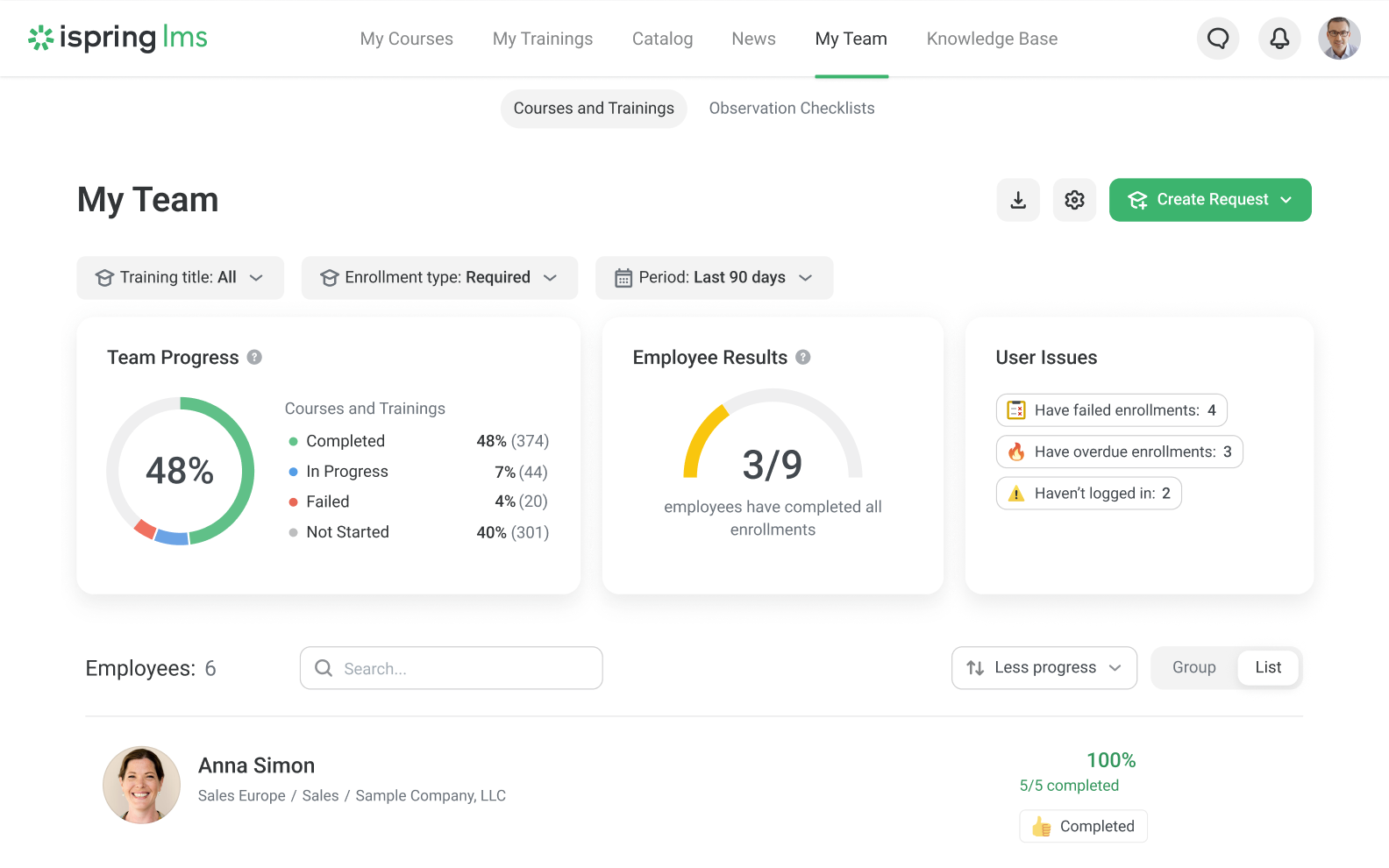
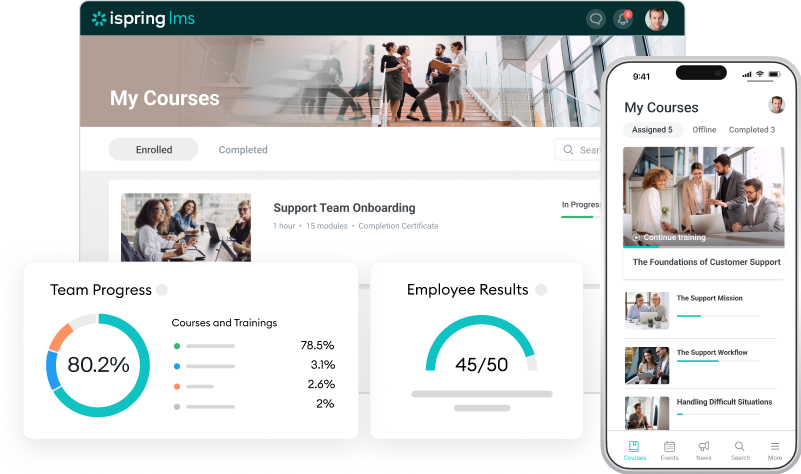
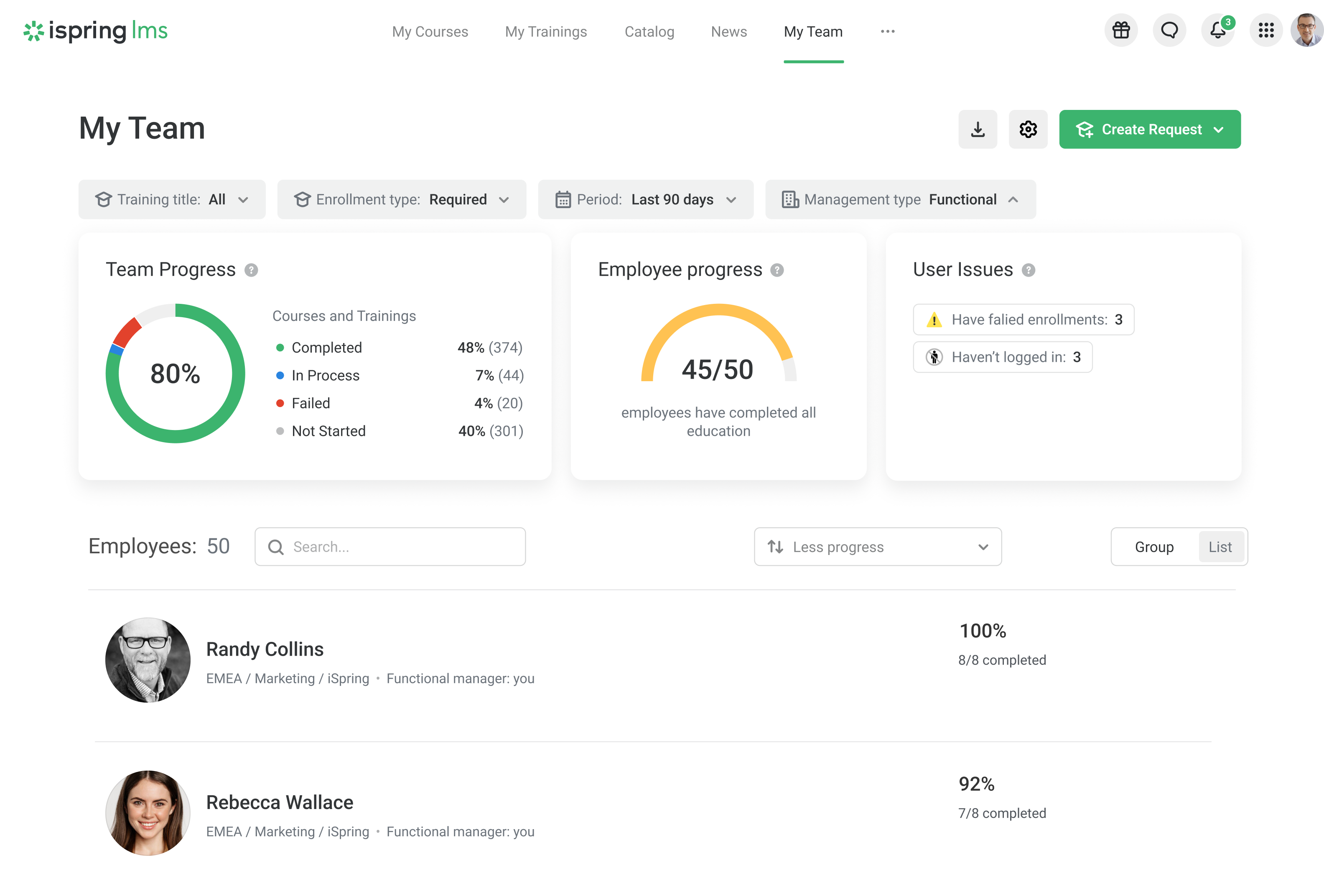
The team progress in iSpring LMS
For example, when your company launches a key product update and trains the sales team, tracking progress highlights who’s up to speed and who needs a nudge.
Calculate ROI
70% of L&D teams struggle to connect training efforts to business KPIs. That’s why tracking with solid metrics matters — it lets you calculate real ROI, moving beyond costs to see the full impact on skills, compliance, and results. With these insights, you can refine programs confidently, without guesswork.
Start simple: subtract training costs from gains like higher productivity or fewer errors, and then track it over time for insights.
 Also read: How to Measure eLearning ROI
Prove employee training effectiveness
Training takes real investment, so show decision-makers the payoff with hard metrics from tracked programs. Think boosted productivity, fewer errors, or sales lifts that prove every dollar’s worth it — and pave the way for more funding and a learning culture.
For example, you could showcase how a customer service training program led to a 15% increase in customer satisfaction scores.
Improve employee training quality
Precise tracking data uncovers exactly what’s working (and what’s not) in your courses, so you skip the hunches and make targeted tweaks that reduce employee turnover.
Picture this: 80% of sales reps fail the product knowledge test after training. The data flags pricing tiers as the weak spot — so you simply add a focused module, run quick follow-ups, and retest.
Boom: stronger content, better results, and employees who stick around.
Tracking Employee Training Progress and Results
We recommend matching your tracking method to your goals and what you have on hand. A simple survey in free software works fine for quick feedback, but for deeper skills analysis, a learning management system makes it a lot easier.
Now, let’s dive into our top methods for tracking employee training progress and outcomes.
1. Learning analytics
Learning analytics is the data your training software pulls together during and after sessions — things like enrollments, attendance, completion rates, and time spent per course. It gives you a clear picture of engagement across your programs, so you can spot drop-offs, see how much time employees are investing, and check if they’re meeting deadlines.
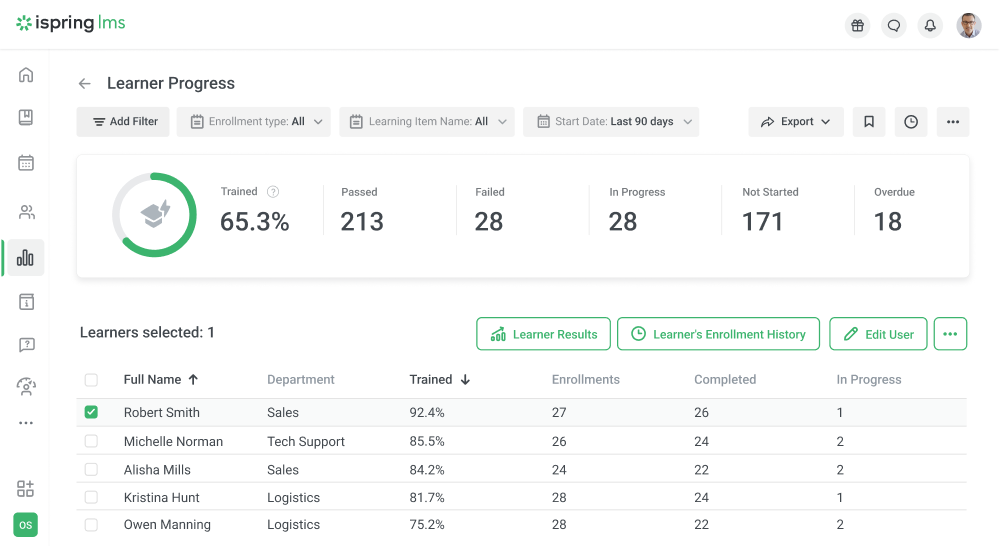
I’ve found that this shines for a big-picture view, especially on mandatory training or compliance checks, helping you build action plans for trends and gaps. But it’s not perfect — raw numbers won’t tell you why completions tank (bad design? tech glitches? motivation dip?). Pair it with surveys or chats to get the full story, and you’ll refine so that programs actually stick.
Pro tips
- Track completion rates and deadlines to ensure 100% adherence to legal requirements.
- Analyze exam pass rates to verify competency in roles that require specific skills (e.g., IT or healthcare).
2. Pre- and post-training assessments
Pre- and post-training assessments are quick tests or quizzes on your course’s key skills and concepts. Start with one before training to get a baseline, then run a similar one to see what stuck and where gaps remain.
The pre-training assessment sets a baseline on what employees already know, while the post-training one shows how much they picked up. Comparing the two reveals your course’s effectiveness and pinpoints where extra training makes sense. It’s a simple way to track progress toward SMART goals and deliver outcomes you can measure.
Here are some examples of question types for a pre-test assessment on product knowledge basics:
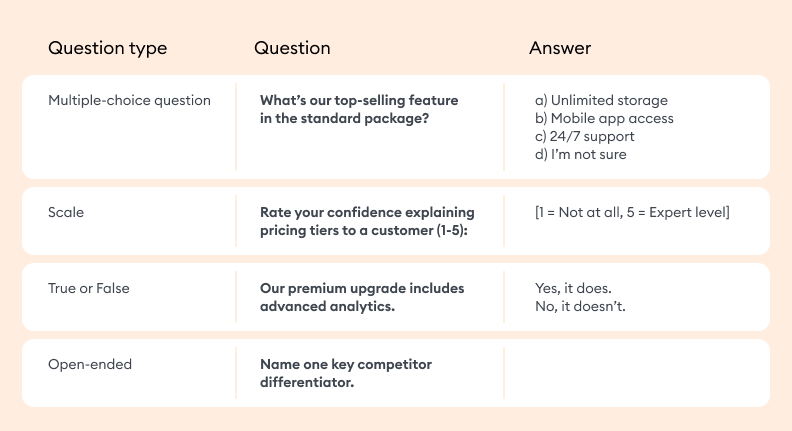
Example of pre-training assessment questions for product knowledge basics
These assessments won’t always capture hands-on skills or soft skills like teamwork, since they lean toward theory. That said, they’re still gold for measuring knowledge gains — especially in technical or compliance roles — and keeping employees accountable with regular progress checks. It’s a straightforward way to drive continuous improvement without overcomplicating things.
Pro tips
- Measure retention of critical policies (e.g., workplace safety rules) by comparing pre- and post-training test scores.
- Measure coding or data analysis proficiency through hands-on quizzes before and after training.
3. Employee feedback on training
This approach lets you hear directly from employees about the training they’ve completed. Ask them to rate the trainer or review the course right after finishing, using open-ended questions to dig past vague “it was fine” answers.
For basic surveys, here are some solid options to get started:
Google Forms: Free and simple for polls or quick feedback — no frills, but it gets the job done.
iSpring Suite: Steps it up with interactive quizzes, custom scoring, and branching. Publish as SCORM, AICC, cmi5, or xAPI to upload straight to your LMS and track results seamlessly.
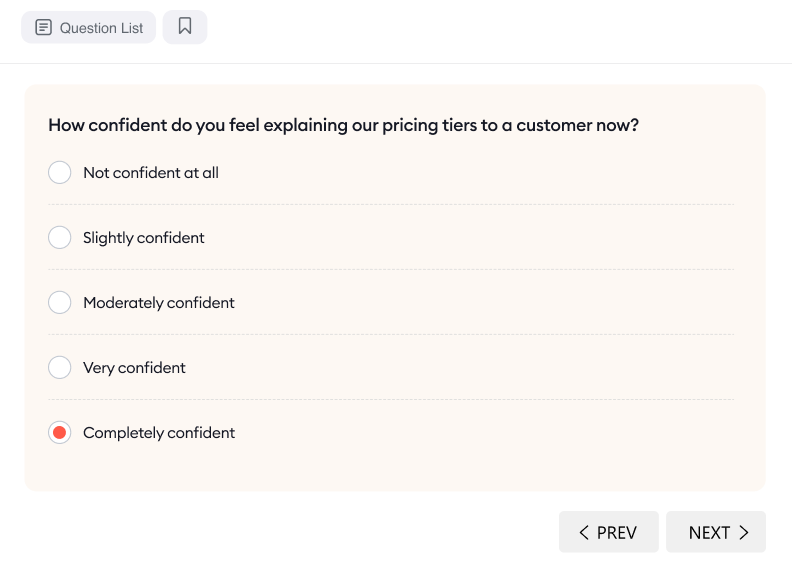
Post-training question example created in iSpring Suite
Reviews and comments give instructional designers, L&D pros, and facilitators a clear view of where learners hit roadblocks, lose steam, or feel underprepared for assessments. That lets you tweak course length, clarify tricky spots, or rebalance theory with practice to make training sharper and more effective.
Keep in mind that feedback isn’t always totally objective — employees tend to be too positive or negative based on their own biases. I’ve found the best way around this is to craft specific open-ended questions and guarantee anonymity, so you get the candid insights that actually help improve courses.
Pro tips
- Use post-training surveys to ask, “How confident do you feel applying conflict resolution techniques in real-life scenarios?” to refine role-playing exercises.
- Collect anonymous feedback on mentor effectiveness to tailor training modules that address gaps in managerial skills.
4. Project-based assessments
Project-based assessments measure how well employees apply training in real-world tasks, not just how they recall concepts. After a project management course, for example, employees might lead a small initiative using Agile practices or risk assessment tools and then have their results reviewed by a supervisor or peers.
They work especially well for roles that rely on creativity and critical thinking, like leadership programs or customer service training.
In iSpring LMS, individual development plans tie learning directly to role expectations, skill gaps, and actual performance signals. Instead of simply adding more content, they clarify what growth looks like for each employee and how learning will support that over time.
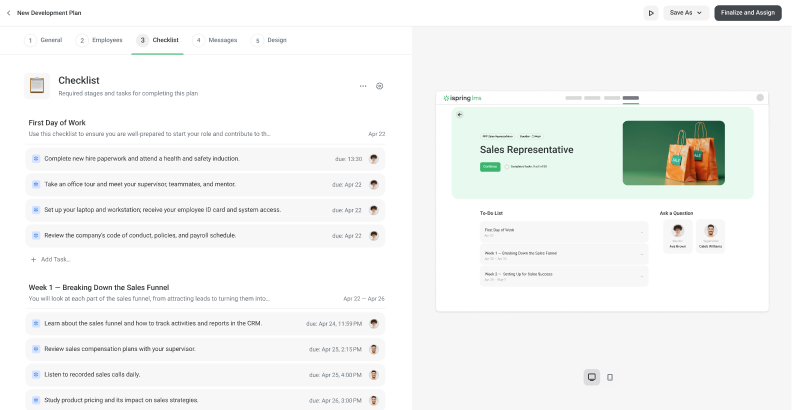
A typical development plan includes:
- Clear, action-focused checklists that turn role expectations into concrete skill-building steps.
- Assigned mentors or supervisors who guide progress and offer ongoing feedback.
- Milestones and deadlines that keep development focused, measurable, and on track.
Pro tips
- Assign a coding project using newly learned languages (e.g., Python) and assess code quality and functionality.
- Have employees design a team-building initiative, evaluated by peer feedback and project outcomes.
5. Simulation or scenario-based testing
This approach evaluates employee training by putting people into controlled, realistic scenarios that mirror actual job challenges. For example, after a cybersecurity course, IT staff might respond to simulated phishing attacks to test how well they spot and handle threats. In customer service, employees could work through scripted customer calls to practice handling objections and applying sales techniques.
Authoring tools like iSpring Suite allow you to create such simulations with no coding skills. You can create dialogue scenarios in which learners navigate conversations with virtual characters (e.g., customers, colleagues). Each decision impacts the storyline, mimicking real-world interactions.
For example, a salesperson can practice handling objections, or a manager can rehearse conflict resolution. Check out this simulation created with iSpring Suite:

6. On-the-job performance evaluation
On-the-job performance evaluation helps you track training progress by looking at how employees apply new knowledge in actual work situations. It often includes 360-degree feedback, in which managers, peers, and sometimes customers share their perspectives on an employee’s behavior and results.
The downside is that KPIs may oversimplify complex skills like empathy or creativity. To get real value, analyze the feedback with these limits in mind and focus on whether employees actually demonstrate the soft skills targeted in training.
Modern training tools can also streamline this process by sending surveys, collecting responses, and turning them into clear, actionable reports.
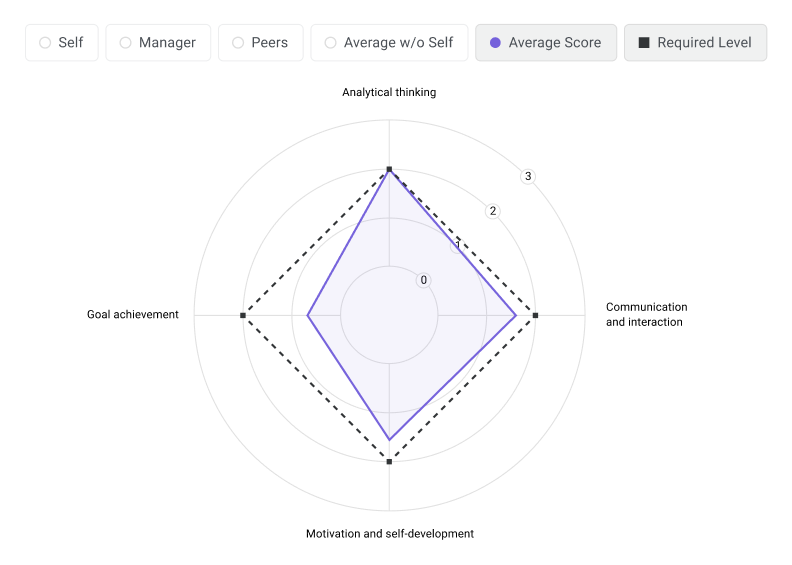
360-degree review report in iSpring LMS
You can conduct on-the-job performance evaluations regularly. In this way, you can track staff training progress over time and compare current performance with past results.
Pro tips
- Monitor post-training KPIs like reduced call resolution time or improved customer satisfaction scores.
- Track increases in conversion rates or upsell success after workshops on negotiation techniques.
7. Supervisor reports and feedback
Supervisors play a key role in evaluating how effectively employees apply what they’ve learned from training. By observing day-to-day tasks, they can see firsthand how well team members follow established procedures and apply their new knowledge.
Supervisors document these observations, noting where employees meet training objectives — such as complying with safety rules or reaching performance targets — and where there’s room for growth. Their reports and feedback help organizations understand how well the training works and highlight areas where additional guidance or refresher sessions may be needed.
This method is especially useful when you need a clear picture of how effective your safety training really is — not just in theory, but in how it shapes on-the-job performance. Because supervisor reports are widely used in construction, manufacturing, and other high-risk industries, they’re particularly valuable for evaluating the real impact of on-site safety workshops and seminars.
Pro tips
- Monitor defect rates after technical workshops to assess if employees correctly apply assembly procedures.
- Evaluate the proper use of sterilized equipment post-seminar to prevent protocol violations.
Which Training Metrics Should You Track?
Now that we’ve looked at how to track employee growth and training, let’s focus on what to measure. Here are six essential metrics to start with — even if you don’t yet have any employee training tracking software in place.
1. Training completion rates
This metric shows how many employees have completed a course or gone through your training materials. It’s important to track for two key reasons:
- Compliance training. When it comes to mandatory programs, tracking completion ensures that every employee finishes their required courses by the set deadline. This helps you confirm full compliance, reduce risks, and create a safer, more confident workplace.
- Engagement. For non-mandatory courses, high completion rates show that your content resonates with learners. If engagement is low, it’s worth digging into the cause. Are employees aware of the training? Is the content relevant and engaging? Understanding these factors can help you make meaningful improvements.
You can also break your overall completion rate down by department or job role. This detailed view helps you quickly spot which teams might need extra support and keeps your training program on track.
2. Pass/fail rate
This metric usually applies to tests and quizzes and shows whether learners have completed their training.
It might seem straightforward, but it can be tricky to interpret. If everyone passes on the first attempt, that could mean learners were well-prepared — or that the test was simply too easy to be meaningful. On the other hand, a sudden spike in failed attempts could suggest that something’s off, such as unclear content or overly challenging questions.
In either case, it’s best to review this metric regularly to ensure that your assessments stay fair, effective, and aligned with learning goals.
3. Knowledge gain
This metric helps you measure employee training progress by comparing knowledge or skill levels before and after a training program. It’s one of the most straightforward ways to see how effective your course truly is.
Knowledge gain is typically measured through pre- and post-training assessments, allowing you to see not just if employees completed the training, but how much they’ve learned. Reviewing these results regularly helps you spot gaps and adjust your program so it delivers key concepts more effectively.
4. Course satisfaction rating
This is the employee satisfaction rate. L&D teams typically collect this metric through surveys or feedback forms.
High satisfaction ratings show that the training materials are easy to understand, while low scores can highlight areas for improvement in the training’s content, relevance, or delivery.
5. Performance improvement score
This metric is crucial for assessing the practical benefits of the course. It links learning experiences to real-world results, allowing you to track employee progress and see if there’s an increase in work efficiency, number of calls made, client contacts, sales, etc.
6. Training course ROI
ROI, or return on investment, compares the benefits gained from training — such as improved key performance indicators or reduced employee turnover — against the cost of delivering that training.
Understanding the ROI of a course gives you a clear picture of its financial impact. It helps justify your investment, demonstrate value to stakeholders, and ensure that training resources are used wisely.
All these metrics can be tracked manually in spreadsheets, even without dedicated software. However, using an LMS makes the process much simpler: it automatically gathers and organizes training data, offers deeper analytics, and generates detailed reports — all in just a few clicks.
Free template: LMS ROI Calculator Template
How to Measure Training ROI: Key Metrics
To measure the return on investment of L&D programs, focus on major metrics that capture both immediate learning outcomes and the long-term business impact:
- Performance improvement. Compare pre- and post-training results (e.g., task or training completion speed, error rates, or quality of output).
- Cost reduction. Track reductions in errors, onboarding time for new hires, or operational inefficiencies linked to training.
- Behavioral change. Assess how well employees apply learned skills through manager feedback, peer reviews, or on-the-job observations.
- Business impact. Connect training to core business goals, such as increased sales, higher customer satisfaction scores, or reduced employee turnover.
Tools to Simplify Tracking Training for Employees
You can monitor training progress either manually (by yourself) or automatically (using specialized training tracking tools, like an LMS or a TMS). Let’s take a closer look at each of them.
1. Learning management system (LMS) – the best employee training tracking software
An LMS is a digital learning hub. It’s a place where you can upload all employee training materials, manage content, and assign it to learners. It also collects numerous statistics on the training process and will automatically create the necessary reports for you. In short, using an LMS is the easiest-to-use and most adequate solution for tracking staff training.
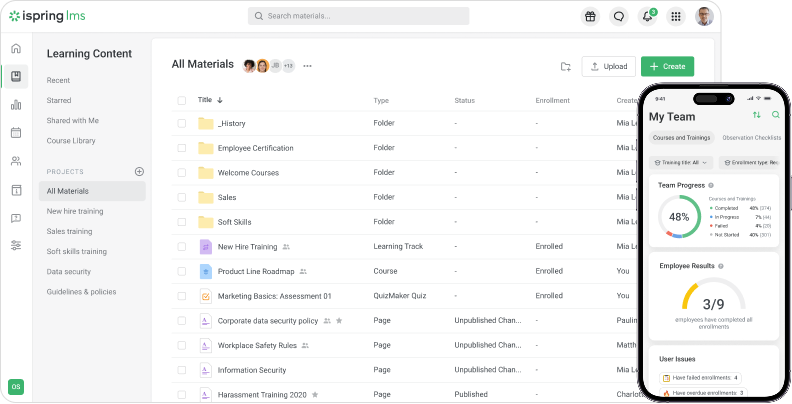
How does an LMS help track training?
1) Automatization of repetitive tasks. No more mind-numbing hours spent on spreadsheets or drowning in paper training records. Training management systems handle the grunt work, from processing statistics to grading tests, within seconds.
2) Extensive training data analysis. An LMS like iSpring LMS provides you with a clear picture of the impact that your training is producing. It allows you to:
- Track overall progress or zoom in on a particular course or individual learner.
- See who is passing assignments with flying colors and who needs help.
- Monitor event attendance.
- Create custom reports that matter to you.
3) Keeping employee training records. It doesn’t matter how many learners you have — 5 or 5,000 — an LMS enables you to track progress in real time without lifting a finger. The LMS also documents every previous training you’ve held, which is especially important in terms of compliance issues.
2. Employee training management system (TMS) – advanced administrative functionality
A TMS is a specialized type of software used to track employee training progress and is mostly used by enterprises. Unlike learner-centric learning management systems, training management systems target administrators and organizational activities that take place before any class is conducted. In general, it can be compared with a CRM (customer relationship management) system.
The basic features of a TMS might involve:
- Session plan management
- Training cost tracking
- Logistics and resource management
- Scheduling and booking management
- Business intelligence reporting
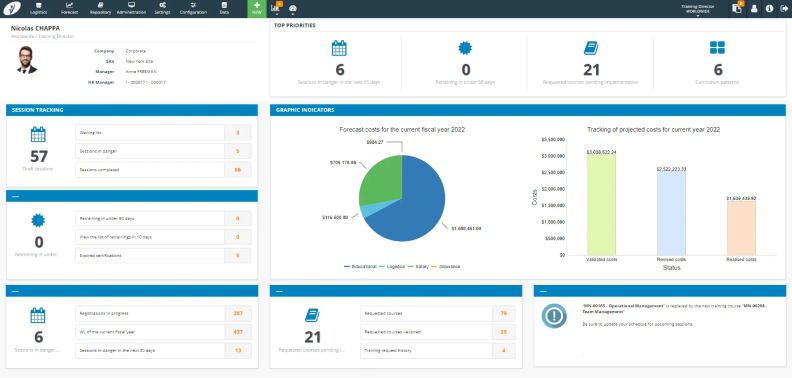
The Training Orchestra training resource management system
3. Google and Microsoft Excel spreadsheets – cost-effective workarounds
Not ready to invest in a specialized employee training tracking system?
Spreadsheets are a reliable starting point for training tracking. Both Microsoft Excel and Google Sheets offer similar functionality and a user-friendly interface, with Microsoft Excel providing more advanced features and Google Spreadsheets excelling in collaboration. If multiple team members need to update training logs, Google Sheets might be a better option.
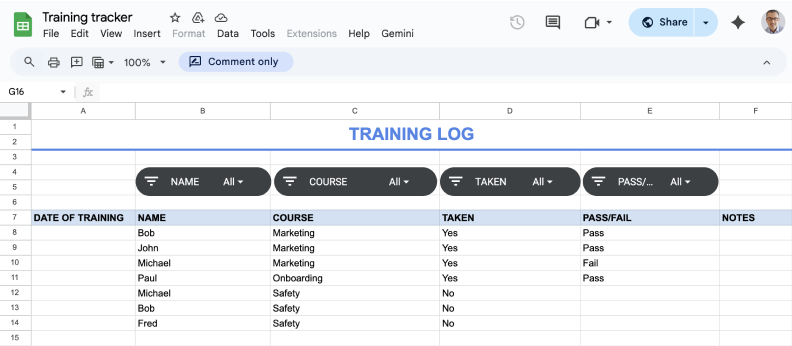
We’ve also created a training progress tracker spreadsheet template for you to use as a starting point. This file consists of three tabs:
- Employee training log template (serves as a makeshift dashboard).
- Courses (a list of the training activities or required training courses).
- Learners (a list of learners).
Each time you have an employee training session, you’ll need to enter training data into the table manually. Built-in sorting filters make it easy to quickly identify who has completed a certain course and who still needs to take it.
FAQ
Which employee training tracking method is best for a small business with limited resources?
Spreadsheets and manual data entry are an easy training tracker for employees who work for a small business with limited resources. However, if your organization can afford a small investment, an LMS with a low-cost plan offers better automation and tracking features, making it a scalable long-term solution.
What metrics should be prioritized when tracking employee training?
To ensure that your training methods are effective and aligned with business goals, focus on these important metrics:
- Performance improvement score
- Training course ROI
- Knowledge gain
- Training completion rate
- Pass/fail rate
- Course satisfaction rating
How do you track training attendance?
The best way of tracking employee training attendance is to use an LMS, like iSpring LMS. It will track your employees’ online training activity automatically. If you also conduct in-person sessions, you’ll need to keep track of employees’ attendance at offline events and then add that training data to the LMS.
How do you maintain training records in the workplace?
To track employee certifications and keep a staff training record, you’ll need to perform manual data entry or use a learning management system here too. It will guarantee that they won’t get lost or damaged and that they’ll remain secure and always be at hand.
How do you audit staff training?
Here’s how to keep track of employee training progress in 4 simple steps:
- Create a list of your current employee training programs.
- Analyze employee training metrics and learners’ feedback.
- Examine employees’ performance.
- Evaluate your current program based on the results of your analysis and how they align with your training goals.
How can employee feedback be collected and utilized in training programs effectively?
Here are some ways to collect employee feedback:
- Post-training surveys
- Focus groups
- One-on-one interviews
- Ongoing feedback channels (e.g., suggestion boxes)
Once you’ve collected the feedback, review it to identify common themes and prioritize adjustments to learning programs. Then, inform employees about updates made based on their feedback, showing that you value their input.
Now, It’s Your Turn
Track employee training progress to keep your programs effective, share meaningful results with management, and continuously improve over time. It will also help you remain compliant and avoid unnecessary headaches down the road.
If you’re ready to make tracking easier and more insightful, try iSpring LMS for free. You’ll get automated tracking, centralized analytics, shareable reports, and everything you need to manage training success from one place.
for your mission-critical project


The Best Training Module Software: Take Your Pick

The 11 Best HR Tools & Management Software in 2026

Retail Training Made Easy: How to Deliver It Online