
The 10 best AI course creator tools for online training
 17 minutes




AI course creation now covers much more than writing lesson copy. Depending on the tool, you can upload a PDF or PowerPoint slide deck, generate full interactive courses, add assessments and media, and publish them directly or export courses to an LMS.
We compared 10 AI course creators to see which ones are useful for real course production, not just AI drafting.
Key takeaways
AI course creators can now handle much more than first drafts, from turning existing documents into lessons to generating quiz questions, narration, visuals, and LMS-ready courses. The right choice depends on your workflow: iSpring Suite AI is well suited to corporate L&D and advanced authoring, while other tools specialize in AI tutoring, browser-based course creation, interactive scenarios, or frontline training.
What is an AI course creator?
An AI course creator is designed to get you from source material to a usable course faster. It can organize the content, draft lessons, add questions, and sometimes create media or translations. Dedicated platforms usually go further than ChatGPT by giving you an editable course and publishing options.
Free vs. paid AI course creators
The free plan of an AI course creator is usually enough to test how the tool works or build a small course, but “free” rarely means unrestricted. Free plans may limit the number of courses, creators, or learners, add vendor branding, or restrict publishing and SCORM export.
Paid plans usually provide teams with more room to work, with higher AI limits, analytics, integrations, collaboration, and LMS delivery. Security, APIs, admin controls, and larger user limits are often only available on enterprise plans.
How to create a course with AI
AI course creators can handle many common training formats, from employee onboarding and compliance to product and sales training. They also work well for SOPs, process training, and customer or partner education. This is especially useful when you already have source material that needs to be turned into a structured course. The process usually follows these steps:
- Define the audience and learning outcome. Decide who the course is for and what learners should be able to do by the end.
- Add a prompt or upload existing learning materials. Give the AI enough context to work with, whether that’s a brief, PDF, PowerPoint presentation, SOP, or other source content.
- Generate and edit the course outline and lessons. Let the AI organize the material into modules and lessons, then check the structure before moving on.
- Add visuals, narration, and interactions. Use the options your tool provides, such as images, voiceovers, scenarios, video, or interactive activities.
- Review, test, and publish. Review and test the finished course, then share it directly or export it in a supported format, such as SCORM or xAPI.
The best AI course creator tools
iSpring develops AI-powered course creation software, so we compared each tool using the same criteria, including course generation, assessments, LMS support, collaboration, and pricing. The comparison is based on official vendor information, verified in September 2026.
The best AI course creators at a glance
The best AI course builder depends on what you need to produce. According to our research, iSpring Suite AI is a strong choice for corporate L&D teams building interactive, LMS-ready training. Coursebox combines AI course creation with delivery and learner support, while Coassemble works well for turning existing documents and presentations into browser-based courses. Mindsmith stands out for multilingual eLearning, and Mitti (formerly SafetyCulture) is geared toward mobile training for frontline teams.
A detailed tool comparison
| AI course creator | Best for | AI capabilities | Input-output | Assessments | LMS/SCORM | Pricing and free options |
| iSpring Suite AI | Corporate L&D and LMS-ready training | Course drafts, text, images, voiceovers, translation | PPT, docs, audio, prompts → SCORM, xAPI, cmi5, AICC, HTML5 | 14 question types, quizzes, role-plays | Yes | $1,290/author/year; 14-day free trial |
| Coursebox | AI course creation and delivery in one platform | Course generation, AI tutor, scenarios, video, voice | PDFs, slides, video, URLs → HTML, PDF, SCORM, LTI | Quizzes, assignments, AI grading | Yes, on supported plans | Free plan; Creator starts at $300/year (billed annually), which is equivalent to $25/month; the Pro plan starts at $1000/year (billed annually), which is equivalent to $83/month; the Pro + LMS plan starts at $3000/year (billed annually), which is equivalent to $250/month |
| Coassemble | Browser-based document-to-course creation | Course generation, quizzes, narration, images | Word, PDF, PPT, Google Slides, SCORM → link, embed, Dynamic SCORM | Quizzes and knowledge checks | Yes | The Build plan starts at $2,500/year (billed annually), which is equivalent to $208.33/month, or $250/month if billed monthly; free sandbox for testing course creation and integrations |
| CreateUpon | Turning workplace content into training | Course generation, narration, translation | PDF, PPT, audio, video, URLs → SCORM, PDF, link, embed | Quizzes, exams, knowledge checks | Yes | The Personal plan starts at $468/year (billed annually), which is equivalent to $39/month, or $49/month if billed monthly; 14-day free trial |
| Mindsmith | Multilingual interactive eLearning | Course generation, AI conversations, video, narration | Documents, presentations, video → SCORM, LTI, shareable links; experimental xAPI export is available for Enterprise | Quizzes, open responses, scenarios | Yes | Free plan; the Professional plan starts at $468/year (billed annually), which is equivalent to $39/month, or $49/month if billed monthly |
| LearningStudioAI | Fast document-to-course conversion | Course drafts, quizzes, images, narration | PDF, Word, PPT, text → SCORM, PDF, HTML, link | Quizzes and knowledge checks | Yes | From $39/month for 5 AI course generations per month |
| Mitti | Frontline, SOP, and compliance training | Course generation, questions, voiceovers, translation | PDF, PPT, DOCX, images → mobile-first delivery | Quizzes and knowledge checks | SCORM import; native delivery | Free for up to 10 users; The Premium plan starts at $288/year (billed annually), which is equivalent to $24/month, or $29/month if billed monthly |
| Lingio | Mobile-first frontline training | Course generation, stories, quizzes, gamification | Text, pasted content, keywords → Lingio app | Quizzes and gamified activities | No standard SCORM export | The Essential plan is $416/year (billed annually), which is equivalent to $34.66/month, for 50-100 learners and up to 10 AI-created courses. Professional is $625/year (billed annually), which is equivalent to $52/month, and includes unlimited AI course creation. |
| Disco | Cohort learning, academies, and communities | Curriculum generation, AI learner support | PDFs, video/audio, URLs → Disco platform | Quizzes and assignments | Not SCORM-first | Organization is $4,788/year (billed annually), which is equivalent to $399/month for up to 500 members. Enterprise pricing is available upon request. A demo and a free trial are both available |
| Mini Course Generator | Short interactive courses for creators and small teams | Course generation, images, voiceovers, AI activities | Topic/uploaded content → link, embed, PDF, SCORM | Quizzes, games, activities | Yes, on supported plans | The Plus plan is at $468/year (billed annually), which is equivalent to $39/month, or $49/month if billed monthly. A 14-day free trial is available with no credit card required |
1. iSpring Suite AI
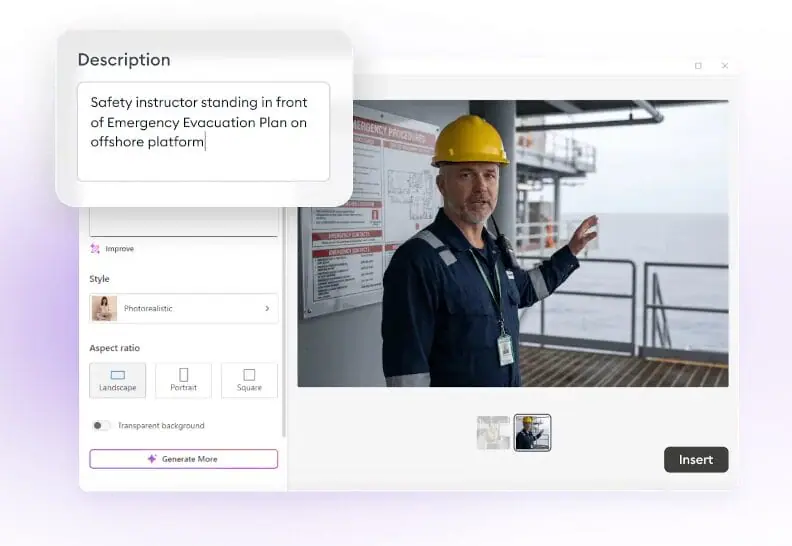
iSpring Suite AI is a PowerPoint-based course authoring software for corporate training. Its AI Course Creator can turn a topic and source materials into an editable course draft with slides, interactions, and questions, then help with images, voiceovers, and translation.
Best for: Corporate L&D teams creating interactive, LMS-ready training.
Key features
- AI course drafts from prompts and existing materials
- Quizzes, role-plays, videos, and interactive content
- SCORM, xAPI, cmi5, AICC, and HTML5 publishing
- AI text and image generation, translation into 70+ languages, and ElevenLabs-powered voiceovers.
Pricing
$1,290 per author/year. A 14-day free trial is available.
Pros
- Complete, editable course drafts
- Strong interactive authoring and LMS publishing
Cons
- Full desktop authoring requires Windows and Microsoft PowerPoint, but the subscription also includes browser-based iSpring Cloud AI
- No permanent free plan

2. Coursebox
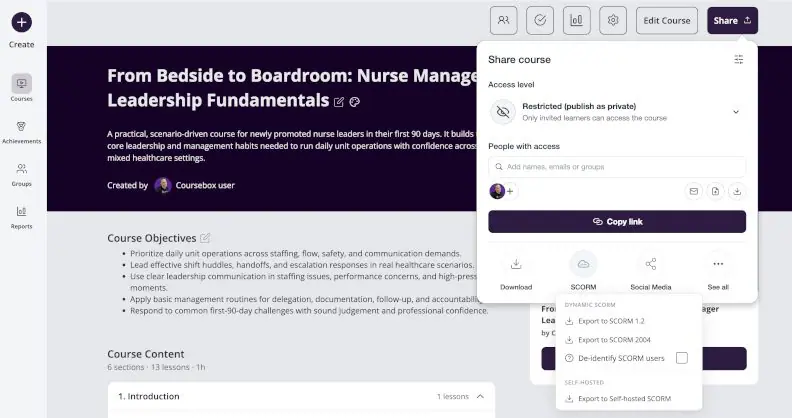
Coursebox is an AI course maker and LMS that can build courses from prompts, PDFs, slide decks, videos, or URLs, as well as edit existing courses.
Best for: Teams that want AI course creation and delivery in one platform.
Key features
- Conversational course creation and editing
- AI quizzes, grading, tutors, and scenarios
- SCORM, LTI, PDF, and HTML delivery options
Pricing
A free plan is available for creating mini-courses. Creator starts at $300/year (billed annually), which is equivalent to $25/month.
Pros
- Combines authoring, delivery, assessment, and AI tutoring
- Can build and revise courses through natural-language instructions
Cons
- Free courses are limited and carry Coursebox branding
- Some export and LMS features require higher-tier plans
- AI usage is credit-based
3. Coassemble
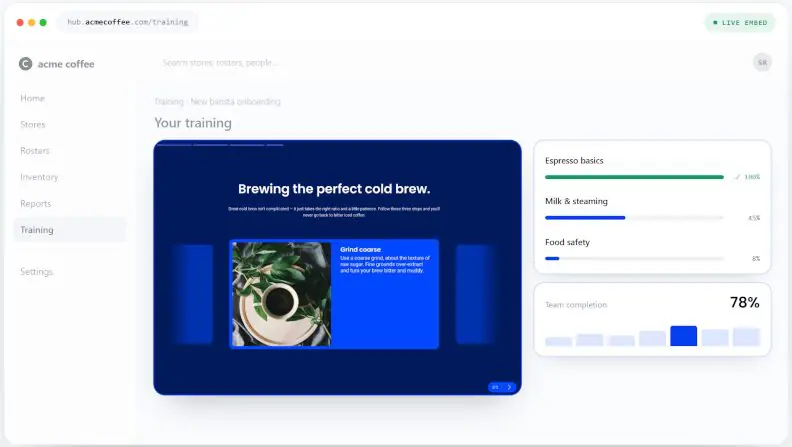
Coassemble can turn documents and presentations into a course draft, rather than leaving you to copy the content into a course builder yourself. Its AI sets up the structure and questions, and you can then edit, brand, and publish the course.
Best for: Teams that want a browser-based document-to-course workflow with flexible delivery.
Key features
- Builds courses from Word, PDF, PowerPoint slides, Google Slides, and SCORM
- AI-generated screens, quizzes, narration, and images
- Direct sharing, embeds, and Dynamic SCORM export
Pricing
The Build plan starts at $2,500/year (billed annually), which is equivalent to $208.33/month, or $250/month if billed monthly. A free sandbox is available for testing.
Pros
- Fully browser-based and editable after generation
- Flexible sharing and SCORM delivery
Cons
- Some API and infrastructure features require higher-tier plans
- AI narration, image generation, and recipient limits apply
Too much to read? Get a summary from AI
4. CreateUpon
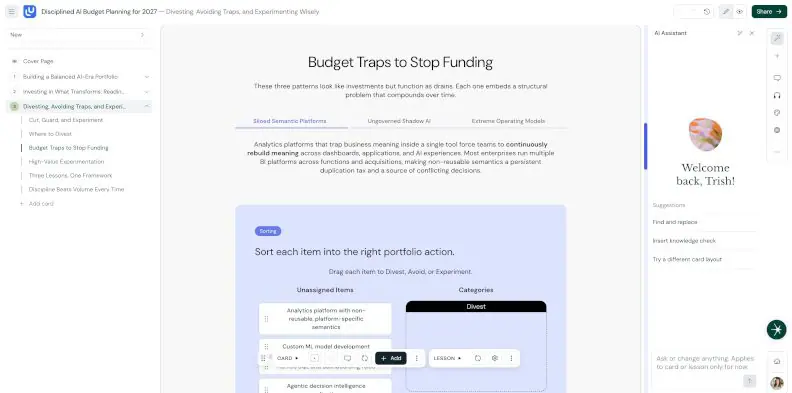
CreateUpon turns existing workplace content into engaging training. It works with documents, presentations, audio, video, web pages, or a brief, and lets you review the structure before generating the full course.
Best for: L&D teams and subject-matter experts turning existing workplace content into training.
Key features
- Builds courses from documents, media, web links, and briefs
- Generates quizzes, knowledge checks, and exams
- Supports narration, translation, SCORM, PDF, link, and embed delivery
Pricing
The Personal plan starts at $468/year (billed annually), which is equivalent to $39/month, or $49/month if billed monthly. A 14-day free trial is available.
Pros
- Strong source-to-course workflow
- Good multilingual and narration support
Cons
- Static SCORM and editable PPTX exports require the Enterprise plan
- Collaboration (with live editing and commenting) and advanced source controls require the Enterprise plan
5. Mindsmith
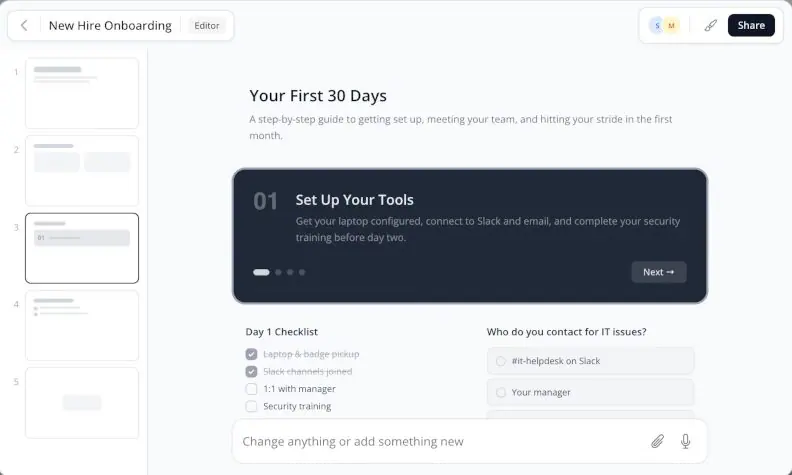
Mindsmith is a browser-based AI authoring tool that can turn documents, presentations, videos, SOPs, or a prompt into an editable course draft.
Best for: L&D teams and instructional designers creating multilingual, interactive eLearning in a browser.
Key features
- Generates courses from documents, presentations, videos, and prompts
- Supports quizzes, AI-graded responses, branching scenarios, and AI conversations
- Publishes via SCORM 1.2/2004, xAPI, LTI, or shareable links
Pricing
A free plan is available. The Professional plan starts at $468/year (billed annually), which is equivalent to $39/month, or $49/month if billed monthly.
Pros
- Strong interactive authoring with 30+ elements
- Good support for scenarios, AI conversations, and multilingual delivery
Cons
- AI generation uses monthly credits on non-Enterprise plans
- Some localization features require higher-tier plans
6. LearningStudioAI
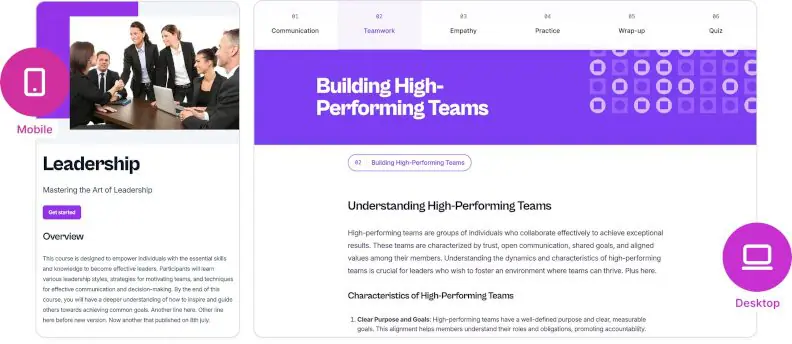
LearningStudioAI turns a topic, PDF, Word file, PowerPoint presentation, or text into an editable online course with lessons, quizzes, images, and narration. Courses can then be refined in the visual editor and exported for LMS delivery.
Best for: Quickly converting existing documents into LMS-ready courses.
Key features
- Generates courses from PDF, Word, PowerPoint presentations, texts, or prompts
- Adds quizzes, AI images, and text-to-speech narration
- Exports to SCORM 1.2/2004, PDF, HTML, or a shareable link
Pricing
Starts at $39/month for 5 AI course generations per month. There is currently no free trial.
Pros
- SCORM export is included from the Starter plan
- Handles quizzes, visuals, and narration in the same workflow
Cons
- Document size limits vary by plan
- Learner tracking requires an external LMS
7. Mitti
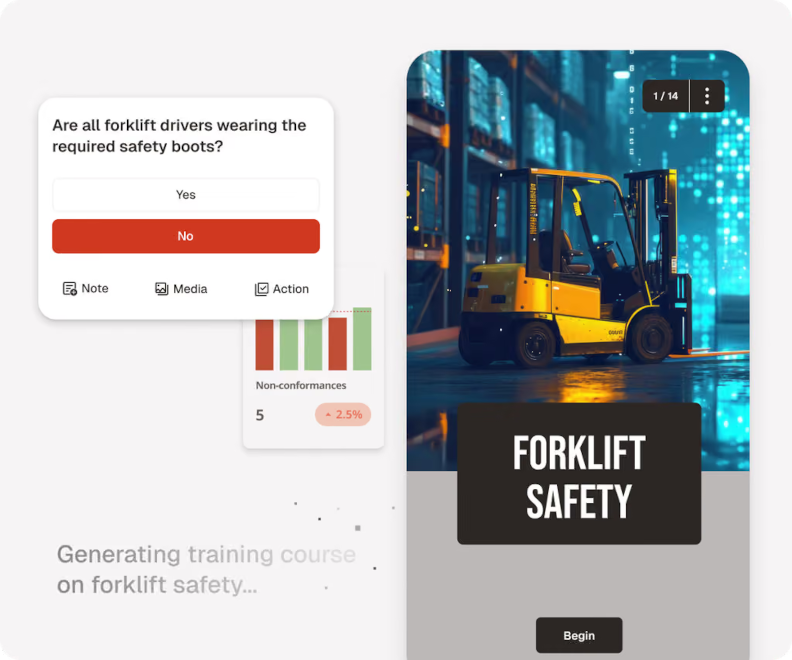
Mitti is a mobile-first training platform for frontline teams. Its AI course creator can turn prompts, documents, PowerPoint presentations, images, and SOPs into short courses with quizzes, voiceovers, and translations.
Best for: Frontline training, onboarding, SOPs, and compliance across distributed teams.
Key features
- Builds courses from PDF, PPT, DOCX, images, and prompts
- Generates quizzes, voiceovers, and multilingual training
- Delivers training directly through Mitti with learner tracking
Pricing
Free for teams of up to 10. The Premium plan starts at $288/year (billed annually), which is equivalent to $24/month, or $29/month if billed monthly.
Pros
- Strong SOP and document-to-course workflow
- Mobile-first delivery with multilingual support
Cons
- Better suited to frontline training than complex eLearning
- AI usage is credit-based
8. Lingio
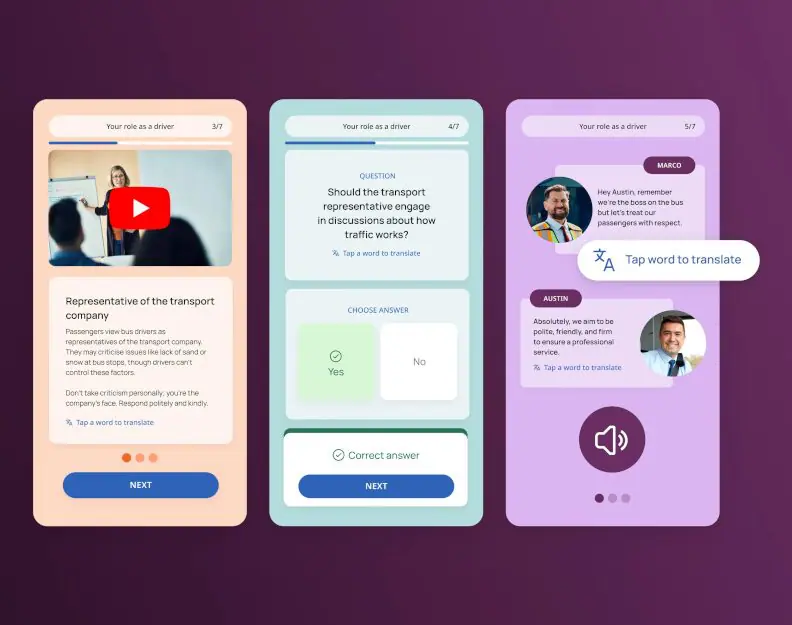
Lingio turns source material into short mobile courses for frontline teams. It handles the first build and can add quizzes, stories, and gamified activities before the course is assigned to learners.
Best for: Mobile-first onboarding and frontline employee training.
Key features
- Generates courses from text, keywords, and existing training material
- Adds quizzes, stories, and point-based activities
- Delivers training through Lingio with learner tracking and in-app translation of industry terms into 100+ languages
Pricing
The Essential plan is $416/month billed annually for 50-100 learners and up to 10 AI-created courses. Professional is $625/month billed annually and includes unlimited AI course creation.
Pros
- Built-in delivery, tracking, and multilingual support
- Strong mobile-first experience for deskless teams
Cons
- Focused mainly on frontline training rather than complex eLearning
- Entry plan limits AI course creation process to 10 courses
- No standard SCORM export listed for regular plans
9. Disco
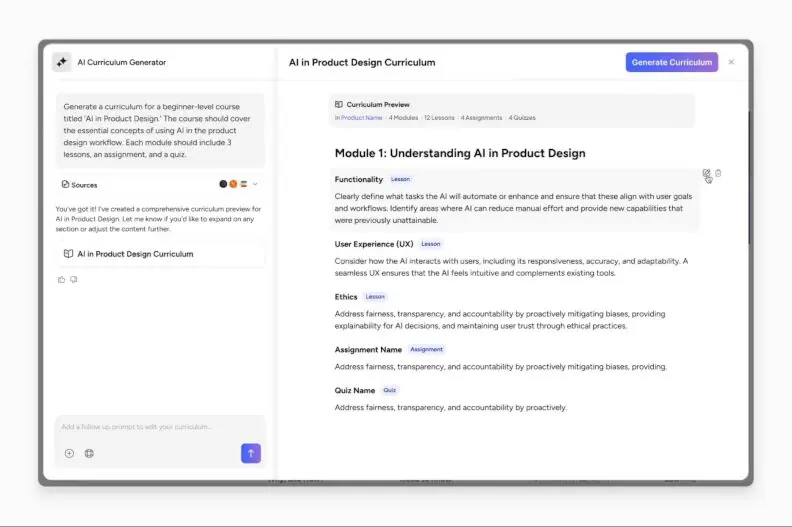
Disco takes existing material and turns it into courses or full learning programs. From there, teams can add live sessions, community discussion, and AI learner support in the same platform.
Best for: Training businesses and enterprise teams that want course creation, community, and cohort-based learning in one platform.
Key features
- Generates curricula, lessons, quizzes, and assignments from existing content
- Supports self-paced and cohort-based programs
- Combines live learning, community features, and AI learner support
Pricing
Organization is $4,788/year (billed annually), which is equivalent to $399/month for up to 500 members. Enterprise pricing is available upon request. A demo and a free trial are both available.
Pros
- Strong mix of course creation, cohorts, and community
- Supports both self-paced and live collaborative learning
Cons
- More complex than a simple AI course generator
- Best suited to programs delivered within the Disco ecosystem
10. Mini Course Generator
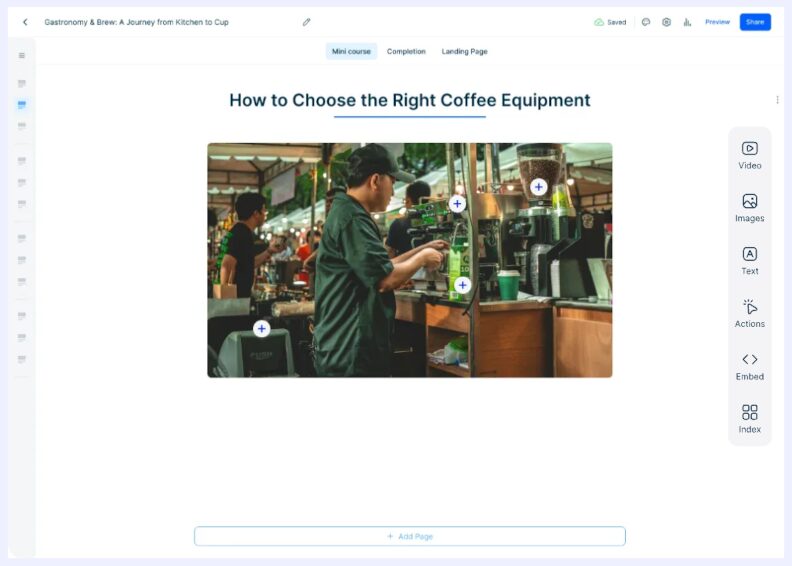
Mini Course Generator is a lightweight AI authoring tool for short interactive courses. It can generate lesson pages, quizzes, images, voiceovers, and activities from a topic or uploaded content, and then let authors edit the results in a block-based builder.
Best for: Creators, trainers, and small teams producing short interactive courses without a complex authoring setup.
Key features
- Generates courses, quizzes, images, and voiceovers
- Adds games and other interactive activities
- Supports link sharing, embeds, PDF, and SCORM upload on the Pro plan. Dynamic SCORM export requires a higher-tier plan.
Pricing
The Plus plan is at $468/year (billed annually), which is equivalent to $39/month, or $49/month if billed monthly. A 14-day free trial is available with no credit card required.
Pros
- Strong interaction options, including AI games
- Flexible sharing, embedding, and selling options
Cons
- Translation and SCORM upload require the Pro plan
- Credit-based AI usage
General benefits and limitations of AI course creation
AI can take a lot of the manual work out of course creation, but it still needs human review. The main advantages and limitations are:
| Advantages | Limitations |
| Faster development and lower production effort: AI can draft first-pass content. | Accuracy issues: AI can produce outdated, incorrect, or overly generic material. |
| Easier repurposing: Existing PDFs, presentations, and documents can be turned into training programs faster. | Feature limits vary: Some tools restrict interactions, accessibility options, exports, or advanced LMS features. |
| More scalable production: Small teams can create and update more courses without adding the same amount of manual work. | Privacy and plan restrictions: Free plans often limit branding, SCORM, analytics, or usage. |
How to choose an AI-powered course creator
Start with what you need to create and how the course will be delivered. Then check:
- What the artificial intelligence actually generates: outline only, or full lessons, quizzes, scenarios, visuals, and narration.
- LMS compatibility: SCORM, xAPI, or other formats your LMS requires.
- Editing and collaboration: how much control you have over content, branding, reviews, and team workflows.
- Language and accessibility: translation, voiceover, supported languages, and accessibility options.
- Pricing and security: AI limits, learner or creator caps, export restrictions, data handling, and enterprise controls.
Decision matrix
| If you need | Best fit |
| Corporate training with advanced authoring and LMS publishing | iSpring Suite AI |
| AI-generated courses with tutoring and automated grading | Coursebox |
| Browser-based courses from existing documents | Coassemble |
| AI conversations, branching scenarios, and interactive simulations | Mindsmith |
| Frontline training with offline access and spaced repetition | Mitti |
FAQ
What is the best AI course creator for L&D teams?
The best AI course creator for corporate training comes down to the work you need it to handle, from the first draft through publishing.
Can AI create an entire online course?
Yes. Many AI tools can build a complete online course draft, not just write the lesson text. That can include quizzes, images, narration, and publishing options, but the course still needs a human check.
Can AI turn a PowerPoint presentation into a course?
Yes. Tools such as iSpring Suite AI, Coassemble, CreateUpon, and LearningStudioAI can use PowerPoint files as source material and turn them into structured online training.
Can AI generate quizzes for a course?
Yes. Most AI course creators can turn course content into quizzes or knowledge checks. Some go further with scenarios, open-ended questions, and AI grading.
Can AI course creators export to SCORM?
Many can. iSpring Suite AI, Coursebox, Coassemble, CreateUpon, Mindsmith, LearningStudioAI, and Mini Course Generator support SCORM in some form, although export may depend on the plan.
Do AI course creators require instructional design or technical skills?
Not always. AI makes it possible to build a basic course without formal instructional design skills. More involved training still benefits from someone who understands learning objectives, pacing, practice, and assessment.
Is AI-generated training content accurate?
Not necessarily. AI can draft the content, but someone still needs to check the facts and context. An SME review is particularly useful for technical, regulated, or internal company training.
Can AI course creators translate courses?
Yes, many AI course creators do. The difference is how far the translation goes — text only, or the full course with quizzes and voiceover too.
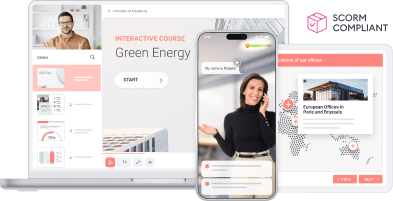
Course generation is only the starting point. iSpring Suite AI lets you take the AI draft, build out the training, and publish the finished course to your LMS.
Create online courses and assessments in record time.



The 10 Best Free eLearning Authoring Tools in 2026

The 50+ Best Computer-Based Training Software
The 60+ Best Instructional Design Software and Tools for 2026
 AI
AI