
The 8 Best Adobe Captivate Alternatives
 17 minutes






If you’re an emerging instructional designer looking for the right course creation tool, you’ve probably heard of Adobe Captivate, one of the biggest players in the industry. But its popularity doesn’t necessarily mean it’s the best fit for your needs. You might have even tried Captivate, only to find its interface too complex or not suited to your workflow.
 In this article, I’ll review eight of the best Adobe Captivate alternatives that could be the right solution for you or for your L&D teams. I’ll analyze their features, highlight who they are best suited for, and compare pricing to help you decide.
The Best Adobe Captivate Alternatives
| Adobe Captivate alternative | Description | Primary Use Case |
| 1. iSpring Suite | An all-in-one eLearning authoring tool built on a familiar PowerPoint interface with AI features for generating content, quizzes, and multimedia, enabling professional courses with no tech background. | Ideal for turning PowerPoint presentations into full-fledged, interactive eLearning courses with no need for tech skills or prior experience. |
| 2. Articulate 360 | A complete eLearning suite: Storyline 360 lets you create highly interactive, slide-based courses with complex branching and simulations; Rise 360 enables fast creation of responsive, modular courses directly in a browser. | Storyline 360: Advanced, interactive custom courses.Rise 360: Mobile-friendly, responsive longread courses and modules. |
| 3. Create (formerly Elucidat) | A cloud-based eLearning authoring tool that enables you to create online courses with pre-built templates. | Great for the rapid creation of online courses with pre-designed templates, making it ideal for teams needing to produce courses quickly. |
| 4. Lectora | Comprehensive software for creating courses with a high level of customization via programming code, external libraries, and scripts; most suitable for well-trained developers. | Suitable for developers looking for extensive customization options and requiring advanced programming capabilities to create highly tailored eLearning content. |
| 5. Gomo | An easy-to-use cloud-based authoring tool that’s perfect for novice course developers like HR teams and collaborative eLearning projects. | Designed for beginners and HR teams needing a user-friendly platform for creating interactive eLearning content collaboratively. |
| 6. Coassemble | An online training platform that lets you build simple courses by using ready-made templates. | Ideal for assembling basic eLearning courses quickly using pre-designed templates, making it suitable for organizations with limited eLearning development resources. |
| 7. dominKnow | A comprehensive eLearning tool with solid collaboration features designed for large businesses. | Tailored for large businesses needing a collaborative eLearning authoring platform with advanced features for content creation, management, and delivery. |
| 8. ActivePresenter | One of the affordable alternatives to Captivate that covers 3 key features: eLearning authoring, screen recording as well as audio and video clips editing. | An Adobe Captivate alternative suited for users seeking specific eLearning content creation features, such as screen recording and video editing, particularly those with a limited budget. |
1. iSpring Suite
Type: Desktop + Web
OS: Windows
Pricing: Starts at $970 per user/year, with discounts available for educators and nonprofit organizations.
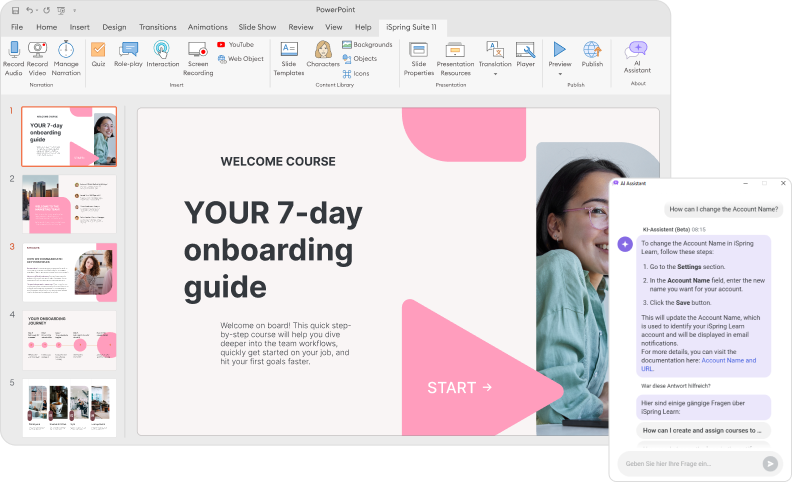
iSpring Suite is an Adobe Captivate alternative tailored to create eLearning courses easily and rapidly. It’s integrated into PowerPoint, so you can leverage and repurpose existing presentations. Besides, this integration means that those who have created PPT decks will be able to pick it up and start authoring immediately.
With iSpring, you can create great looking courses that include interactive quizzes, interactions, video tutorials, and role-play simulations for mastering communication skills. A quiz maker, a simulation builder, a video studio, and all the other built-in iSpring components are easy to navigate and follow the same design principles. So, once you get the hang of one, there will be no problem with the others.
The iSpring Suite AI package offers a vast content library filled with characters, locations, icons, and slide templates, so you don’t need to search the Internet for high-quality images and can create professional-looking training videos even with no design skills.
Built with ongoing technological innovation in mind, iSpring Suite AI is continually updated with new AI features and also comes with iSpring Cloud AI, an online service for collaboration on eLearning content with AI assistant included.
Key features
- Professional video studio for recording screencasts and webcam videos
- Robust tool for creating interactive quizzes and surveys with 14 question types
- Built-in tool for creating role-plays with branching scenarios
- AI text-to-speech for natural-sounding voiceovers
- AI-powered automated translation to 70+ languages
- AI generation of text, images, and quiz questions
- Ability to convert Word and PDF documents into interactive flipbooks
- Strong capabilities for course player customization
- Content library with 130,000 eLearning assets and templates
- Cloud space for fast content sharing and collaboration
- Compatible with AICC, SCORM 1.2, SCORM 2004, xAPI, and cmi5
- Ability to create courses in HTML5 format ready for mobile learning
Pros
- Ability to use ready-made PPT slides as a starting point for a course
- Ease of use, a simple, familiar interface for non-tech people
- A unique, specialized tool for building scenarios
- Responsive design for mobile learning
- AI significantly speeds up content creation and localization
- AI helps non-designers and non-writers produce professional content
- Collaborative authoring
- Offers discounted plans for freelancers, academics, educational institutions, non-profits, and government organizations
- 24/7 live tech support via phone, email, and chat
Cons
- Doesn’t allow you to create VR learning experiences
- Doesn’t have an infinite scroll function
- Provides fewer customization options
- Works only on Windows
Pricing
- $970/year for the basic iSpring Suite plan
- $1,290/year for the iSpring Suite AI plan (AI-enabled)
Custom reduced pricing is available for individual educators, with special pricing for nonprofit organizations.

2. Articulate 360
Type: Desktop-based and Web-based authoring (Storyline 360 and Rise 360)
OS: Windows, Mac, and Web-based
Pricing: Personal plans start at $1,199/year; AI-enhanced plans start at $1,449/year.
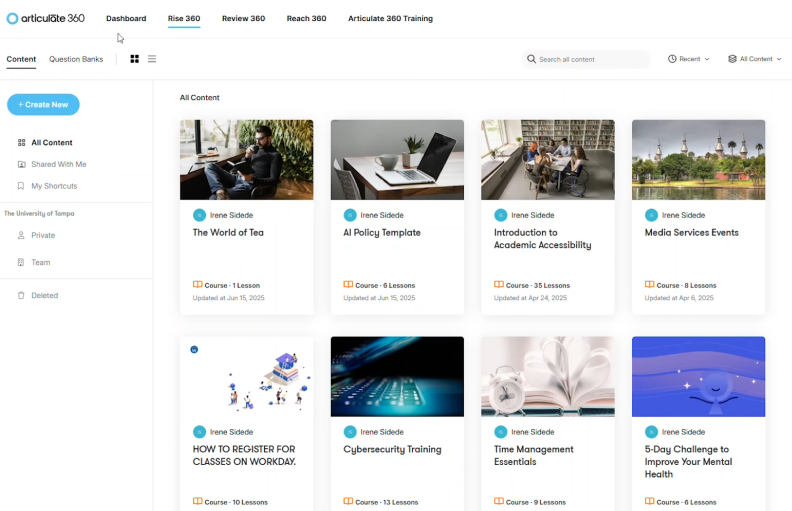
Articulate 360 is another Adobe Captivate alternative. It is a comprehensive eLearning authoring suite that includes Storyline 360 for highly interactive, slide-based courses, and Rise 360, a web-based tool for building responsive, modular courses quickly. Together, they provide flexibility for creating both complex custom eLearning and fast, professional-looking content with minimal technical skills.
Key features
- Storyline 360: PowerPoint-like interface, triggers and layers for advanced interactions, screen and webcam recording, text-to-speech, customizable course player, and compatibility with AICC, SCORM, xAPI, and cmi5.
- Rise 360: Browser-based, responsive course creation, built-in content blocks (text, images, multimedia), collaboration tools, cloud storage, and basic reporting.
- Shared: Extensive content library, templates, characters, icons, stock media, and regular feature updates.
Pros
- A wide range of interactivity options (quizzes, simulations, branching scenarios)
- Supports multimedia (audio, video, animations)
- Easy-to-use interfaces (drag-and-drop in Rise 360; familiar for PowerPoint users in Storyline 360)
- Collaboration and cloud-based workflow
- Courses are fully responsive and mobile-ready
- A large active user community and frequent software updates
Cons
- Higher cost compared with some alternatives
- No standalone purchase. Must subscribe to the entire suite; cannot purchase Storyline or Rise separately.
- Advanced Storyline features may have a learning curve
- Rise 360 has limited customization and advanced simulation options
- Storyline’s built-in video editing is basic; complex interactions may require additional tools
- Requires a stable internet connection for Rise 360 access
Pricing
The Articulate 360 subscription, which includes both Storyline 360 and Rise 360, is offered in two main packages: Standard and AI.
- Articulate 360 Standard: Starting from $1,199 USD per user/year
- Articulate 360 AI: Starting from $1,449 USD per user/year
3. Create (formerly Elucidat)
Type: Web
OS: All
Pricing: No price listed; need to contact the vendor.
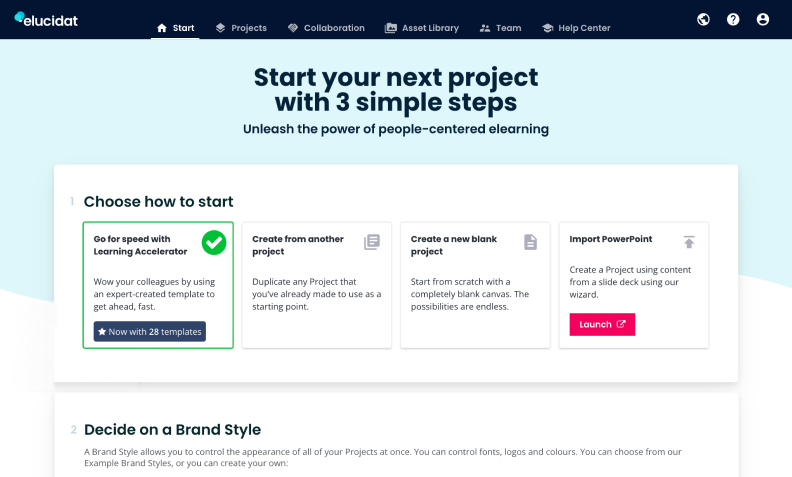
Create, formerly Elucidat, is another cloud-based Adobe Captivate replacement that enables you to produce high-quality digital learning with no coding or design background. You can start authoring with preset templates that come with a downloadable storyboard, a live example, and in-line guidance.
The tool boasts a wide range of question types for online quizzes and allows you to create personalized pathways through your content based on user actions using Rules. However, it doesn’t provide you with the functionality needed to record audio and video or build role-play simulations.
Like Articulate Rise, Create is a good option if you need a single platform for creating basic eLearning courses, sharing them with learners, and tracking which learners have started, completed, and passed or failed a course.
Key features
- Ready-made course templates for fast content authoring
- Compatible with SCORM and xAPI (Tin Can)
- Ability to add animation effects and page transitions
- Ability to create tailored pathways in courses
- Ability to create fully tailored page layouts for your projects
- Great capabilities for creating brand-compliant learning
- Easy to access data about how users engage with learning content
- Online space for storing and collaborating on content
Pros
- A cloud-based eLearning platform for easy collaboration and access
- Automatic responsive design
- Intuitive drag-and-drop interface
- Extensive template library for quicker course development
- Built-in accessibility features
- Basic learning management system functionality
- Robust analytics and reporting tools
- Comprehensive support and training resources
Cons
- Higher cost because pricing models are designed primarily for large enterprises
- Requires a stable internet connection
- Customization options may be somewhat limited
- Steep learning curve for advanced features
- Relies heavily on templates
- Integration capabilities may have limitations
Pricing
No price listed; must contact the vendor
4. Lectora
Type: Desktop + web
OS: Windows
Pricing: Starts at $129/month, billed annually
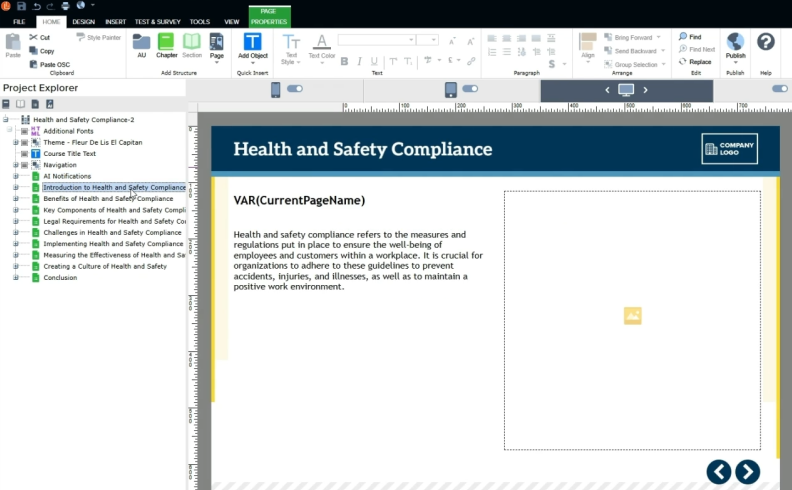
Lectora, Adobe Captivate competitor, includes a comprehensive set of tools for creating various kinds of eLearning content: slide-based courses, quizzes, interactive videos, and role-play simulations. It also allows you to embed games from The Training Arcade® directly into your eLearning project and, like Adobe Captivate, create VR courses with 360º videos and equirectangular photos.
Lectora can hardly be referred to as easy-to-use authoring software. It is mostly used by experienced instructional designers and can be especially useful for course developers who are good at coding because it allows you to write your own custom scripts and include custom libraries, fonts, and CSS.
However, the Adobe Captivate competitor offers a set of Course Starter templates that include matching layouts, scenarios, games, interactions, timelines, and more. These can be a good starting point for newbies.
Key features
- App for creating VR projects
- Professionally designed Course Starter templates
- Can embed games into courses from The Training Arcade®
- Ability to add your own scripts, custom libraries, fonts, CSS
- Built-in Asset Library with stock images, audio, video, and more
- Integration with an authoring tool for creating role-play simulations
- Screen recorder and video editing tool
- Online space for storing content and collaborating
Pros
- Powerful authoring tools for interactive and customizable eLearning content
- Extensive options for creating complex interactions, simulations, and branching scenarios
- Built-in accessibility features, such as keyboard navigation and screen reader compatibility
- Supports various multimedia formats
- A dedicated community of Lectora users who provide support, share resources, and offer tips and advice
Cons
- Steep learning curve
- Complex, overwhelming interface
- Limited template library, requiring you to do more custom development
- Higher price point
- Creating complex interactions may require knowledge of scripting languages, such as JavaScript
- Workflow may be less intuitive and it might take more time to accomplish tasks
Pricing
Starts at $129/month, billed annually (for the Studio Gold Suite), with higher plans (for the full Studio suite) starting at $879/month, billed annually.
5. Gomo
Type: Web based
OS: All
Pricing: Not publicly listed; contact the vendor for pricing.
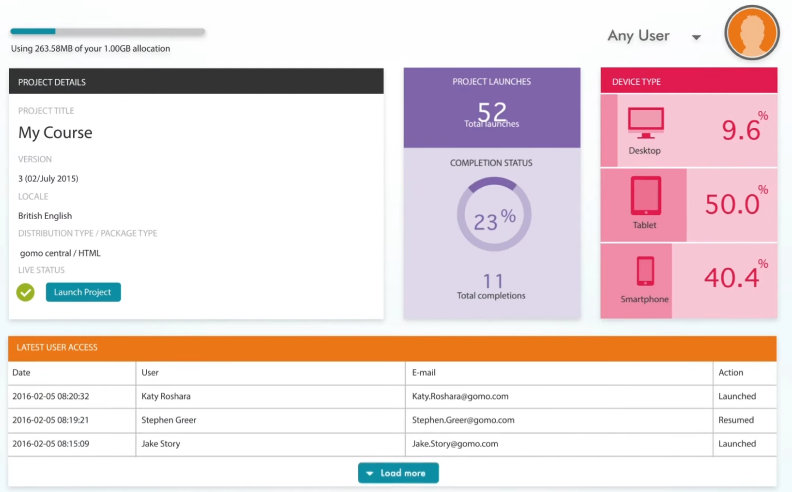
Gomo is a cloud-based Adobe Captivate alternative. It is designed for easy course authoring and collaboration on content – multiple users can edit the content and leave comments for each other in real-time. With Gomo, you can build interactive content using a drag-and-drop interface.
The course authoring process is based on working with pre-built templates. You just need to select the templates, fill them with text and images, and it’s ready to go. This authoring tool also comes with a collection of themes that can be easily adjusted to suit your brand or your project. You can add your logo and brand palette to create your own customized theme, and apply it to all of your courses.
Overall, Gomo is a great tool that allows you to build simple courses fast, but it’s not a good fit if you want to create professional courses with advanced interactions and simulations.
Key features
- Ability to create responsive courses quickly right in a browser
- Allows team collaboration on the content
- A variety of pre-built templates for fast content authoring
- A collection of preset customizable themes
- Easy-to-use image editors
- Ability to set up branching scenarios
- Simple course structure overview
- XLIFF translation support for creating localized content
Pros
- Works as a cloud-based solution, providing easy access and collaboration
- Intuitive drag-and-drop interface
- Template library for faster development
- Multi-language support for course creation, translation, and localization
- Analytics and reporting tools
- Seamless integration with various LMSs
Cons
- Limited authoring options for advanced eLearning content
- Fewer customization options, less personalized training courses
- Higher cost both for individuals and organizations
- Steep learning curve for more advanced features
- Requires a stable internet connection
Pricing
Pricing is tailored based on the number of users and storage requirements. For a precise quote, you’ll need to contact the vendor.
6. Coassemble
Type: Web
OS: All
Pricing: Free forever (1 creator)
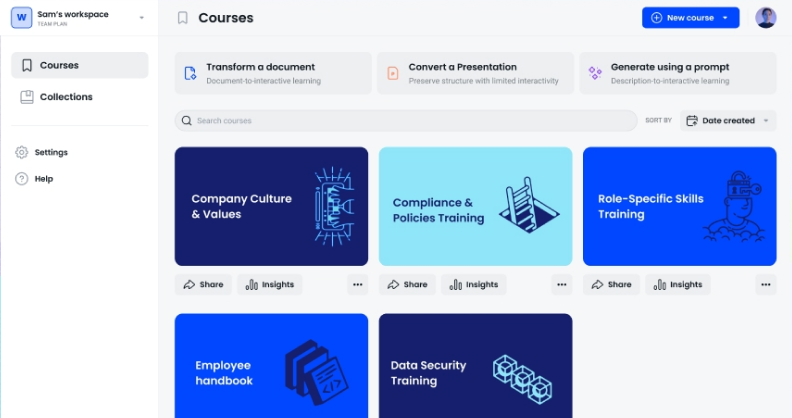
Like Articulate Rise, Adobe Captivate alternative Coassemble represents itself as a complete online training platform. It includes the functionalities of both a course creation tool and a learning management system (LMS).
To create a course, you need to select from among 30 pre-built templates, or so-called “lesson screens,” and fill them with content. There are standard screen templates that can be used for text, images, and videos, as well as interactive screen templates, and activity-based challenge screens for building quizzes. To personalize your online course experience, you can set up the customization options: add a logo, choose brand colors, etc.
Once your course is created, you can assign it to your learners and keep track of how they’re progressing. Engage learners and create interesting training solutions. For example, you can reward your learners for completing a course with a certificate.
Key features
- Ability to create responsive courses quickly, right in a browser
- An extensive variety of pre-built templates for fast course authoring
- Ability to customize courses according to your brand
- Online space for storing and sharing content
- Ability to create and issue certificates of completion
- Can import SCORM modules to add them to your courses
- A wide range of integrations via Zapier
- Basic reporting capabilities
Pros
- Easy course authoring, thanks to its simple interface and templates
- Built-in library of eLearning assets
- Robust quizzes and surveys
- Supports social learning features, such as discussion forums and collaboration
- Responsive customer support and help documentation
- A free plan is available for individuals
Cons
- Lacks many advanced features for eLearning development, like interaction and simulations
- Templates may limit visual differentiation
- Requires a stable internet connection
- Advanced features have a learning curve
Pricing
Free forever for individuals; Team plan $600/month (billed annually) for 5 creators; Enterprise pricing available upon request.
7. dominKnow
Type: Cloud-based
OS: Windows, Mac, Chrome OS
Pricing: Business plan $1,997/year per author. Enterprise pricing upon request.
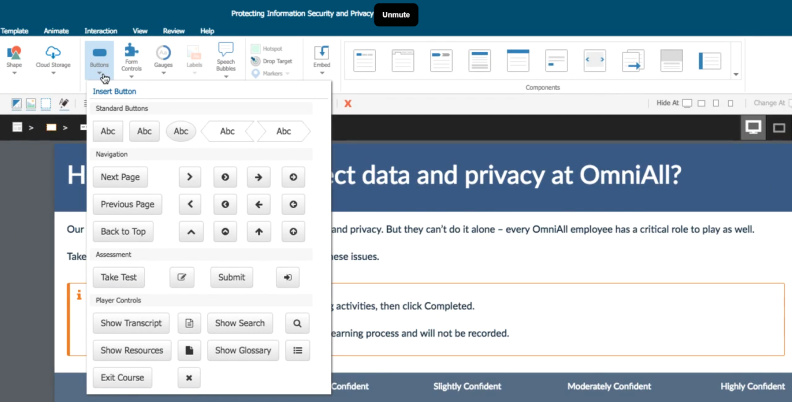
Among all the Adobe Captivate competitors discussed, dominKnow is the top authoring solution for enterprise-level companies. Despite multiple advanced features, dominKnow ensures a smooth learning curve for both seasoned and junior instructional designers creating engaging eLearning courses.
dominKnow is an Adobe Captivate alternative software with solid features for teams. For example, you can manage course versions, easily add reviewers, track review statistics, and schedule reviews.
dominKnow simplifies eLearning translation and localization. Creating eLearning content becomes less time-consuming as you can translate courses in over 50 languages, export for translation, and easily import the translated digital content. When you make changes to your content in one language, those changes are automatically reflected in the other language versions.
The system is self-hosted and doesn’t require IT infrastructure services. Content can take various forms, from SCORM, AICC, xAPI, and CMI5 to website packages, print training material, and presentations. Content publishing output is HTML5 only, with no Flash involved.
Users generally find the system satisfactory, but some note that due to dominKnow’s cloud-based nature, offline usage is limited.
Key features
- Single-source authoring that gives users centralized control of critical data across the training library
- One-step publishing for Learning Management Systems and for non-LMS content
- Components of a learning program can be broken down into different objects and reused
- Multiple authors collaboration in real time
- Off-the-shelf courses that you can easily customize to match business and learning needs
- Built-in Software Simulation that gives learners an opportunity to practice using software
- You can create learning materials in various document formats, such as Word, PDF, and ePub
- A library of over 10,000 high-quality royalty-free images
Pros
- Enables real-time authoring for enhanced teamwork
- Content dynamically adjusts based on learner behavior
- Allows the reuse of learning content objects from previous projects
- Includes an interactive scenario builder
- Streamlines feedback with a special review function
Cons
- Advanced features may require time to master
- No audio or video recording and editing
- No text-to-speech functionality
- Price may be high for some users
- Requires a stable internet connection
- Built-in library of ready-made assets is smaller than other alternatives
Pricing
Business plan is $1,997/year per author; Business Plus is $2,497/year per author (minimum 5 authors); Enterprise pricing available on request.
8. ActivePresenter
Type: Desktop
OS: Windows, Mac
Pricing: Free edition available for personal/non-commercial use; paid plans start at $249 per license.
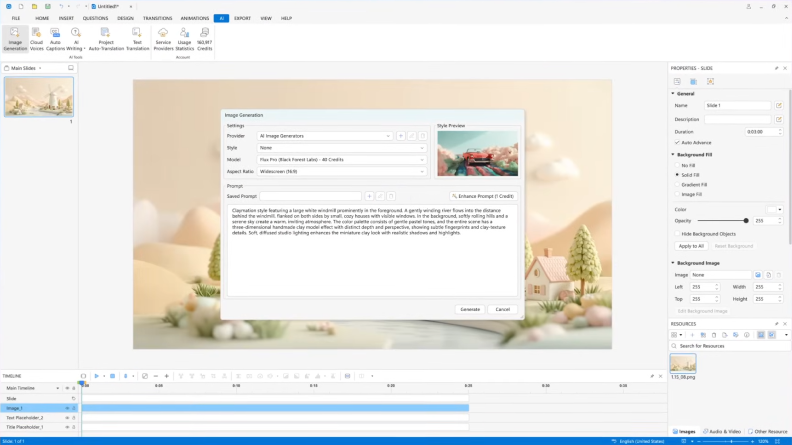
Adobe Captivate competitor ActivePresenter has 3 key features: eLearning authoring, screencasting, and audio and video editing. The software allows you to design videos and slide-based courses enriched with gamification elements to engage learners. You can also set up software simulations that give learners a chance to test it out for themselves rather than watch the screencast.
One of the key features of ActivePresenter is its compatibility with the latest web standard, HTML5. This allows you to seamlessly integrate your training content into your existing learning platform.
The tool is probably the best Adobe Captivate alternative for limited budgets. You make a one-time payment for an everlasting license. However, it means each license you buy can be activated on one device at a time. It is possible to transfer the license to a different device by deactivating it on the current computer and activating it on the new one.
Despite the convenience and ease of use, some users note a slight slowdown on their PC when running the app.
Key features
- Free version for personal / non-commercial use with limited functionality
- Ability to create interactive videos with multiple audio and visual layers
- Discounts for educational facilities and NGOs
- Popular video output formats: MP4, WebM, MVK, WMV, AVI
- Supports the latest web standard HTML5 for content publishing
- Compatible with common eLearning standards like SCORM and xAPI
Pros
- Powerful video recording and editing tools
- Supports creation of interactive assessments
- Slide-based authoring in a familiar interface
- Creates content adaptable to different devices
- Affordable pricing for individual users and small businesses
Cons
- Advanced features may have a learning curve
- Basic interactivity compared to Adobe Captivate
- Fewer options for customization
- Not suitable for real-time cloud-based collaboration
- Smaller user community and lack of help resources
Pricing
Standard plan is $249 per license and Pro plan is $499 per license (one-time payment); educational and volume discounts are available.
To Sum Up
Every Adobe Captivate alternative reviewed in this article has its niche and use cases. Choosing the product that fits your education and training needs makes its flaws vanish and its advantages shine brighter than those of its competitors. Know what your resources and requirements are and you will always make the right choice.
If you want to produce eLearning courses right out of the gate, with no prior training or need to read support forums, start with a free 14-day trial of iSpring Suite AI and explore all of its features now.
Create online courses and assessments in record time.





6 Customer Service Training Tools for Every Occasion and Purpose

How to Create a SCORM File from Course Content

How to Convert Your PowerPoint Slides to an eLearning Module
