H5P alternatives: 10 free and paid tools
 27 minutes






If you’re looking for H5P alternatives, it helps to understand what H5P already offers. H5P is a free, open-source technology for creating interactive videos, quizzes, presentations, and other learning activities. You can use it on a supported platform such as Moodle or WordPress, with your organization handling setup and hosting. Alternatively, H5P.com is a paid service that provides hosting, LMS integrations, and support. H5P.org is the project’s resource site, offering documentation, examples, and a limited authoring demo.
Other tools are worth exploring when you need more control over the design of learning activities, a simpler publishing workflow, or a tool for building complete eLearning courses. The right tool depends on the scope of your training: a few embedded questions call for a different workflow than a compliance course with lessons, assessments, and LMS completion tracking.
This guide compares ten H5P alternatives for interactive content and complete courses, focusing on what you can create, how you can publish it, and pricing and migration considerations.
Key takeaways
- iSpring Suite AI is a good fit for corporate trainers who want to turn PowerPoint presentations into interactive, LMS-ready courses.
- Articulate Rise 360 focuses on responsive courses built from content blocks, while Storyline 360 offers greater control over custom interactions and branching.
- Adobe Captivate deserves consideration for software simulations and technical training.
- Genially and Wordwall provide alternatives for individual learning activities, although their publishing options and target audiences differ.
- Lumi is especially useful if you already have .h5p files and want to keep editing them.
- eXeLearning and Adapt Learning are free, open-source authoring options for more structured learning content.
H5P alternatives at a glance
| Tool | When to choose it | Delivery to learners | 12-month cost / Free access |
| Tool | When to choose it | Delivery to learners | 12-month cost / Free access |
| iSpring Suite AI | Turn existing PowerPoint materials into complete, LMS-tracked courses | SCORM and other LMS packages | $1,290/author/year; 14-day free trial |
| Articulate Rise 360 | Build responsive courses quickly from reusable content blocks | LMS packages or online courses | Articulate 360 AI: $1,449/year (Personal) or $1,749/seat/year (Teams)* |
| Articulate Storyline 360 | Create custom branching and interaction logic | SCORM, xAPI, cmi5, or AICC packages for LMS; HTML5 for web hosting | Articulate 360 AI: $1,449/year (Personal) or $1,749/seat/year (Teams)* |
| Adobe Captivate | Build software simulations for hands-on practice | LMS packages (SCORM, xAPI) | $479.88/year, the equivalent of $39.99/month; 30-day free trial |
| isEazy Author | Produce consistent courses with templates and multiple authors | SCORM, xAPI or hosted courses | €864/year (Professional — 1 author); €2,244/year (Business — 2 authors); custom pricing (Enterprise). Free plan |
| Lumi | Keep editing and reusing existing .h5p activities | .h5p, HTML; SCORM 1.2 with limits | Lumi Pro: €100/year; Free desktop editor and cloud plan |
| Genially | Make highly visual interactive diagrams and presentations | Embed; SCORM/xAPI on Author plan | Pro from $120/year; Author $600/seat/year (annual billing); free plan |
| Wordwall | Turn short question sets into different practice games | Shared links, embeds, and assignments | Standard $57.60/year; Pro $86.40/year (annual billing); free plan |
| eXeLearning | Build structured, standalone courses with a free editor | HTML or SCORM packages | Free and open source |
| Adapt Learning | Develop responsive courses with a supported technical setup | HTML5; SCORM via Spoor extension | Free and open source; hosting required |
*Rise 360 and Storyline 360 are included in the same Articulate 360 AI subscription. The prices shown cover both tools, not separate licenses.
Prices were checked in November 2026. Prices are shown for 12 months in the currencies listed by the vendors. Adobe Captivate’s annual cost ($479.88) is based on 12 monthly payments of $39.99. isEazy Author Professional (€864/year) and Business (€2,244/year), are billed annually.
isEazy Author and Lumi publish their prices in euros. isEazy supports payments in USD with currency conversion, while US checkout prices for Genially and Lumi haven’t been confirmed. USD and EUR prices aren’t directly comparable. Taxes, regional pricing, licensing terms, and LMS publishing features may vary by plan.
Why look for an H5P alternative?
H5P works well for adding quizzes, interactive videos, and other activities to an existing website or LMS. You may need a different tool when your training extends beyond individual activities.
Reasons to consider alternatives to H5P include:
- Complete course development. You need to turn PowerPoint slides and other materials into structured training courses, with assessments and SCORM publishing.
- More advanced interactivity. You want branching scenarios, software simulations, or custom interactions that are difficult to build with your current H5P setup.
- Easier content maintenance. Your team needs consistent course designs and a practical way to update training materials across multiple courses.
- Simpler hosting and administration. Your open-source H5P setup requires technical support that you would rather avoid. H5P.com already offers managed hosting and LMS integrations, so switching tools may not be necessary.
Before moving to another platform, check whether it supports the activities you use most and how much existing H5P content you would need to rebuild.
Note: the tools are grouped by their primary use cases: complete courses, standalone learning activities, and free or open-source authoring. The comparison draws on official documentation and selected user reviews. We did not conduct systematic hands-on testing of all ten editors.
H5P alternatives for eLearning
1. iSpring Suite AI — Best for PowerPoint-based corporate training
iSpring Suite AI is an eLearning authoring toolkit for developing courses, quizzes, learning activities, role-plays, and training videos. Its desktop authoring tools work inside Microsoft PowerPoint, which makes it convenient for teams that already create training materials as slide decks.
Consider a training specialist updating an employee safety course. They can start with the existing PowerPoint presentation, add graded knowledge checks, include a dialogue simulation, and publish the course for their LMS.
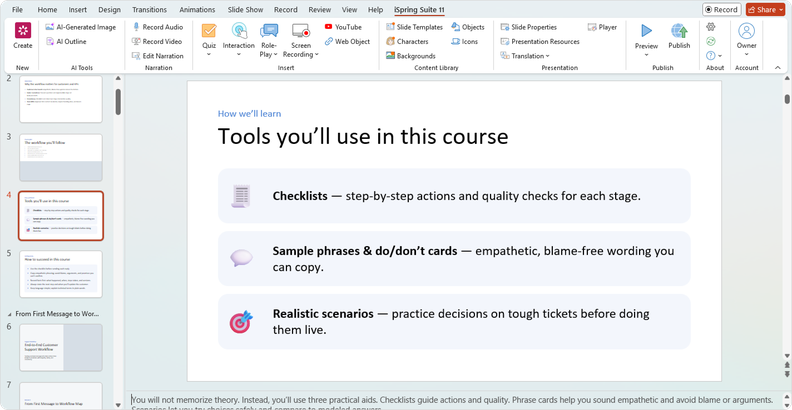
The toolkit includes QuizMaker for assessments, Visuals for interactive elements, and a role-play editor for practicing conversations. AI-assisted tools can help develop course text, images, questions, and initial course drafts. Authors remain responsible for reviewing and editing the output.
iSpring supports SCORM 1.2, SCORM 2004, xAPI, cmi5, AICC, and HTML5 publishing.
Why choose it over H5P?
If your team maintains training in PowerPoint, iSpring lets you keep the source slides and build the surrounding course in the same environment, adding quizzes, interactions, and video as needed.
This can save work when subject-matter experts regularly provide new presentations or request updates to existing material. Our guide explains how to convert PowerPoint slides into an eLearning module.
Independent contractor Dewey Alfonso described combining PowerPoint animations, iSpring interactions, and role-plays in a May 2026 TrustRadius review. The same reviewer wanted more options for scrollable courses — a useful consideration if your team prefers long, web-style pages over slide-based modules.
Limitations
The primary desktop authoring workflow requires Windows and Microsoft PowerPoint. iSpring also isn’t a native H5P editor. No direct workflow has been established for converting existing .h5p files into editable iSpring projects, so recreating activities may be necessary.
For occasional embedded quizzes, the cost of a professional authoring suite may be difficult to justify.
Pricing
iSpring offers three subscription options, billed annually:
- iSpring Suite — $970 per author/year. A PowerPoint-based authoring toolkit for creating courses, quizzes, dialogue simulations, and training videos. This doesn’t include the full AI and cloud authoring package.
- iSpring Suite AI — $1,290 per author/year. Combines PowerPoint-based authoring with AI tools for course development, quiz creation, translation, images, and narration. It includes iSpring Cloud AI for browser-based authoring and collaboration.
- iSpring Cloud AI — $720 per author/year. A standalone, browser-based tool for creating scrollable courses, quizzes, and interactive learning materials on Mac or Windows, without installing PowerPoint or desktop software.
For teams that regularly work with PowerPoint presentations and want AI assistance, iSpring Suite AI offers the most complete toolkit. If you only need browser-based authoring, iSpring Cloud AI is available separately.

2. Articulate Rise 360 — Best for responsive, block-based courses
Rise 360 is a browser-based authoring tool that uses content blocks to build responsive eLearning courses.
You can add text, multimedia, flashcards, knowledge checks, labeled graphics, and other interactive elements. The editor provides a consistent structure across lessons, making it suitable for producing a series of training modules with a shared visual style.
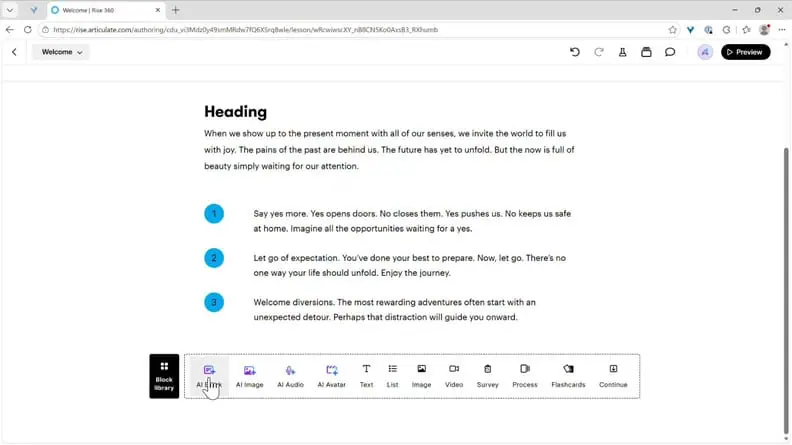
For example, an L&D team preparing onboarding materials for several departments could create reusable lesson structures and populate them with department-specific content.
Rise supports LMS exports in SCORM 1.2, SCORM 2004, xAPI, cmi5, and AICC formats, along with web distribution.
Why choose it over H5P?
Rise offers an integrated way to organize individual activities into responsive courses. Its lesson structure, navigation, and reusable blocks can be useful when several authors contribute to a training library.
In an August 2026 Capterra review, instructional designer Anna Beatriz B. described using Rise for quick, text-heavy responsive courses and Storyline for complex scenario work. For an onboarding program with frequent policy updates, you could build the main lessons in Rise and use Storyline for scenarios that require complex branching.
Limitations
The block-based editor makes consistent layouts easier to maintain, but provides less freedom for custom interaction design than a free-form authoring tool like Storyline.
Pricing
Rise 360 is part of Articulate 360 AI, which costs $1,449 per year for a Personal license or $1,749 per seat per year for Teams. The subscription also includes Storyline 360. A 14-day free trial is available.
Too much to read? Get a summary from AI
3. Articulate Storyline 360 — Best for custom interactions and branching
Storyline 360 is a desktop authoring tool for creating interactive courses with more control over how learners move through content.
It uses triggers, variables, layers, and object states to build interactions. For example, an instructional designer can create a customer-service simulation where the learner’s response changes what happens next.
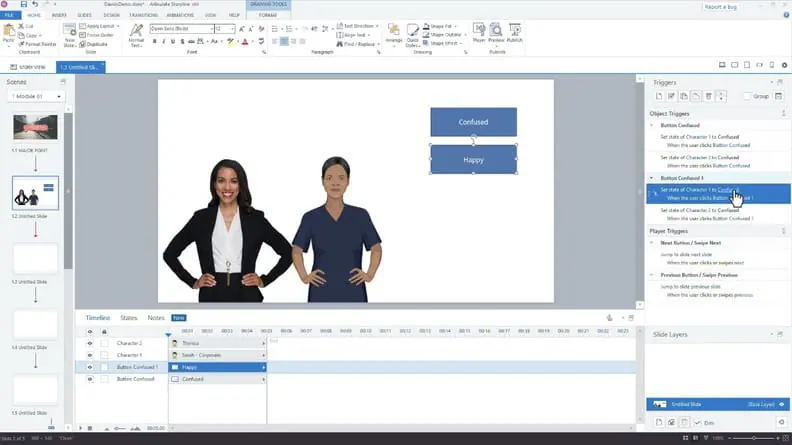
Storyline also supports quizzes, multimedia, and software simulation workflows. Courses can be published to compatible LMSs via SCORM, xAPI, cmi5, or AICC.
Why choose it over H5P?
H5P already has a Branching Scenario content type. Storyline becomes more interesting when you need additional control over conditions, interface elements, or how different learner decisions interact.
In a customer-service simulation, a variable can store an earlier learner choice and change the feedback several screens later.
Limitations
Complex branching scenarios take more time to test and update. When training requirements change, you may need to review triggers, states, and decision paths to make sure every outcome still works as intended.
Storyline uses Windows desktop authoring. If several designers need to update the same scenario, agree on source-file ownership and a review process before development begins. If you’re considering other tools with different authoring workflows, see our comparison of Articulate 360 alternatives.
Pricing
Storyline 360 is included in Articulate 360 AI together with Rise 360.
The complete subscription costs $1,449 per year for a Personal license or $1,749 per seat per year for Teams. A 14-day free trial is available.
4. Adobe Captivate — Best for software simulations
Adobe Captivate is an eLearning authoring tool for interactive courses, assessments, and software training.
Its software simulation capabilities are particularly relevant when employees need to practice using an application. Instead of watching a recorded demonstration, learners can interact with simulated controls and practice completing a process.
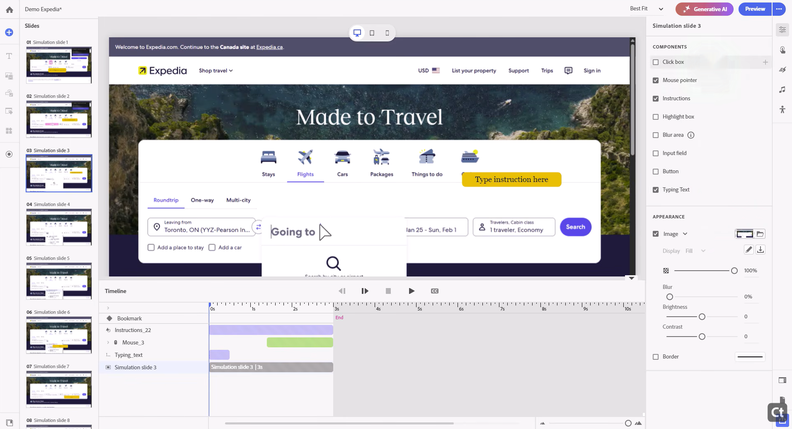
Captivate also supports responsive course creation and LMS publishing, including SCORM 1.2, SCORM 2004, and xAPI.
Why choose it over H5P?
Choose Captivate when learners need to practice completing a software workflow instead of watching a demonstration.
In a June 2024 TrustRadius review, eLearning developer Gabe Nance described using Captivate primarily for software demonstrations and simulations, often alongside video tools. The practical question is whether staff need to click through a procedure or simply watch it. That review predates Captivate 13, so check the current simulation workflow with a trial.
Limitations
Adobe Captivate and Captivate Classic have different feature sets. Check the version used in any tutorial or product comparison.
Modern Captivate can import PowerPoint presentations, but imported slides retain a fixed layout. Some elements are converted into images, and imported slides have restrictions on interactive components. For more software training tools, see our guide to Adobe Captivate alternatives.
Pricing
Adobe Captivate costs $39.99 per month with an annual subscription, totaling $479.88 over 12 months. Payments are collected monthly. A 30-day free trial is available, while team pricing is provided separately.
5. isEazy Author — Best for template-based corporate courses
isEazy Author is a browser-based tool for creating training courses from templates and predefined interactive elements.
It includes assessment activities and AI-assisted content creation. The editor is suitable for teams that produce recurring onboarding, compliance, or product-training modules and want a consistent visual structure.
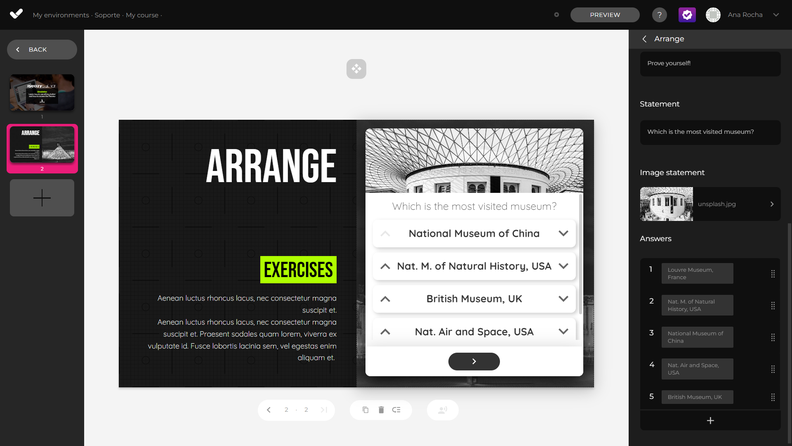
Courses can be published in SCORM and xAPI formats or distributed through other available sharing methods.
Why choose it over H5P?
If your current H5P workflow involves assembling individual activities into courses, isEazy Author lets you build complete, LMS-ready courses in a single editor. For teams that need to edit the same project together, collaborative editing is available in the Business and Enterprise plans, but not the Professional plan.
In a May 2025 Capterra review, deputy compliance manager Sarah D. described building LMS-ready courses with little training, but found some presentation adjustments difficult. For teams producing multiple branded courses, test the actual template and interaction controls before choosing a plan.
Limitations
Templates may restrict how precisely you can customize an interaction. More demanding branching scenarios are worth comparing with free-form authoring tools.
The standard PowerPoint import converts slides into images. You can add interactive elements afterward, but you won’t retain fully editable PowerPoint objects.
Pricing: isEazy Author has a free plan with limited features. With annual billing, Professional costs €72/month for one author (€864/year), while Business costs €187/month for two authors (€2,244/year). Enterprise pricing is available upon request.
isEazy publishes its prices in euros. However, customers can pay in other currencies, including USD, with Stripe applying currency conversion at the time of payment.
H5P alternatives for interactive content and activity creation
The next three tools are useful when you want to create specific learning activities without committing to a full course-development environment.
6. Lumi — Best for editing existing H5P content
Lumi, developed by Lumi Education, is an H5P authoring tool that lets you create and edit learning activities using a free desktop editor or a cloud-based platform.
Its desktop editor lets you create and modify .h5p files without first installing H5P inside Moodle or WordPress. Lumi also provides cloud hosting and sharing options.
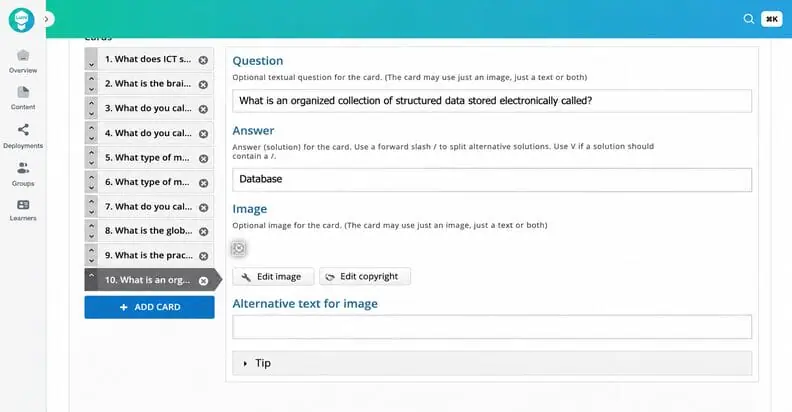
Depending on the content type, you can save an H5P file, publish it as HTML, or export it as a SCORM package.
Why choose it over your current H5P setup?
Lumi lets you change your authoring workflow while keeping existing .h5p files editable. It makes sense when you want to work outside a CMS without recreating your activities in another format.
For example, a trainer with a folder of existing .h5p quizzes can open and revise those files in Lumi. Before switching distribution methods, export a sample and check whether its question feedback and scoring still work in the destination LMS.
Limitations
Lumi remains an H5P-based editor, so the capabilities of individual H5P content types still apply.
Its SCORM export supports SCORM 1.2, and the official documentation lists restrictions for some content types. Timeline activities, for example, aren’t supported for standalone HTML or SCORM export.
Pricing
Lumi Desktop Editor is free. Lumi Cloud also offers a free plan with a 15 MB file upload limit. Lumi Pro costs €100 per year or €10 per month and increases the upload limit to 500 MB. It also includes individual feedback features.
Prices are published in euros on Lumi’s main website. A standard US price in dollars hasn’t been confirmed.
7. Genially — Best for visually rich interactive content
Genially is a browser-based editor for creating interactive images, presentations, visual explainers, and learning activities.
You can add clickable areas, animated elements, information windows, and other interactions. Suppose you’re explaining a manufacturing process. You could create an interactive diagram that reveals information about each stage when the learner selects a hotspot.
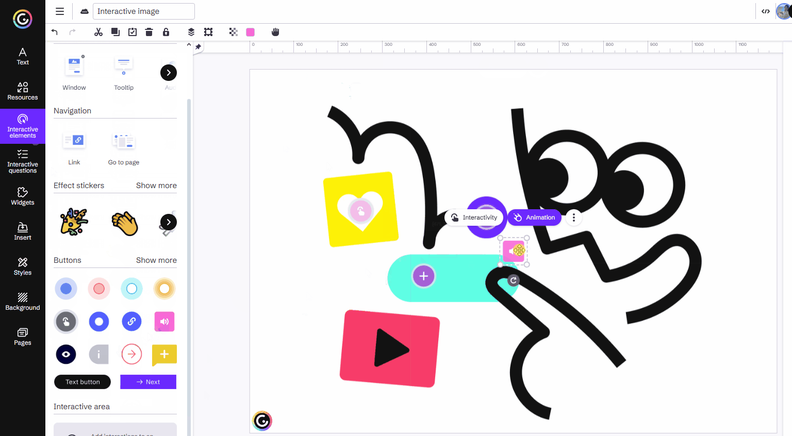
Genially offers templates and visual design controls that may be useful when the standard appearance of an H5P activity doesn’t meet your needs.
Content can be shared or embedded online. SCORM, xAPI, and LTI are available through the appropriate subscription.
Why choose it over H5P?
Genially is worth considering when your primary goal is visual presentation. You can build activities around images, diagrams, or interactive presentations rather than working within H5P’s predefined content types.
In a February 2026 Capterra review, school owner Kristina T. valued moving objects during a presentation but found the editor navigation and interaction controls less intuitive. In a trial, check how quickly your team can create and revise the kind of interactive graphic it needs.
Limitations
SCORM and LTI aren’t available on the Free or lower-priced individual plans. The current pricing page places SCORM 1.2, SCORM 2004, xAPI, and LTI in the Author plan.
Pricing
Genially offers a free plan. Pro starts at $120/year, while Master costs $300/year per user. For LMS publishing, the Author plan costs $600/year per seat and includes SCORM, xAPI, and LTI support. All paid prices are based on annual billing. Promotional discounts may apply.
8. Wordwall — Best for quick template-based learning activities
Wordwall helps authors create short interactive exercises, including quizzes, matching games, flashcards, and sorting activities.
You choose a template, enter the content, and adjust the available settings. A trainer could create a matching exercise to help learners practice product terminology.
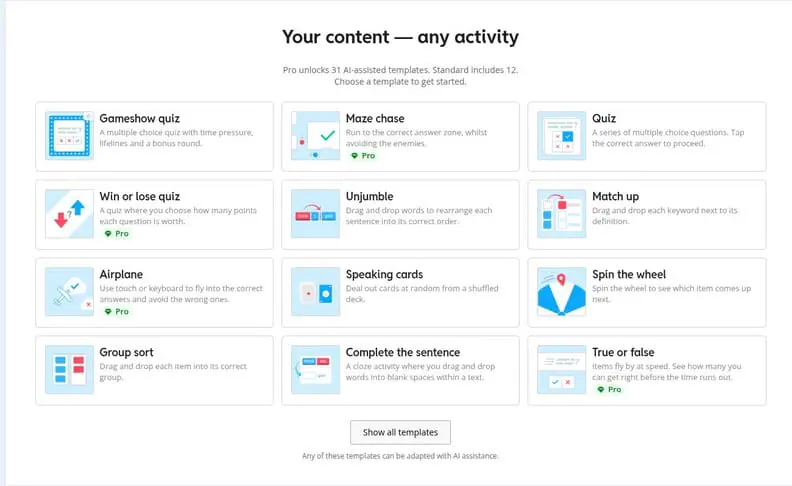
Activities can be shared through links or embedded on a page. Wordwall also provides assignment features for collecting results.
Why choose it over H5P?
Wordwall is convenient for producing short, template-based exercises when you don’t need a complete course-authoring environment.
For example, you can enter a set of product terms once, then see how the same material works as matching or flashcard practice. Check the available templates first: Wordwall makes this kind of variation convenient, but it is not designed to manage an entire corporate course.
Limitations
Wordwall is designed primarily for school education. Its interface, templates, and administrative features may not meet the requirements of corporate L&D teams.
The service’s Terms of Use also restrict certain commercial uses and provide exceptions for educational use. Organizations planning paid training or internal corporate deployment should clarify the applicable licensing terms with Wordwall before adopting it.
A native SCORM export option hasn’t been confirmed through the reviewed official documentation. An embedded activity or assignment result is not the same as an LMS-tracked SCORM package.
Pricing: Wordwall’s Basic plan is free and lets you create up to three activities. With annual billing, Standard costs $57.60/year and Pro costs $86.40/year. Both paid plans allow unlimited activities, while Pro includes 22 additional templates. Monthly subscriptions are also available.
H5P alternatives for free and open-source course authoring
These open-source H5P alternatives are worth considering if you want to develop structured learning content without paying for a commercial authoring license. eXeLearning offers a desktop editor, while Adapt Authoring Tool requires a server installation. Compare their technical requirements before choosing a free authoring environment.
9. eXeLearning — Best for free course authoring with SCORM export
eXeLearning is free, open-source software for creating educational resources and courses. It supports structured learning materials, interactive components, and web or LMS publication.
Authors organize content across pages and add components called iDevices. These include different ways to present information and create learning activities.
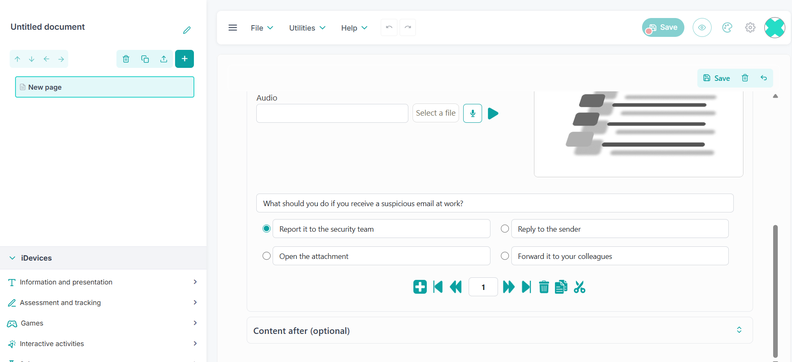
Version 4 provides desktop applications for Windows, macOS, and Linux, along with options for online deployment.
An instructor preparing a short workplace training module could combine explanations, images, and interactive questions in a sequence of lessons, and then export the result to an LMS.
Why choose it over H5P?
If you already have H5P activities, eXeLearning lets you embed supported content alongside lessons and assessments without recreating every activity. You can then publish the complete course as a SCORM package.
Limitations
Embedding an H5P activity doesn’t turn it into editable eXeLearning content.
Teams should also evaluate the editor’s design controls and available iDevices against their actual requirements. A collaborative online deployment may involve server administration.
Version 4 introduced substantial changes, so older eXeLearning 2.9 tutorials may not accurately reflect the current interface.
Pricing
Free and open source. Organizations deploying a shared server installation may incur hosting and IT maintenance costs.
10. Adapt Learning — Best for responsive open-source courses
Adapt Learning is an open-source framework and authoring tool for creating responsive HTML5 courses.
Its authoring application runs on a server and provides a web-based interface for organizing content, adding components, and publishing courses. This can appeal to teams with technical resources that want more control over their authoring environment.
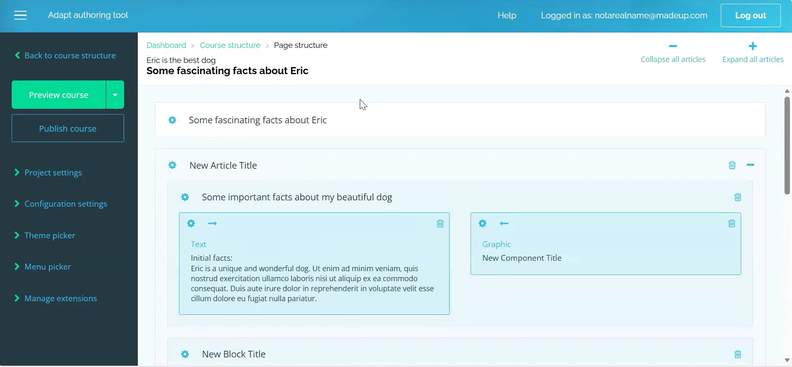
Adapt includes the Spoor extension for SCORM-related tracking and publishing workflows.
Why choose it over H5P?
Adapt is useful when you’re developing responsive courses with a consistent structure and want an open-source system that can be maintained and extended internally.
A training team with its own developers might maintain a shared course theme and a controlled set of components. This gives authors a consistent environment, but also means that someone needs to manage upgrades, component compatibility, and publishing tests.
Limitations
The authoring application requires installation on a web server and ongoing technical maintenance. It is unlikely to be the most convenient solution for creating a few individual interactive exercises.
Spoor includes settings for SCORM 1.2 and SCORM 2004 4th Edition, but its documentation still describes SCORM 1.2 as the officially supported version. If your LMS requires SCORM 2004, test the specific extension version and package before adopting Adapt.
Pricing
Free and open source. Self-hosting the authoring tool requires technical setup and may involve additional hosting and maintenance costs.
How to choose the right H5P alternative
Before comparing subscriptions, identify which part of your H5P workflow you want to replace.
Decide what you’re creating
For individual learning activities, start with Lumi, Genially, or Wordwall.
For structured employee training, consider authoring tools such as iSpring Suite AI, Rise, or isEazy Author. Storyline and Captivate may be better candidates when you need custom interactions or software simulations.
For examples of how to combine activity types within a course, see our guide to making an online course interactive.
If a free authoring environment is essential, investigate eXeLearning and Adapt.
Check how the content will be published
These delivery methods serve different purposes:
- Embed or shared link: Useful for activities hosted online.
- Standalone HTML: Suitable for web delivery, with tracking dependent on the surrounding system.
- SCORM package: Commonly used to upload courses to an LMS and communicate completion or assessment data.
- LTI integration: Connects an LMS to compatible externally hosted content.
- xAPI: Enables learning activity tracking when the necessary systems are configured.
Ask your LMS administrator which options are supported. A product’s ability to export SCORM or xAPI doesn’t guarantee that every reporting feature will work in your LMS.
For more on the standards involved, see xAPI vs. SCORM.
Check what happens to existing H5P files
If you already have a library of interactive videos or quizzes, the cost of migration may outweigh the savings from switching.
Lumi supports editing .h5p files. With other authoring tools, you may need to embed existing activities or recreate them.
Before committing, rebuild or transfer one representative activity. Check the content, feedback, scoring, and reporting after publication.
Check accessibility
Before choosing an authoring tool, test the published content with keyboard navigation and assistive technology. Check captions, text alternatives, and how learning activities work on smaller screens. An accessible authoring interface doesn’t automatically guarantee an accessible learner experience.
Compare the cost of maintaining content
A free editor may require a server and technical support. A paid authoring service can reduce some of that work but introduce licensing restrictions.
If several people develop courses, also evaluate author seats, collaboration, handover, and the process for updating published material.
H5P vs. iSpring Suite AI for corporate training
When comparing H5P alternatives for corporate training, consider the entire authoring and LMS workflow. H5P and iSpring Suite AI can both create interactive content, but they support different ways of developing and maintaining courses.
| Consideration | H5P | iSpring Suite AI |
| Consideration | H5P | iSpring Suite AI |
| Authoring workflow | Create individual H5P content types inside a supported platform or editor | Develop PowerPoint-based courses and interactive learning materials |
| Typical content | Quizzes, interactive videos, presentations, branching activities | Courses, quizzes, role-plays, interactions, training videos |
| LMS delivery | Platform integrations and H5P.com LTI; reporting depends on setup | SCORM, xAPI, cmi5, AICC and other publishing options |
| AI assistance | Smart Import through commercial H5P.com Premium | AI-assisted content and course development |
| Existing H5P content | Native .h5p workflows | Direct editable import not established |
| Main trade-off | Features and hosting depend on the chosen H5P environment | Paid license and PowerPoint/Windows-based desktop authoring |
If you’re adding two quick knowledge checks to an existing Moodle course, H5P may already give you everything you need.
For a five-module compliance course with PowerPoint source materials, graded assessments, role-plays, and LMS completion tracking, iSpring Suite AI offers a more integrated course-development workflow.
The ability to update existing slide-based materials is particularly relevant when regulations, procedures, or product details change regularly.
If you plan to move away from H5P, first identify which activities you’ll need to recreate or retain as embedded content.
FAQ about H5P alternatives
What are the best free H5P alternatives?
Lumi is useful for continuing to create and edit .h5p files. eXeLearning offers free course authoring and SCORM export, while Adapt Learning provides an open-source framework for responsive courses.
Wordwall has a limited free plan for short exercises, although its licensing and publishing options may make it less appropriate for some corporate training scenarios.
If you already use free H5P successfully inside Moodle, switching may offer little practical benefit.
Which H5P alternatives support SCORM export?
iSpring Suite AI, Articulate Rise 360, Articulate Storyline 360, Adobe Captivate, isEazy Author, eXeLearning, and Lumi offer SCORM publishing options.
Genially supports SCORM 1.2 and SCORM 2004 through its Author plan. Adapt uses the Spoor extension, although its SCORM 2004 support documentation requires clarification.
When comparing H5P alternatives with SCORM export, check the standard, configuration requirements, and tracking behavior in your LMS.
Can I use H5P alternatives with Moodle or Canvas?
Yes, but the publishing method matters. Tools such as iSpring Suite AI, Rise 360, and eXeLearning can export SCORM packages. Moodle lets you upload these as course activities, whereas Canvas requires an administrator-enabled SCORM LTI integration.
For shorter activities, Wordwall offers an embedding option for both platforms. However, embedding an activity doesn’t automatically send scores or completion data to the LMS gradebook.
Before choosing a tool, check which SCORM versions and integrations your LMS supports and whether they provide the reporting you need.
Can I convert H5P content to SCORM?
Lumi can export supported H5P content as SCORM 1.2 packages.
For other tools, direct conversion may not preserve the original interactions as editable content. You may be able to embed the activity, or you might have to recreate it.
Also test the exported activity’s reporting behavior. Packaging a learning object as SCORM doesn’t automatically guarantee that every interaction will be tracked as expected.
Which H5P alternative is best for corporate training?
For PowerPoint-based corporate training, consider iSpring Suite AI. Rise 360 is suited to responsive, block-based courses, while isEazy Author focuses on template-based course production. For complex branching, compare Storyline 360; for software simulations, evaluate Adobe Captivate.
Before choosing, check which tool supports your LMS reporting requirements and how easily your team can update published courses.
Are there AI-powered H5P alternatives?
Yes. iSpring Suite AI, Articulate 360 AI, isEazy Author, and Genially provide AI-assisted content creation features.
H5P.com also offers Smart Import through its commercial Premium offering.
Compare the tasks each product can perform, such as drafting course structures, creating questions, generating visuals, or turning source materials into editable lessons. AI-generated training content still requires review.
Which H5P alternative should you choose?
The best choice depends on what you need to change: how you create learning activities, how you build complete courses, or the way you deliver training to learners.
Before choosing among these H5P alternatives, test a representative activity or LMS-tracked module. Check how easily you can update the content, publish it, and track the expected results in your LMS.
Create online courses and assessments in record time.