Easygenerator reviews 2026: Pros, cons, and pricing
 16 minutes






Easygenerator reviews highlight a clear trade-off: the tool is easy to learn but offers limited flexibility in course design and functionality.
For this analysis, we read 197 Easygenerator reviews on G2 and checked the product’s pricing and features as of November 10, 2026.
To highlight each tool’s strengths and limitations, we compared these findings with feedback from 892 iSpring Suite reviews on G2.
Key takeaways
- Easygenerator is built for quick, simple courses. Its simplicity comes with limits in design and functionality, and that’s why design control tops reviewers’ wish list.
- Easygenerator says it costs more per author than iSpring Suite and that iSpring “converts that library better than we do” if you have a large PowerPoint library and your authors are all on Windows.
- Small teams feel the price gap most. Easygenerator’s Team plan starts at five authors, so even two authors who want to co-author pay $7,495 a year.
- It runs only in the browser, so there’s no offline authoring.
- Easygenerator is about making course creation easy. iSpring Suite AI is about giving course creators more freedom and possibilities, without making you choose between simplicity and professional tools.
What we looked at
For this review, we read 197 Easygenerator reviews on G2. This way, the praise and complaints we quote are the ones G2 itself counts as recurring. We compared them with 892 iSpring Suite reviews, read the same way. We also checked both companies’ pricing, feature pages, and release notes as of November 2026.
What kind of creator is Easygenerator best for?
Easygenerator’s main idea is employee-generated learning, where “an organization’s own subject-matter experts create training content directly.”
A verified user at an enterprise manufacturing company wrote in an incentivized October 2026 review that they built the training their organization needed “in just three days,” after more than a year of trying to buy third-party training packages.
Using my existing subject matter expertise, I was able to develop the training we needed in just three days. This was a significant improvement on our previous approach and demonstrates the value of combining internal expertise with the right technology.
If you build an eLearning tool that a lawyer, a mining plant HR manager, and a health worker can all understand at first glance, you need to make authoring features as simple and universal as they get. That requires some trade-offs.
What working with a tool where simplicity is the #1 priority gets you:
- Pre-set blocks instead of a blank page
- Teamwork in the browser from any computer (with co-authoring from the Team plan)
- A way to produce a lot of simple learning content, fast
What it costs you:
- It will be harder to bring your PowerPoint library along. Easygenerator imports decks, but it says that if you have a large library and “your authors are all on Windows, iSpring Suite converts that library better than we do.”
- Less room to make it yours. Limited customization and limited flexibility top the list of complaints.
- No offline work. In its words, “authoring needs an internet connection.”
iSpring Suite AI doesn’t make you pick one type of author. Experts who would rather stay in the browser get iSpring Cloud AI, a course builder with real-time collaboration. Pros get the full PowerPoint toolkit with branching, role-plays, and screencasts, and people who already work with slides a lot don’t have to learn a new tool or rebuild their entire library:
“ love how iSpring Suite allows me to integrate it with Microsoft PowerPoint to use my preexisting slideshows.
The key point: Easygenerator is built around one type of author. iSpring Suite AI covers both the expert and the professional under one license.
Review feature: where Easygenerator meets user requirements
| Rating | 8.9 / 10 |
| Based on | 150 responses |
Source: G2, Easygenerator vs. iSpring Suite, November 2026.
Too much to read? Get a summary from AI
Design and templates
Design is where the difference shows most. The most common wish on Easygenerator’s list is about looks. Even a reviewer who loves “the creative freedom it gives us” wants more:
“ wish Easygenerator offered a wider variety of templates and design options. […] More flexibility in layouts, visuals, and overall styling would help courses feel less repetitive.
Easygenerator explains that “Templates and built-in didactic support keep output consistent across many authors.” Every author works within the same blocks, so courses tend to look alike.

Collaboration across departments and course design in Easygenerator, source: Easygenerator
With iSpring Suite AI, every slide is yours to design. You keep all of PowerPoint’s layout and formatting tools, so a course isn’t limited to a set of ready-made blocks. Then you add what makes each course look different:
- 134,000+ assets in total in Content Library: 2,300+ templates, 81,000+ character photos, and 3,600+ icons and UI controls
- 380+ illustrated characters and locations, plus 2,500+ 3D locations, so a sales course and a safety course don’t share the same scenery
- Custom characters that match your brand and your scenario, from skin tone and hair to clothing and expression
- AI image generation for the workplace scene you can’t find on any stock site
Easygenerator itself notes, “A smaller library of characters and scenes than iSpring offers.”

Course templates from the iSpring Content Library.
Key point: Easygenerator keeps every author on the same rails. iSpring gives you the freedom to build courses that don’t look like anyone else’s.
Quizzes and interactions
Easygenerator covers the basics: quizzes, flip cards, hotspots, walkthroughs, and scenario blocks. Reviewers also see the ceiling. Mohammed N., a digital training development officer at an enterprise, wrote in an incentivized April 2025 review that the tool “lacks the complexity of other authoring tools by design, and Easygenerator agrees that there’s a limit: “Courses that depend on custom variables or conditional logic belong in Storyline or Lectora rather than with us.”
iSpring goes past checking what people know. It helps them practice what they’ll do at work:
| What’s listed | Easygenerator | iSpring Suite AI |
| What’s listed | Easygenerator | iSpring Suite AI |
| Question types | 11 | 14 |
| Feedback | Correct and incorrect feedback | Custom feedback for every answer, plus pop-ups before a tricky question or after an incorrect one |
| Branching | Scenario blocks, no custom variables or conditional logic | Branching scenarios: an incorrect answer leads to an extra explanation, and a correct one leads to a harder question |
| Role-plays | AI role-plays, EasyCoach add-on | Branching dialogue simulations with characters, emotions, voiceovers, and scoring, included |
| Screen recording | Screen and webcam | Screencasts with timeline editing and click highlights |
Sources: Easygenerator help center, Easygenerator’s iSpring comparison page and pricing page, and the iSpring Suite features page, November 2026.
Here’s what that looks like in practice. An operations coordinator at a nonprofit onboarded more than 80 volunteers with a 15-minute course:
The branching logic lets me send people to extra help slides if they answer a quiz question incorrectly, without me having to create separate documents for every scenario.
Key point: Easygenerator works well for basic, block-based interactive learning. iSpring lets you build scenarios that model real work situations.
Reporting and LMS
Reporting is where Easygenerator reviews get specific. Muqaddar K., a learning and development specialist at an enterprise, describes how managers get their team’s results:
“… download the complete learner report and then vlookup with the email.”
Anyone who’s lived in spreadsheets knows that feeling. The same reviewer lists adding learners course by course and progress being lost when a learner’s email changes. A verified user at a mid-market software company agrees, in an incentivized April 2025 review, that “people who don’t use LMS have limited reporting capabilities.“
iSpring Suite AI sends results straight to your LMS through SCORM or xAPI, whether that’s iSpring LMS or the one you already run. Courses are verified across 160+ LMS platforms and published to SCORM, xAPI, cmi5, AICC, and HTML5. You decide how each question is tracked, with time limits, attempt counts, passing scores, and negative marking. Easygenerator says it doesn’t publish cmi5 or AICC.
Key point: if your training runs through an LMS, as most corporate training does, iSpring fits the setup you already have.
Feature Spotlight: how many G2 reviewers highlighted ease of admin in Easygenerator
| Rating | 9.1 / 10 |
| Based on | 60 responses |
Source: G2, Easygenerator vs iSpring Suite comparison, November 2026.
Integrated AI features
In iSpring Suite AI, AI isn’t an extra feature. It speeds up every stage of building a course:
- Course creation from your materials: upload documents, presentations, or a prompt, and get a structured draft with lesson text, interactions, and quizzes
- Quiz generation from your content
- Translation into 70+ languages
- Image generation for scenes you won’t find on stock sites
- Voiceovers in 53 languages, synced to your slides
- Design before generation: since October 2026, you can set colors and fonts before AI builds the slides
Catherine C., CEO of a small business, wrote in an organic September 2026 review of iSpring Suite that you can “let it create a course draft in just a few minutes” and adds, “What used to take me hours can now be done much faster.”
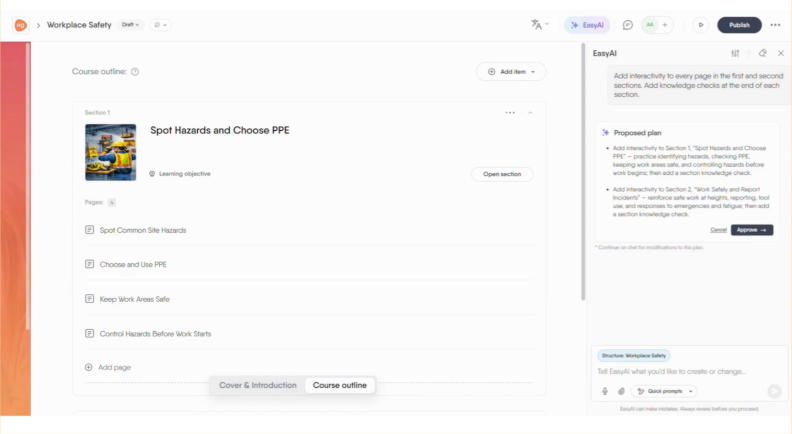
Easygenerator AI in action. Source: Easygenerator
Easygenerator says EasyAI makes course creation “up to 9x faster” and that it’s “built into every plan.”
Reviews of its AI are mixed: a verified user at a mid-market consulting company likes the EasyVideo avatars and text-to-speech, and in the same incentivized October 2026 review calls the image generator “very poor.” EasyVideo is an add-on, and an EMS advisor says of its AI audio:
I often had to shorten my scripts, replace words with simpler, easy-to-read ones, and regenerate my video multiple times.
Key point: both AI tools help you work faster. iSpring uses AI from the first draft to a translated, voiced course. Just pay attention to the accuracy!
Pricing Comparison
iSpring Suite AI costs $1,290 per author per year, against $1,499 for Easygenerator Pro, and the gap grows for small teams:
| List price per year | Easygenerator | iSpring Suite AI |
| List price per year | Easygenerator | iSpring Suite AI |
| 1 author | $1,499 (Pro: 10 courses, 100 learners) | $1,290 |
| 2 authors who co-author | $7,495 (Team starts from 5) | $2,580 |
| 3 authors who co-author | $7,495 (Team starts from 5) | $3,870 |
| 5 authors | $7,495 | $6,450 |
| Unlimited authors | Enterprise, custom price | Per author, custom quotes for volume |
Sources: Easygenerator pricing page and iSpring pricing page, November 2026.
The price per seat is only half of it. Here’s what one author gets:
| One author, one year | Easygenerator Pro, $1,499 | iSpring Suite AI, $1,290 |
| One author, one year | Easygenerator Pro, $1,499 | iSpring Suite AI, $1,290 |
| Courses and learners | 10 courses, 100 learners | No course or learner limit listed |
| Co-authoring and reviewers | Team plan and up | Real-time collaboration included |
| AI translation | EasyTranslate add-on | Included |
| Role-plays | EasyCoach add-on | Included |
| Authoring | Browser only | PowerPoint toolkit plus browser builder |
Sources: Easygenerator pricing and features pages, iSpring pricing and features pages, November 2026.
A solo instructional design expert with a lot to produce should check the Pro limits first: 10 courses and 100 learners. Easygenerator’s add-ons have no listed price, and its Team plan adds learner tracking and dynamic SCORM. With iSpring, an LMS is a separate cost.
Key point: the gap is widest for a team of 2 to 4 who want to co-author, because the Team plan starts at 5 seats. Easygenerator says it “becomes competitive at scale” because Enterprise offers unlimited authors.
Easygenerator vs. iSpring Suite: which one is for you?
Are you a subject matter expert who needs to produce a lot of eLearning content on a tight deadline? Do you know your field inside out, but you’ve never designed a course, and terms like AICC and cmi5 don’t mean much to you yet? Then Easygenerator is worth it. As the name suggests, it’s built to make course creation easy.
Are you an L&D professional or part of a small team with multiple authors? Do you need a wide range of tools, complex interactions, embeds, and creative depth because you build courses your own way? Would you like to bring your existing library with you, work offline when you need to, and stay in a familiar environment like PowerPoint? Then you’ll feel at home with iSpring Suite AI.
Here’s how that plays out by team:
Easygenerator Pros and Cons for Different L&D Roles
| If you’re… | Better fit | Why |
| If you’re… | Better fit | Why |
| A small professional L&D team | iSpring Suite AI | More to build your projects with (14 question types, included role-plays, characters and locations), and a lower price: $6,450 vs. $7,495 for five authors |
| An instructional designer | iSpring Suite AI | Branching scenarios, dialogue simulations, and screencasts with timeline editing, all alongside PowerPoint’s own tools |
| Working in PowerPoint a lot | iSpring Suite AI | You keep your slides and your habits, and you build right inside PowerPoint |
| Restricted by IT or low connectivity | iSpring Suite AI | It installs on your own Windows computer, and you can author offline (AI features still need an internet connection) |
| An LMS admin who needs cmi5 or AICC | iSpring Suite AI | iSpring supports publishing in both formats, while Easygenerator says it does not |
| A single subject matter expert | Easygenerator | The easiest start (9.4 for ease of use), but pricier: $1,499 vs. $1,290, with Pro plan capped at 10 courses and 100 learners |
| A big company with many occasional authors | Easygenerator | Unlimited authors on Enterprise at a custom price, which Easygenerator says “becomes competitive at scale;” however, you get fewer question types and a smaller character library |
| A single expert who wants a browser tool | iSpring Cloud AI | A browser course builder with AI at $720 a year, against $1,499 for Easygenerator Pro |
| On a Mac, with no need to work offline | Easygenerator | One browser tool for every author and every course |
The bottom line
Easygenerator software reviews describe a tool that’s built for experts who’ve never designed a course but need to do it fast. That simplicity comes with limits in design, interactivity, and price per seat.
If you build training for a living, work mostly on a desktop, you are proficient in PowerPoint, and do courses your own way, try iSpring Suite AI for free. It also has an objectively lower price with a small team.
Easygenerator makes course creation easy. iSpring Suite AI gives you more freedom and possibilities, and is also extremely user-friendly.
Key numbers: where the two authoring tools stand in 2026
To help you choose the best fit for your needs, here’s where iSpring Suite AI and Easygenerator stand when we compare the two side by side:
| Easygenerator | iSpring Suite AI |
| Easygenerator | iSpring Suite AI | |
| Overall rating | 4.7 stars | 4.6 stars |
| Number of reviews | 197 | 892 |
| Best for | Small businesses led by SMEs | Small and medium-sized businesses |
| Time to implement | 2 months (8 answers) | 1 month (23 answers) |
| List price per author, per year | $1,499 (Pro)*
| $1,290 (Suite AI)*
|
| Question types | 11 | 14 |
| Publishing standards | SCORM, xAPI, LTI | SCORM, xAPI, cmi5, AICC, HTML5 |
| Company in the market since | 2013 | 2001 |
Sources: ratings, review counts, and implementation times from G2; prices, question types, and publishing standards from Easygenerator’s and iSpring’s websites, November 2026.
FAQ
What do real users think about Easygenerator in 2026?
Users rate Easygenerator 4.7 out of 5 across 197 reviews, praising its ease of use, intuitive interface, and responsive customer support.
What are the most common criticisms of Easygenerator?
Limited customization (5 mentions), limited flexibility (also 5), “not intuitive” regarding reporting and content creation (4 mentions), and limited editing (3 mentions).
Is Easygenerator worth the price for a small L&D team?
It depends on the team size. One author pays $1,499 with 10-course and 100-learner limits. Co-authoring requires the Team plan at $7,495 for up to five authors. Two iSpring Suite AI authors cost $2,580, with collaboration included.
What are the limitations for instructional designers?
Easygenerator lists several things: no cmi5, no offline authoring, a smaller character library, and no support for courses with custom variables or conditional logic. It’s also not the cheapest option on the market for small teams (although Easygenerator states it “becomes competitive at scale” with its Enterprise plan and unlimited seats).
How does Easygenerator compare with iSpring Suite AI?
Easygenerator suits in-house experts and non-designers who want to start fast in a browser. iSpring Suite AI gives you an in-browser builder and a PowerPoint toolkit in one license, and it suits professionals and small teams that already work in PowerPoint: more question types, included role-plays, a larger library, offline authoring, and a lower list price.
Is Easygenerator suitable for enterprise compliance training?
45.7% of Easygenerator reviewers work at enterprises, according to G2. Learner tracking, certifications, and dynamic SCORM start at Team. It publishes SCORM and xAPI but not cmi5 or AICC, so check the compatibility with your LMS.
Can Easygenerator create interactive SCORM courses from PowerPoint?
Yes, with Easygenerator you can create interactive SCORM courses from PowerPoint. It imports PowerPoint files into an editable course, and you add blocks and questions, then export it. With iSpring, you stay inside PowerPoint, keep your animations and transitions, and publish from there.
What are the best alternatives to Easygenerator for corporate training?
G2 lists Articulate 360, Captivate, and Create among them. If you work in PowerPoint, we’d put iSpring Suite AI first, of course. Our roundup of eLearning authoring tools covers more.
Should I choose Easygenerator or iSpring Suite AI for employee onboarding?
Both authoring tools handle it well. Choose according to who builds the course: in-house SMEs point to Easygenerator, and an L&D team with slides points to iSpring Suite AI.
Create online courses and assessments in record time.