The 7 best Easygenerator alternatives in 2026
 15 minutes


Easygenerator is a browser-based eLearning authoring tool with AI-powered course structuring, quizzes, drag-and-drop content creation, real-time collaboration, and LMS publishing. EasyAI can outline courses and rephrase text. EasyTranslate supports translation into 75 languages, subject to plan and add-on terms.
If you’re looking for Easygenerator alternatives, your team probably needs more flexibility to create online courses, work with PowerPoint, build software simulations, or manage training materials.
In this article, we compare seven corporate eLearning alternatives, focusing on content creation, interactivity, collaboration, analytics, and course maintenance.
Key takeaways
- iSpring Suite AI is worth considering if you create training in PowerPoint and need quizzes, branching dialogues, and AI-assisted authoring.
- Articulate 360 offers advanced interactions, while Adobe Captivate is particularly useful for software simulations.
- Create and dominKnow ONE are options for teams managing multilingual training or large libraries of reusable content. iSpring Cloud AI and isEazy Author offer browser-based course creation.
- The best Easygenerator alternative depends on your authoring workflow, collaboration needs, budget, and LMS publishing requirements.
Easygenerator alternatives: 7 eLearning authoring tools compared
| Tool / best for | Difference from Easygenerator | AI and LMS export | Pricing | Trial / free access |
| iSpring Cloud AI — Browser-based authoring and small teams | Online course authoring and review; compare workflow and pricing | AI drafting; SCORM/xAPI | Business: $720/author/year | 14-day free trial; no credit card required |
| iSpring Suite AI — PowerPoint-based training | PowerPoint-based authoring, quizzes, and branching dialogues | AI authoring; SCORM/xAPI | Business: $1,290/author/year | 14-day free trial; no credit card required |
| Articulate 360 — Custom interactive courses | Rise and Storyline authoring environments | AI subscription tools; SCORM/xAPI | Personal: $1,449/year; Teams: $1,749/user/year | Free trial offered |
| Adobe Captivate — Software training | Recorded demonstrations and practice simulations | Generative AI (credits vary by plan); SCORM/xAPI | $39.99/month, annual subscription (Individual); Teams upon request | 30-day free trial |
| Create (formerly Elucidat) — Multilingual training | Brand Styles, version history, and managed localization | AI-assisted course creation; SCORM/xAPI (check plan terms) | Custom pricing; contact sales | Upon request |
| dominKnow ONE — Large course libraries | Linked content reuse and version management | AI Question Generator; AI translation costs extra; SCORM/xAPI | Custom pricing; contact sales | 14-day free trial |
| isEazy Author — Template-based content creation | Template-based layouts and corporate templates (plan-dependent) | AI authoring; SCORM; xAPI on Enterprise | Free; Professional from €72/month (billed annually); Business from €187/month (billed annually); Enterprise: custom pricing. | Free tier offered |
Prices are in USD where available and refer to different license types. For corporate training, compare business-use rights, the same number of author seats, collaboration features, and total team costs.
Choose based on your learning objectives, source materials, authoring skills, integration requirements, and the users who will maintain your courses.
Best for: L&D specialists and subject matter experts who create and review courses online.
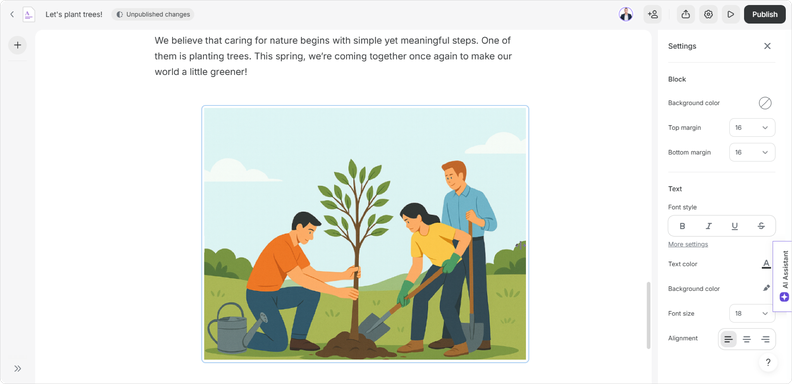
iSpring Cloud AI is a user friendly, browser-based authoring tool for creating online courses with text, images, videos, quizzes, and interactive elements. AI-powered features can help with lesson outlines, content drafting, and quiz question generation.
iSpring Cloud AI is available as a standalone product and is included in iSpring Suite AI. If you prefer browser-based course creation and don’t need PowerPoint-based authoring tools, you can use Cloud AI on its own.
Reviewers and subject matter experts can leave feedback on courses. For example, an L&D specialist can ask a product expert to check an onboarding lesson for accuracy.
Why choose it over Easygenerator?
iSpring Cloud AI is worth comparing for individual authors who need AI-assisted development, LMS export, and online review. Easygenerator shares these core features, so test the editing experience and plan limits rather than assuming either tool is better.
Cloud AI accepts ready-to-use PowerPoint, PDF, MP4, and MP3 files as project materials, although uploading them does not automatically turn them into editable course blocks. Easygenerator also supports document-based workflows.
Pricing
iSpring Cloud AI Business: $720 per author/year. Confirm the required author seats, storage, and collaboration terms for your team.
Before switching
Recreate a lesson and compare the editor, quiz settings, review process, and SCORM export.
Best for: Training specialists who develop courses in PowerPoint and need assessments or dialogue simulations.
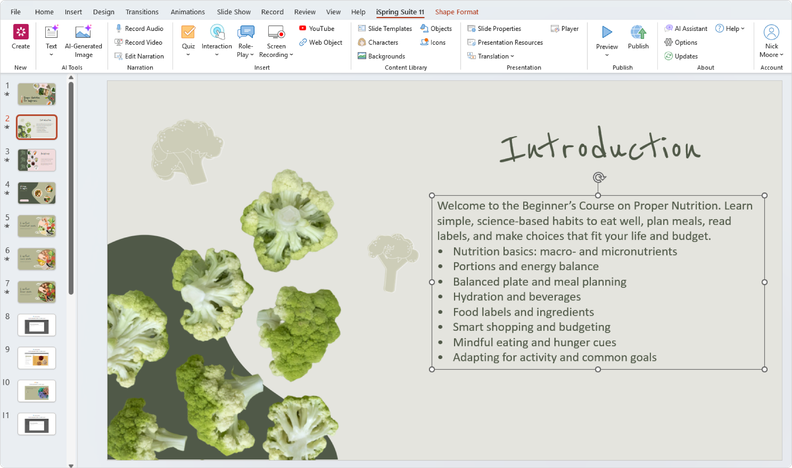
iSpring Suite AI works in desktop Microsoft PowerPoint on Windows. Authors can turn presentations into eLearning courses with quizzes, branching dialogues, and other activities to create interactive learning experiences.
A sales trainer could add knowledge checks to an existing product presentation and build a dialogue simulation for handling objections.
iSpring Suite AI also includes access to iSpring Cloud AI for browser-based course creation. Cloud AI is also available separately for teams that don’t need PowerPoint-based authoring.
For teams that don’t need AI features, there’s also iSpring Suite — a PowerPoint-based authoring toolkit for creating interactive courses, quizzes, dialogue simulations, and training videos.
Why choose it over Easygenerator?
Its main advantage for PowerPoint users is keeping presentations as editable source projects while adding dedicated assessment and dialogue tools. Easygenerator also offers quizzes and role-play features, but follows a browser-based workflow.
The trade-off is desktop authoring on Windows with Microsoft PowerPoint. Editable projects depend on the original presentation and associated files, so teams need a process for sharing source files and managing updates. For a step-by-step workflow, see how to convert PowerPoint slides into an eLearning module.
Compare AI allowances for narration, translation, and quiz creation. ElevenLabs narration has a shared allowance of 200,000 characters per 30 days across Suite AI and Cloud AI; additional characters can be purchased.
Pricing
- iSpring Suite AI: $1,290 per author/year. Includes access to iSpring Cloud AI.
- iSpring Suite: $970 per author/year. It’s a PowerPoint-based authoring toolkit for creating courses, quizzes, and training videos without the AI features included in Suite AI.
Before switching
Convert a frequently updated presentation. Test the quizzes, review process, and source-file management.

Best for: Instructional designers who need responsive courses and customized interactions.
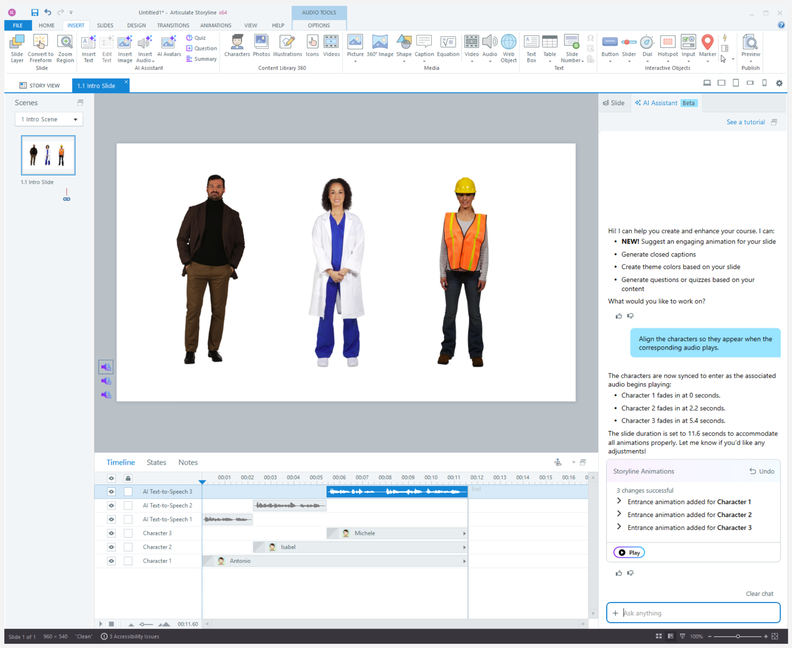
Articulate 360 includes Rise 360 for block-based courses with responsive design and Storyline 360 for customizable interactions using triggers, layers, and variables. Storyline is a powerful authoring tool designed for instructional designers who need more advanced interactions.
A team might use Rise for product knowledge training and Storyline for a customer service scenario where learners make decisions and receive different feedback.
Why choose it over Easygenerator?
Storyline supports custom interaction logic through triggers, conditions, variables, and layers. Rise offers a structured editor, while Easygenerator also has pre-built templates and interactive elements.
Storyline’s flexibility has a learning curve and requires a Windows desktop workflow. Rise offers a more structured browser-based workflow; test both editors before deciding which your team can maintain. For a broader overview of desktop and cloud trade-offs, read Best eLearning authoring tools.
Pricing
- Articulate 360 AI Personal: $1,449/year, purchased and licensed to a single individual.
- Articulate 360 AI Teams: $1,749/user/year, with team administration, transferable seats, and team collaboration features.
Some advanced AI operations use separately purchased credits; other AI features are included.
Before switching
Build a course in Rise and recreate its most demanding interaction in Storyline. Check who will maintain each project.
Too much to read? Get a summary from AI
Best for: Teaching employees to use software applications.
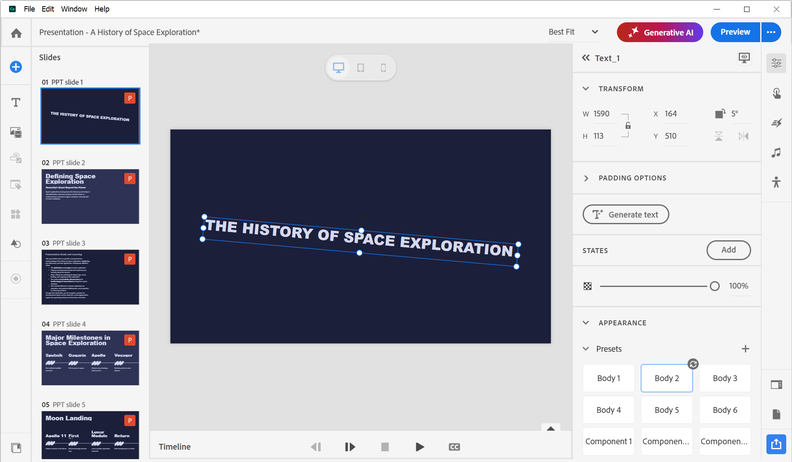
Adobe Captivate is a desktop eLearning tool for software simulations. Authors can record procedures and create demonstrations, guided practice, and assessments.
An operations trainer can record how to process a request in a CRM system, then let learners practice the procedure before working in the live application.
Why choose it over Easygenerator?
Captivate offers dedicated software recording and practice modes, making it a stronger fit when users need to rehearse actions inside an application.
Captivate 13 and later can import PowerPoint slides with many editable objects, but imported slides retain fixed layouts. Some complex elements may become images, and software simulation slides cannot be added within a project imported from PowerPoint.
Pricing
- Adobe Captivate Individual: $39.99/month with an annual commitment, billed monthly. Teams and Enterprise pricing is available upon request.
- The Individual subscription includes 25 generative AI credits per month; premium avatar credits are purchased separately. AI allowances differ for Teams and Enterprise.
Before switching
Record a real software procedure and test demonstration, practice, and assessment modes. If PowerPoint import matters, test it in a separate project.
Best for: Organizations producing branded training in several languages.
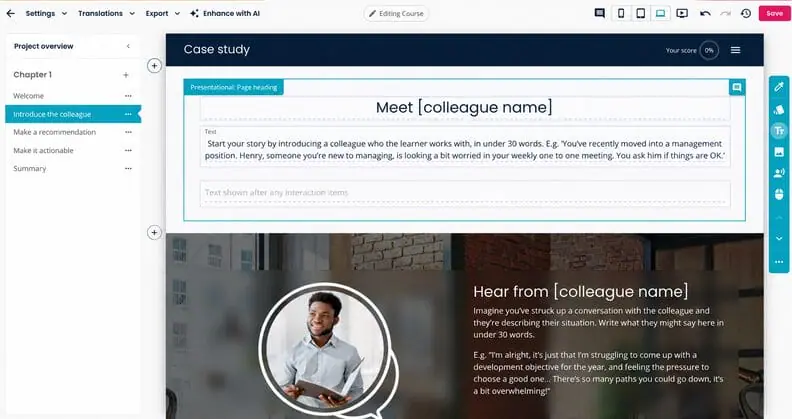
Create (formerly Elucidat) is a cloud-based authoring platform with customizable templates, brand styles, translation workflows, version history, and collaboration.
Its review process allows feedback on individual content blocks, including those from external subject matter experts who accept an invitation and activate an account. This helps distributed teams coordinate updates and local reviews.
Why choose it over Easygenerator?
Easygenerator also offers collaboration, reviews, and translation. Compare Create for centralized brand controls, version history, and localization workflows rather than treating these capabilities as exclusive.
Create can link translated course variants to source content, but updates and translation review still require a managed workflow. Check how version history and review permissions work in the proposed plan.
Pricing
Create uses quote-based pricing.
Request a vendor quote; no fixed official USD price was available at the time of writing.
Before switching
Ask for a demonstration of how updates to the original course are reflected in its translated versions, and reviewer feedback.
Best for: L&D teams maintaining large libraries of related courses.
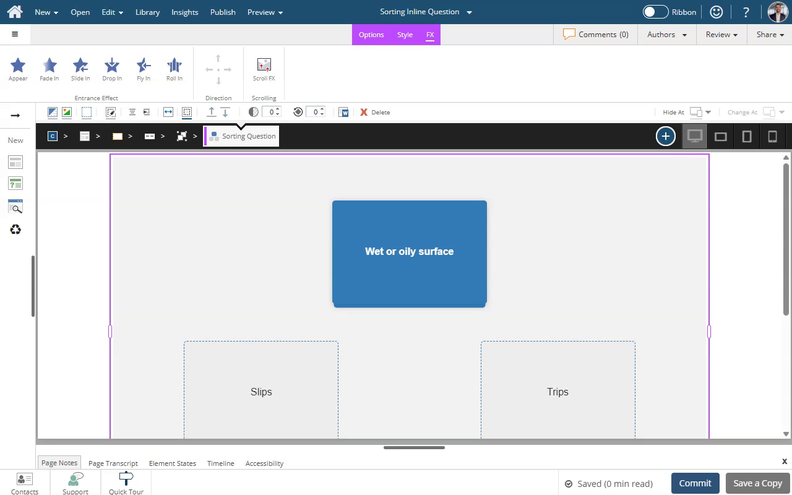
dominKnow ONE combines eLearning authoring with comprehensive content management capabilities, cloud-based collaboration, version control, and linked reuse for large course libraries.
For example, a compliance team can reuse a policy statement across departmental courses instead of maintaining independent copies.
dominKnow ONE also imports PowerPoint and Word files. PowerPoint slides can become editable content in fixed-layout Claro projects, while Word imports use document styles to structure learning content.
Why choose it over Easygenerator?
Its Shared Learning Objects support content reuses across projects, which can improve scalability for large libraries. Copied elements are not necessarily linked.
Check how changes reach linked projects and how revised courses are republished to the LMS. A change in an authoring library does not automatically replace every delivered SCORM package.
Pricing
Business, Business PLUS, and Enterprise: custom per-author quotes. A fixed USD price was unavailable in the official sources reviewed at the time of writing.
Before switching
Change a shared content element and inspect how it updates linked projects and published courses.
Best for: Teams that prefer template-based course creation.
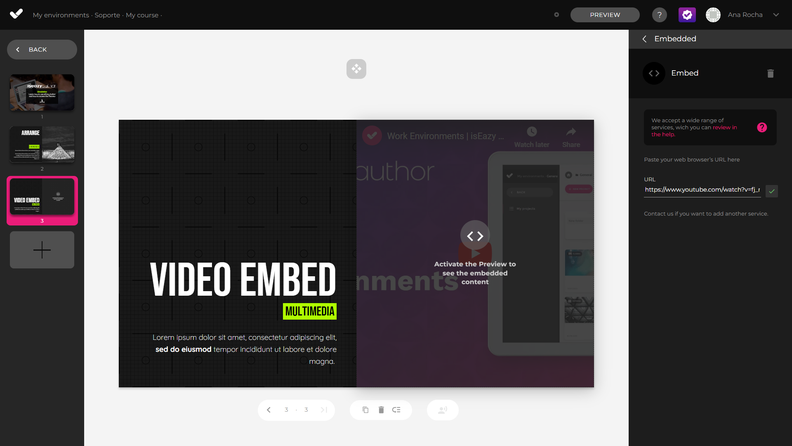
isEazy Author is a browser-based tool for building courses with customizable templates, prepared layouts, interactions, and quizzes.
For example, an HR specialist could assemble an onboarding course with information sections, interactive elements, and knowledge checks.
Why choose it over Easygenerator?
isEazy Author offers template-based layouts, customizable styles, and interactive activities. Easygenerator has similar features, so compare their intuitive design, editing workflows, and customization limits.
For repeatable branded training, compare corporate templates, styling controls, and accessibility options. Confirm which customization features are included in each plan.
Pre-built templates can speed up development, but test whether the result is polished content that supports your learning objectives.
isEazy Author also offers AI-assisted authoring and text-to-speech using Eazy Credits. After an initial allowance, additional credits or an AI subscription may be required.
Pricing
isEazy Author offers Professional at €72/month for one author and Business at €187/month for two authors. Enterprise pricing is available upon request. Prices are listed in euros, but customers can pay in other currencies, including USD, with currency conversion applied at checkout.
Before switching
Recreate a typical lesson using the available templates. Check the interactions, design options, and LMS publishing process.
How to choose an Easygenerator alternative
Before switching from Easygenerator, identify what your current authoring workflow is missing.
- Need more control over course design and interactions? Consider Articulate 360 for custom interactions and branching, Adobe Captivate for software simulations, or iSpring Suite AI for PowerPoint-based courses with quizzes and role-play scenarios.
- Want to keep creating courses in a browser? iSpring Cloud AI and isEazy Author offer browser-based authoring. If your team manages a large content library, compare dominKnow ONE for reusable content and Create for multilingual production.
- Looking for a more cost effective option? Compare the cost for your actual number of authors, including AI features, collaboration, and publishing requirements. If tracking learner engagement matters, check whether your LMS provides the detailed analytics you need. A lower starting price doesn’t necessarily mean a lower total cost for your team.
If Easygenerator already meets your needs, switching may not be worthwhile. For a broader guide to evaluating authoring software, see our comparison of eLearning authoring tools.
Frequently asked questions about Easygenerator’s alternatives
What is the best Easygenerator alternative for corporate training?
There is no single best option for every organization.
iSpring Suite AI fits PowerPoint-based training; Articulate 360 offers advanced interactions; Adobe Captivate focuses on software simulations; dominKnow ONE emphasizes reuse and content management.
Are there cheaper alternatives to Easygenerator for small teams?
For one author, iSpring Cloud AI Business starts at $720/year and iSpring Suite AI Business at $1,290/year, compared with Easygenerator Pro at $1,499/year. But a lower single-author price does not guarantee a lower team cost. Easygenerator Team starts at five authors; compare equal seat counts, commercial-use rights, and collaboration features before choosing.
Is there a free Easygenerator alternative?
Easygenerator offers a Free plan after its 14-day trial, but SCORM/xAPI export is not included. isEazy Author Free allows up to three watermarked projects and limited SCORM publishing.
If you need LMS delivery, confirm that SCORM export is included in the free plan rather than only in a paid subscription.
Which Easygenerator alternatives support SCORM and xAPI?
All seven alternatives support SCORM and xAPI publishing, although isEazy Author requires Enterprise for xAPI. Exact export settings and plan entitlements vary; test a sample package in your LMS.
Can I import an Easygenerator SCORM course into another authoring tool?
A SCORM export may not be editable in another course builder. Some source content may be reusable, but you may need to rebuild the course. Test a sample before migrating. To learn more about how SCORM packages work, see our guide to SCORM.
Easygenerator vs. iSpring Suite AI: Which should you choose?
Easygenerator suits subject matter experts creating courses in a browser without PowerPoint.
Easygenerator offers browser-based co-authoring on Team and Enterprise plans. iSpring Suite AI uses desktop PowerPoint and provides dedicated quiz and branching-dialogue tools.
iSpring Suite AI also includes Cloud AI for browser-based course authoring. Compare AI usage allowances and how your team will share and update PowerPoint source files.
Which alternative is best for software simulations?
Adobe Captivate is a strong option for recorded demonstrations and guided software practice. dominKnow ONE also supports software simulations; compare capture and assessment workflows.
Final thoughts on eLearning authoring tools
Before switching, rebuild a representative lesson in two or three tools. Test its interactions, reviews, LMS publishing, and update process. For short microlearning lessons, check mobile display quality and how quickly authors can revise individual modules.
Choose the tool that fits your source materials, team skills, learners, and long-term maintenance needs. The best Easygenerator alternatives are the ones your team can build with and maintain.
Create online courses and assessments in record time.